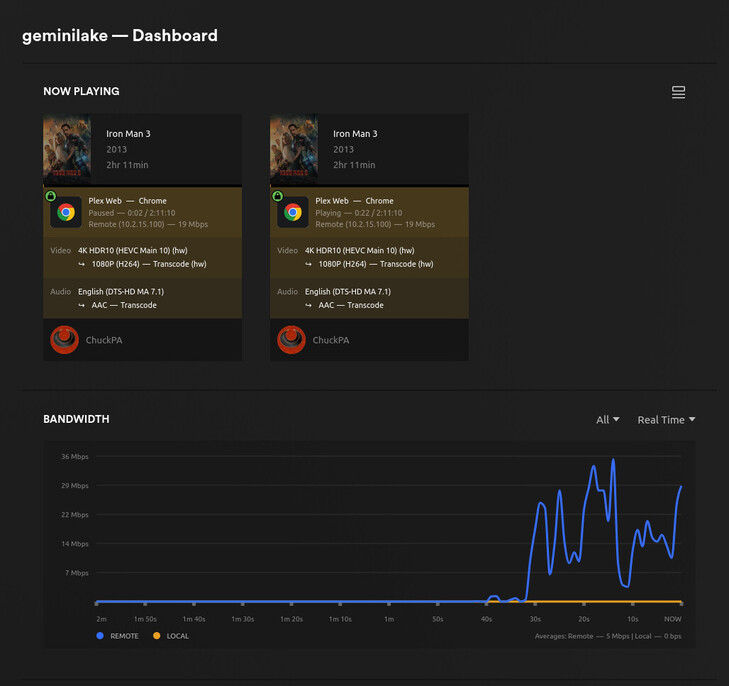
lol luckily didnt have to wait long…new version just dropped 
I’m triggered post DSM 7 update to touch plex more than i have to.
lol luckily didnt have to wait long…new version just dropped
I’m triggered post DSM 7 update to touch plex more than i have to.
Plex doesn’t bite 
I might… but Plex doesn’t

I would VERY MUCH like to see DEBUG logs ZIP files which capture the failure(s).
I can’t fix what I don’t see.
I’m running into this issue as well. 4K HDR10 HEVC content will not use the hardware transcoder when transcoding to SDR. Relevant info:
Sep 27, 2023 16:09:22.265 [140076626238264] ERROR - [Req#212a21/Transcode/ckemavbnwujeyx0w4ir6dv2z/d45d2792-f567-4785-8219-7d63abb25985] [AVHWDeviceContext @ 0x7feeeecdd240] Failed to get number of OpenCL platforms: -1001.
Sep 27, 2023 16:09:22.266 [140076383562552] ERROR - [Req#212a39/Transcode/ckemavbnwujeyx0w4ir6dv2z/d45d2792-f567-4785-8219-7d63abb25985] [AVHWDeviceContext @ 0x7feeeecdd240] Failed to get number of OpenCL platforms: -1001.
Sep 27, 2023 16:09:22.266 [140076406180664] ERROR - [Req#212a3a/Transcode/ckemavbnwujeyx0w4ir6dv2z/d45d2792-f567-4785-8219-7d63abb25985] [Parsed_hwmap_2 @ 0x7feef0b6df40] Failed to created derived device context: -19.
Sep 27, 2023 16:09:22.266 [140076341046072] ERROR - [Req#212a3b/Transcode/ckemavbnwujeyx0w4ir6dv2z/d45d2792-f567-4785-8219-7d63abb25985] [Parsed_hwmap_2 @ 0x7feef0b6df40] Failed to configure output pad on Parsed_hwmap_2
Sep 27, 2023 16:09:22.267 [140076318010168] ERROR - [Req#212a3c/Transcode/ckemavbnwujeyx0w4ir6dv2z/d45d2792-f567-4785-8219-7d63abb25985] Error reinitializing filters!
Sep 27, 2023 16:09:22.267 [140076335786808] ERROR - [Req#212a3d/Transcode/ckemavbnwujeyx0w4ir6dv2z/d45d2792-f567-4785-8219-7d63abb25985] Failed to inject frame into filter network: No such device
Sep 27, 2023 16:09:22.268 [140076430379832] ERROR - [Req#212a3e/Transcode/ckemavbnwujeyx0w4ir6dv2z/d45d2792-f567-4785-8219-7d63abb25985] Error while processing the decoded data for stream #0:0
Sep 27, 2023 16:09:22.297 [140076851051320] DEBUG - Jobs: '/usr/lib/plexmediaserver/Plex Transcoder' exit code for process 24876 is 1 (failure)
Sep 27, 2023 16:09:22.297 [140076399852344] DEBUG - Streaming Resource: Changing client to use software decoding
root@plex:~# cat /etc/os-release
PRETTY_NAME="Ubuntu 22.04.3 LTS"
NAME="Ubuntu"
VERSION_ID="22.04"
VERSION="22.04.3 LTS (Jammy Jellyfish)"
Version 1.32.7.7484
Model name: 12th Gen Intel(R) Core(TM) i7-1260P
root@plex:~# ll /dev/dri/
drwxr-xr-x 3 root root        100 Sep 26 10:16 ./
drwxr-xr-x 8 root root        540 Sep 26 10:16 ../
drwxr-xr-x 2 root root         80 Sep 26 10:16 by-path/
crw-rw---- 1 root video  226,   0 Sep 26 10:16 card0
crw-rw---- 1 root syslog 226, 128 Sep 26 10:16 renderD128
root@plex:~# id plex
uid=1001(plex) gid=1001(plex) groups=1001(plex),44(video),103(syslog)
root@plex:~# apt policy intel-opencl-icd
intel-opencl-icd:
  Installed: 23.17.26241.33-647~22.04
root@plex:~# vainfo
Trying display: wayland
Trying display: x11
error: can't connect to X server!
Trying display: drm
libva info: VA-API version 1.18.0
libva info: Trying to open /usr/lib/x86_64-linux-gnu/dri/iHD_drv_video.so
libva info: Found init function __vaDriverInit_1_18
libva info: va_openDriver() returns 0
vainfo: VA-API version: 1.18 (libva 2.18.0)
vainfo: Driver version: Intel iHD driver for Intel(R) Gen Graphics - 23.2.1 ()
vainfo: Supported profile and entrypoints
      VAProfileNone                   : VAEntrypointVideoProc
      VAProfileNone                   : VAEntrypointStats
      VAProfileMPEG2Simple            : VAEntrypointVLD
      VAProfileMPEG2Simple            : VAEntrypointEncSlice
      VAProfileMPEG2Main              : VAEntrypointVLD
      VAProfileMPEG2Main              : VAEntrypointEncSlice
      VAProfileH264Main               : VAEntrypointVLD
      VAProfileH264Main               : VAEntrypointEncSlice
      VAProfileH264Main               : VAEntrypointFEI
      VAProfileH264Main               : VAEntrypointEncSliceLP
      VAProfileH264High               : VAEntrypointVLD
      VAProfileH264High               : VAEntrypointEncSlice
      VAProfileH264High               : VAEntrypointFEI
      VAProfileH264High               : VAEntrypointEncSliceLP
      VAProfileVC1Simple              : VAEntrypointVLD
      VAProfileVC1Main                : VAEntrypointVLD
      VAProfileVC1Advanced            : VAEntrypointVLD
      VAProfileJPEGBaseline           : VAEntrypointVLD
      VAProfileJPEGBaseline           : VAEntrypointEncPicture
      VAProfileH264ConstrainedBaseline: VAEntrypointVLD
      VAProfileH264ConstrainedBaseline: VAEntrypointEncSlice
      VAProfileH264ConstrainedBaseline: VAEntrypointFEI
      VAProfileH264ConstrainedBaseline: VAEntrypointEncSliceLP
      VAProfileVP8Version0_3          : VAEntrypointVLD
      VAProfileHEVCMain               : VAEntrypointVLD
      VAProfileHEVCMain               : VAEntrypointEncSlice
      VAProfileHEVCMain               : VAEntrypointFEI
      VAProfileHEVCMain               : VAEntrypointEncSliceLP
      VAProfileHEVCMain10             : VAEntrypointVLD
      VAProfileHEVCMain10             : VAEntrypointEncSlice
      VAProfileHEVCMain10             : VAEntrypointEncSliceLP
      VAProfileVP9Profile0            : VAEntrypointVLD
      VAProfileVP9Profile0            : VAEntrypointEncSliceLP
      VAProfileVP9Profile1            : VAEntrypointVLD
      VAProfileVP9Profile1            : VAEntrypointEncSliceLP
      VAProfileVP9Profile2            : VAEntrypointVLD
      VAProfileVP9Profile2            : VAEntrypointEncSliceLP
      VAProfileVP9Profile3            : VAEntrypointVLD
      VAProfileVP9Profile3            : VAEntrypointEncSliceLP
      VAProfileHEVCMain12             : VAEntrypointVLD
      VAProfileHEVCMain12             : VAEntrypointEncSlice
      VAProfileHEVCMain422_10         : VAEntrypointVLD
      VAProfileHEVCMain422_10         : VAEntrypointEncSlice
      VAProfileHEVCMain422_12         : VAEntrypointVLD
      VAProfileHEVCMain422_12         : VAEntrypointEncSlice
      VAProfileHEVCMain444            : VAEntrypointVLD
      VAProfileHEVCMain444            : VAEntrypointEncSliceLP
      VAProfileHEVCMain444_10         : VAEntrypointVLD
      VAProfileHEVCMain444_10         : VAEntrypointEncSliceLP
      VAProfileHEVCMain444_12         : VAEntrypointVLD
      VAProfileHEVCSccMain            : VAEntrypointVLD
      VAProfileHEVCSccMain            : VAEntrypointEncSliceLP
      VAProfileHEVCSccMain10          : VAEntrypointVLD
      VAProfileHEVCSccMain10          : VAEntrypointEncSliceLP
      VAProfileHEVCSccMain444         : VAEntrypointVLD
      VAProfileHEVCSccMain444         : VAEntrypointEncSliceLP
      VAProfileAV1Profile0            : VAEntrypointVLD
      VAProfileHEVCSccMain444_10      : VAEntrypointVLD
      VAProfileHEVCSccMain444_10      : VAEntrypointEncSliceLP
Also, this version was known not to work and was pulled:
Try 1.32.7.7571 (the current Plex Pass beta); I’ve tested and it works well here whereas .7484 failed.
1.32.7.7571-13cdc68dc
Fixed the issue. Thanks!
I have a working 1520+
Three things to note:
Working version - 1.32.7.7571 in docker
Had to set the GPU to permission 666 as I was getting permission errors
sudo chmod 666 /dev/dri/card0
sudo chmod 666 /dev/dri/renderD128
At this point HW transcoding was working, however the performance was not great on subtitled media.
I now have a working box that can HWtranscode and performance is on par with .6999.
Setting permissions for /dev/dri are expected when you’re using Docker.
Which processor are you using? I went down the rabbit hole last night on GeminiLake and am at that point (VaapiDriver). I know ApolloLake is far better with i965
The 1520+ has a Celeron J4125 GeminiLake.
Before adding the i965 driver 1080p subtitled media would play, hitch, buffer, repeat (playback status said it was using HW transcoding). Post adding the driver the buffer bar flew and playback was silky smooth.
I would say that my experience mirrors what you saw with ApolloLake.
I just replicated on Gemini.

Talking to the engineer, this is now well understood and what we need to change.
… For my next  trick, Does anyone have a ASS subtitle example file / clip I can use in the debugger to walk through and find out where FFMPEG core is going
  ?
?
Please push it and see how far you get with HDR.
You should get everything except subtitles
Sure. I can send you the file that I know causes issues when i965 is not enabled.
I’ll DM it to you when it uploaded to a cloud share.
As for HDR, the colors look right and I was able to push a 68mbps 4k HEVC to 10mbps 1080p no issues. CPU at 20%
I verified that HDR tone mapping was enabled.

EDIT: I cant DM lol.
Excellent. thank you.
DM sent
HDR tone mapping works again with gemini lake?
That right there is a thing of beauty.
Intel quicksync is quite the beast when its happy.
@premikkoci HDR tone mapping is working for me with the i965 driver manually installed and enabled. From the sounds of it there’s a possible solution long term.
For those with the GeminiLake problem, a workaround has been devised.
This same workaround is how we pinpointed where the deviation occurred and what and why the changes are needed.
We have a file for you to test with.
There are specific instructions :
Place this file in the Cache/va-dri-linux-x86_64 directory under Plex Media Server
unzip it
It will look like this when done. (You will also have other files in there. Don’t worry)
root@geminilake:/var/lib/plexmediaserver/Plex Media Server/Cache/va-dri-linux-x86_64# ls -la
total 9176
drwxr-xr-x 2 plex plex      69 May 30 12:00 .
drwxr-xr-x 9 plex plex    4096 May 30 11:59 ..
-rwxrwxrwx 1 root root 7815088 May 30 10:49 i965_drv_video.so
-rw-r--r-- 1 root root 1576222 May 30 12:00 i965_drv_video.zip
root@geminilake:/var/lib/plexmediaserver/Plex Media Server/Cache/va-dri-linux-x86_64#
Stop Plex
Manually add VaapiDriver="i965" to the end of Preferences.xml using the Linux text editor (or Synology/QNAP text editor as appropriate – just don’t use Windows)
It will look like this when done:
SomeOtherPref="Value" VaapiDriver="i965" />
Save the file
Start Plex
Test
Regardless of success or failure,
– Report result
– Attach Logs ZIP file (we need to confirm the behavior reported in the logs)
Thank you all for your patience and support.
holy lord Plex hw HDR transcoding finally working again on:
Are you using the stock image or did you add the i965 driver ?