Color corruption on resize when HW transcoding HEVC content - Synology DS920+

Server Version#: 1.40.0.7775
Player Version#: Plex Web 4.121.1
<If providing server logs please do NOT turn on verbose logging, only debug logging should be enabled>

Bringing up an old topic because it started happening to me recently, possibly after the major database update. It’s the same issue as this post and this post and this post.

My issue is that the fix that most of these threads mention (instructions here and updated code here) seems to be from an older folder structure. I can’t find Plex Transcoder to replace it and implement the script.

Any help? I also heard the most recent betas address this or something similar, so maybe I just wait?

The DS920+ is a GeminiLake CPU.

We fixed the transcoding issues as of PMS 1.38.4.
The old ‘patch’ to Preferences.xml is no longer needed.

There is no need to use ‘bypass scripts’ or other executables.

Cn you please show screenshot(s) of what’s wrong and please also include the server debug logs zip which captures this happening?

PMS 1.40.0 is beta and does have a few issues.
If anything, I would roll back to Public and continue testing

I switched to plexinc/pms-docker:beta an hour ago in an attempt to fix the issue, but I’ve been on plexinc/pms-docker:plexpass for months while this issue was present.

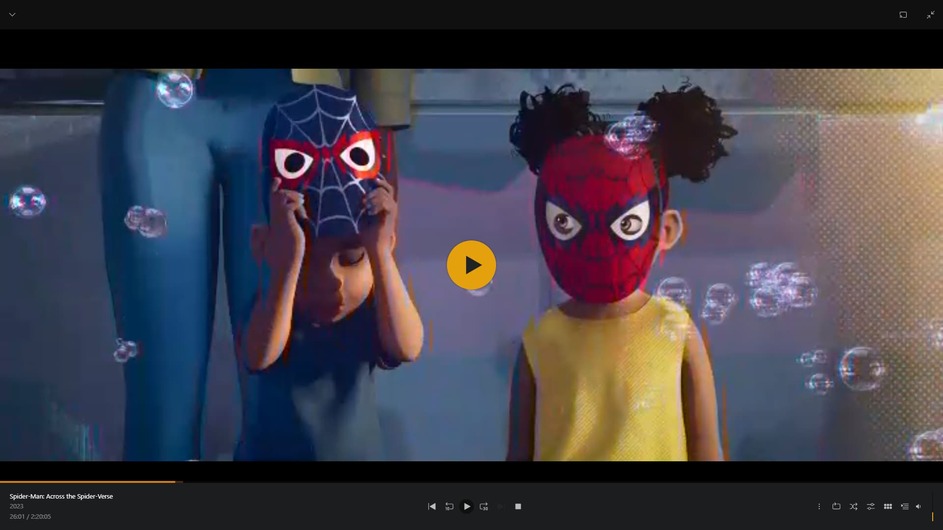
My issue is vertical blue/red lines showing up in the transcode, as described in those other threads. It’s like the color channel is blocky or lower resolution.

Plex Media Server Logs_2024-01-08_21-13-19.zip (2.5 MB)

I’m curious why you’re using Docker especially given you don’t have the hardware transcoding passed through.

There was a time when we needed docker on the NAS systems to get the tonemapping libraries but that time is long past. It’s easy to move to the native app if you’re interested.

Jan 08, 2024 20:19:47.325 [139950148971320] DEBUG - [Req#15b/Transcode] TPU: hardware transcoding: enabled, but no hardware decode accelerator found
Jan 08, 2024 20:19:47.325 [139950148971320] INFO - [Req#15b/Transcode] CodecManager: starting EAE at "/tmp/pms-9a00bc7a-4a6f-43e1-aae1-41b5fd5ecd5e/EasyAudioEncoder"
Jan 08, 2024 20:19:47.325 [139950148971320] DEBUG - [Req#15b/Transcode/JobRunner] Job running: "/config/Library/Application Support/Plex Media Server/Codecs/EasyAudioEncoder-1978-linux-x86_64/EasyAudioEncoder/EasyAudioEncoder"
Jan 08, 2024 20:19:47.325 [139950148971320] DEBUG - [Req#15b/Transcode/JobRunner] In directory: "/tmp/pms-9a00bc7a-4a6f-43e1-aae1-41b5fd5ecd5e/EasyAudioEncoder"
Jan 08, 2024 20:19:47.326 [139950148971320] DEBUG - [Req#15b/Transcode/JobRunner] Jobs: Starting child process with pid 1002
Jan 08, 2024 20:19:47.326 [139950148971320] DEBUG - [Req#15b/Transcode] [Universal] Using local file path instead of URL: /media/TV Shows/Bones/Season 4/Bones (2005) - S04E13 - Fire in the Ice (1080p BluRay x265 iNDG).mkv
Jan 08, 2024 20:19:47.326 [139950148971320] DEBUG - [Req#15b/Transcode] TPU: hardware transcoding: final decoder: , final encoder: 

However, in this case, HW transcoding isn’t needed.

Notice the Video Codec is copy
(This is direct streaming. The 3 Mbps input video is being sent as-is to the player)

Jan 08, 2024 20:19:47.326 [139950148971320] DEBUG - [Req#15b/Transcode/JobRunner] Job running: EAE_ROOT=/tmp/pms-9a00bc7a-4a6f-43e1-aae1-41b5fd5ecd5e/EasyAudioEncoder FFMPEG_EXTERNAL_LIBS=‘/config/Library/Application\ Support/Plex\ Media\ Server/Codecs/1d5bf5d-4660-linux-x86_64/’ X_PLEX_TOKEN=xxxxxxxxxxxxxxxxxxxxxxxxxxxxxxxxxxxxxxxxxx “/usr/lib/plexmediaserver/Plex Transcoder” -codec:0 hevc -codec:1 eac3_eae -eae_prefix:1 uz9km9kk63z93bweqkjrnb2d_ -ss 0 -noaccurate_seek -analyzeduration 20000000 -probesize 20000000 -i “/media/TV Shows/Bones/Season 4/Bones (2005) - S04E13 - Fire in the Ice (1080p BluRay x265 iNDG).mkv” -map 0:0 -codec:0 copy -filter_complex “[0:1] aresample=async=1:ochl=‘stereo’:rematrix_maxval=0.000000dB:osr=48000[0]” -map “[0]” -metadata:s:1 language=eng -codec:1 aac -b:1 256k -f dash -seg_duration 5 -dash_segment_type mp4 -init_seg_name ‘init-stream$RepresentationID$.m4s’ -media_seg_name ‘chunk-stream$RepresentationID$-$Number%05d$.m4s’ -window_size 5 -delete_removed false -skip_to_segment 1 -time_delta 0.0625 -manifest_name “http://127.0.0.1:32400/video/:/transcode/session/uz9km9kk63z93bweqkjrnb2d/fc7ea957-f384-42d8-bfa7-b9eb8d4c531e/manifest?X-Plex-Http-Pipeline=infinite” -avoid_negative_ts disabled -map_metadata -1 -map_chapters -1 dash -start_at_zero -copyts -vsync cfr -y -nostats -loglevel quiet -loglevel_plex error -progressurl http://127.0.0.1:32400/video/:/transcode/session/uz9km9kk63z93bweqkjrnb2d/fc7ea957-f384-42d8-bfa7-b9eb8d4c531e/progress

Did you restart playback and force the transcode quality down to 2 Mbps ?

Jan 08, 2024 21:07:38.112 [139950105295672] DEBUG - [Req#20e6/Transcode/3eoqc7lr3e3k88kk84rc3r27] [FFMPEG] - Format 0x32315659 → yuv420p.
Jan 08, 2024 21:07:38.112 [139950105295672] DEBUG - [Req#20e6/Transcode/3eoqc7lr3e3k88kk84rc3r27] [FFMPEG] - Format 0x30323449 → yuv420p.
Jan 08, 2024 21:07:38.112 [139950105295672] DEBUG - [Req#20e6/Transcode/3eoqc7lr3e3k88kk84rc3r27] [FFMPEG] - Format 0x3231564e → nv12.
Jan 08, 2024 21:07:38.112 [139950105295672] DEBUG - [Req#20e6/Transcode/3eoqc7lr3e3k88kk84rc3r27] [FFMPEG] - Format 0x32595559 → yuyv422.
Jan 08, 2024 21:07:38.112 [139950105295672] DEBUG - [Req#20e6/Transcode/3eoqc7lr3e3k88kk84rc3r27] [FFMPEG] - Format 0x59565955 → uyvy422.
Jan 08, 2024 21:07:38.112 [139950105295672] DEBUG - [Req#20e6/Transcode/3eoqc7lr3e3k88kk84rc3r27] [FFMPEG] - Format 0x48323234 → yuv422p.
Jan 08, 2024 21:07:38.112 [139950105295672] DEBUG - [Req#20e6/Transcode/3eoqc7lr3e3k88kk84rc3r27] [FFMPEG] - Format 0x58424752 → rgb0.
Jan 08, 2024 21:07:38.112 [139950105295672] DEBUG - [Req#20e6/Transcode/3eoqc7lr3e3k88kk84rc3r27] [FFMPEG] - Format 0x58524742 → bgr0.
Jan 08, 2024 21:07:38.112 [139950105295672] DEBUG - [Req#20e6/Transcode/3eoqc7lr3e3k88kk84rc3r27] [FFMPEG] - Format 0x30313050 → p010le.
Jan 08, 2024 21:07:38.112 [139950105295672] DEBUG - [Req#20e6/Transcode/3eoqc7lr3e3k88kk84rc3r27] [FFMPEG] - Created surface 0x4000000.
Jan 08, 2024 21:07:38.112 [139950105295672] DEBUG - [Req#20e6/Transcode/3eoqc7lr3e3k88kk84rc3r27] [FFMPEG] - Direct mapping possible.
Jan 08, 2024 21:07:38.112 [139950105295672] INFO - [Req#20e6/Transcode/3eoqc7lr3e3k88kk84rc3r27] Preparing driver ivd for GPU GeminiLake [UHD Graphics 600]
Jan 08, 2024 21:07:38.112 [139950105295672] DEBUG - [Req#20e6/Transcode/3eoqc7lr3e3k88kk84rc3r27/DriverDL/ivd] Skipping download; already exists
Jan 08, 2024 21:07:38.112 [139950105295672] DEBUG - [Req#20e6/Transcode/3eoqc7lr3e3k88kk84rc3r27] TPU: hardware transcoding: final decoder: vaapi, final encoder: vaapi
Jan 08, 2024 21:07:38.113 [139950105295672] DEBUG - [Req#20e6/Transcode/3eoqc7lr3e3k88kk84rc3r27/JobRunner] Job running: EAE_ROOT=/tmp/pms-9a00bc7a-4a6f-43e1-aae1-41b5fd5ecd5e/EasyAudioEncoder FFMPEG_EXTERNAL_LIBS=‘/config/Library/Application\ Support/Plex\ Media\ Server/Codecs/1d5bf5d-4660-linux-x86_64/’ LIBVA_DRIVERS_PATH=“/config/Library/Application Support/Plex Media Server/Cache/va-dri-linux-x86_64” X_PLEX_TOKEN=xxxxxxxxxxxxxxxxxxxxxxxxxxxxxxxxxxxxxxxxxx “/usr/lib/plexmediaserver/Plex Transcoder” -codec:0 hevc -hwaccel:0 vaapi -hwaccel_fallback_threshold:0 10 -hwaccel_output_format:0 vaapi -hwaccel_device:0 vaapi -codec:1 eac3_eae -eae_prefix:1 3eoqc7lr3e3k88kk84rc3r27_ -ss 192 -analyzeduration 20000000 -probesize 20000000 -i “/media/TV Shows/Bones/Season 4/Bones (2005) - S04E14 - The Hero in the Hold (1080p BluRay x265 iNDG).mkv” -filter_complex “[0:0]hwupload[0];[0]scale_vaapi=w=720:h=404:format=nv12[1];[1]hwupload[2]” -map “[2]” -codec:0 h264_vaapi -b:0 1293k -maxrate:0 1724k -bufsize:0 3448k -r:0 23.975999999999999 -force_key_frames:0 “expr:gte(t,n_forced*8)” -filter_complex “[0:1] aresample=async=1:ochl=‘stereo’:rematrix_maxval=0.000000dB:osr=48000[3]” -map “[3]” -metadata:s:1 language=eng -codec:1 aac -b:1 162k -f dash -seg_duration 8 -dash_segment_type mp4 -init_seg_name ‘init-stream$RepresentationID$.m4s’ -media_seg_name ‘chunk-stream$RepresentationID$-$Number%05d$.m4s’ -window_size 5 -delete_removed false -skip_to_segment 25 -time_delta 0.0625 -manifest_name “http://127.0.0.1:32400/video/:/transcode/session/3eoqc7lr3e3k88kk84rc3r27/a8cc4aee-9700-4d3f-9c48-64fc16071cb4/manifest?X-Plex-Http-Pipeline=infinite” -avoid_negative_ts disabled -map_metadata -1 -map_chapters -1 dash -start_at_zero -copyts -init_hw_device vaapi=vaapi:/dev/dri/renderD128,driver=i965 -filter_hw_device vaapi -y -nostats -loglevel quiet -loglevel_plex error -progressurl http://127.0.0.1:32400/video/:/transcode/session/3eoqc7lr3e3k88kk84rc3r27/a8cc4aee-9700-4d3f-9c48-64fc16071cb4/progress
Jan 08, 2024 21:07:38.113 [139950105295672] DEBUG - [Req#20e6/Transcode/3eoqc7lr3e3k88kk84rc3r27/JobRunner] In directory: “/transcode/Transcode/Sessions/plex-transcode-3eoqc7lr3e3k88kk84rc3r27-a8cc4aee-9700-4d3f-9c48-64fc16071cb4”

I assumed I had working HW transcoding because I got the “(hw)” in transcode streams in the Dashboard. I’d be willing to move to the native app if there’s a reliable way to keep my database intact.

Anyway, the stream you’re looking at may not be the one I intended to show. The issue only occurs when setting quality to something other than Original. I switched to “720p 2mbps” to get the screenshots, and the problem occurred there.

EDIT: Yes, I restarted and forced quality down to 2 Mbps.

  1. May I get a sample piece of that file to examine here? I wonder if there’s something about how it’s recorded / reduced that’s causing further disturbance when converting to H.264.
    – Bones, season 4, was released in 2008 and predates HEVC. Somebody re-encoded it.

  2. Here is a short sample video file (place in an ‘other videos’ type library.
    – It’s 80 Mbps HEVC known to be good. ( I have others if you would prefer longer for testing )

Season 4 overview

The fourth season of the American television series Bones premiered on September 3, 2008, with a two-hour episode and concluded on May 14, 2009, on Fox. The show changed time slots again, airing on Wednesdays at 8:00 pm ET before moving to Thursdays at 8:00 pm ET in 2009.

If not the right file, please direct me further

The file I happened to be playing is something I encoded myself. It’s done in Handbrake with mostly default settings (I don’t touch the color profile settings unless it’s HDR tonemapping), and the source is the raw Blu-ray remux. I can’t get a sample at the moment, but I can in an hour or two when I’m in a better spot.

However, this seems to occur with any HEVC 10bit source, which is 99% of my library.

The vast majority of this is standard bt.709 4:2:2, so I have reason to believe it’s not specific to the file but rather the format itself.

I have a few different CPUs here (KabyLake, GeminiLake, and JasperLake) in addition to multiple GPU types (Intel, AMD, and Nvidia).

If you can get me a sample, whenever is convenient, I’ll run it on everything and see what happens.

Here is from my GeminiLake

at 20 Mbps

at 2 Mbps

The loss in color and quality is expected when turning it down this far.

While I’ve got time, this might’ve started when I had to redo my docker compose for some reason and I needed up-to-date instructions on getting HW transcoding working. I remember the folder structure changing and having to use a different PLEX_UID and PLEX_GID this time around:

screenshot_4

Before, I think each value was 100 and 1026, so maybe it’s implemented wrong now?

It was this video: https://www.youtube.com/watch?v=Yzm_Cmhs6t8

The folder structure changed for the native app (DSM 6 -vs- DSM 7)
The username also changed.
We had to abandon both the Plex shared folder and username plex.

This is because we lost all privileges in DSM 7. (all apps were reduced to non-privileged status)

On DSM 7, from the command line or from that little shell script task, you should get back the UID/GID 297536 in most cases. For some users, it does vary slightly.

For both DSM 6 and DSM 7, we match the Plex/PlexMediaServer UID/GID in containers.

I have several articles which detail all the changes.
I also have a how-to on getting moved to the native app if you wish to.

I’ll be able to send a sample in an hour, but I bet moving to the native app solves all of this for me. I’d appreciate that how-to article, thanks.

Before I give you instructions,

Q: Is your docker container already pointing to /volumeX/PlexMediaServer/AppData ?

If it is, there’s almost nothing we need to do.

If it’s not, we’ll move things around and then let the installer do what it does best.

The docker container points to VolumeX\docker\plex\config\Library\...etc...

Here is a 1m30s sample file: 21.23 MB file on MEGA

or from GDrive: Bones (2005) - S04E13 - Fire in the Ice (1080p BluRay x265 iNDG)-012.mkv - Google Drive

I grabbed the file myself as well.

This is what I get in converting to 4 Mbps @ 1080p

Taking it down to 4 Mbps @ 720

Here’s your file, loaded and playing at 720p 2 Mbps

Look at her eyes. They’ve been overly processed. The curvature is gone at the iris.
(unless that’s how she looks??)

In watching the whole clip, I get no color breakup or lines or anything.

What resolution should I be using? 720p / 2 Mbps ?

Here’s the first part of the instructions.

  1. Stop Plex (docker)

  2. If you don’t have a “Plex” shared folder , Create one
    – As you do, pay special attention to granting CUSTOM permissions to SYSTEM INTERNAL USER ‘Plex Media Server’
    – Full Control permissions == All ADMIN + All READ + All WRITE

  1. If you do have one, and it has “Library” in it. Let me know… It is likely something old to be cleaned up / discarded (?)

  2. Presuming empty,
    – Open FileStation
    – Navigate to the Docker shared folder and into Plex
    – Right-click Library → Move to → “Plex” shared folder.
    (This will take time – Be patient and don’t interrupt it)

  3. If you have the DSM 7 Plex app installed, you can now Uninstall + ERASE it
    (we’re going to ‘migrate’ your docker Plex server into the DSM 7 native structure)

  4. When all is done, You’ll have Plex / Library / Application Support / Plex Media Server

  5. Last step is to apply Ownership again to all the files in the Plex shared folder.

Here’s the How-To (you’ve already done part of it)

  • Scenario 2
    – Start at Step 4
    – Don’t miss any

Let me know when you’re this point

I’ve gotten to the point of migrating files into the Plex shared folder and permissions should be correct now.

OK.

The PlexMediaServer shared folder is Empty ?

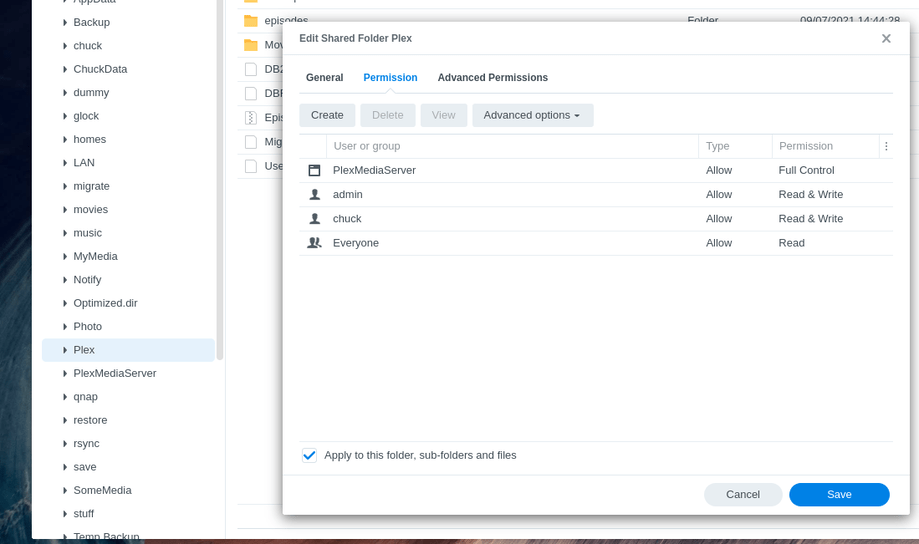
As Final Confirmation of permissions.

FileStation → Right-click on “Plex” → Properties

  1. See “Full Control” for “PlexMediaServer”
  2. Check the box: “Apply to this folder, subfolders, and files”
  3. SAVE

(this will take a moment but not too long)

When this is complete,

Download this,
Package Center
Manual install this PMS

It will sit at “Installing” while it runs.

  1. Don’t interrupt it or Refesh away
  2. In a new tab – open to the DSM Desktop
  3. after about 3 minutes, you’ll see a file “Migration.log” in the Plex shared folder
  4. This is the progress log
  5. When Cleaning: Completed" it’s all done

Alright thanks for the tips. Right now I’m redoing the libraries in Plex Web to point to the new locations. After that I can check if the issue is gone.

Also is it possible to do automatic updates like Docker had?