Server Version#: 1.40.3.8530
Player Version#: 4.129.1
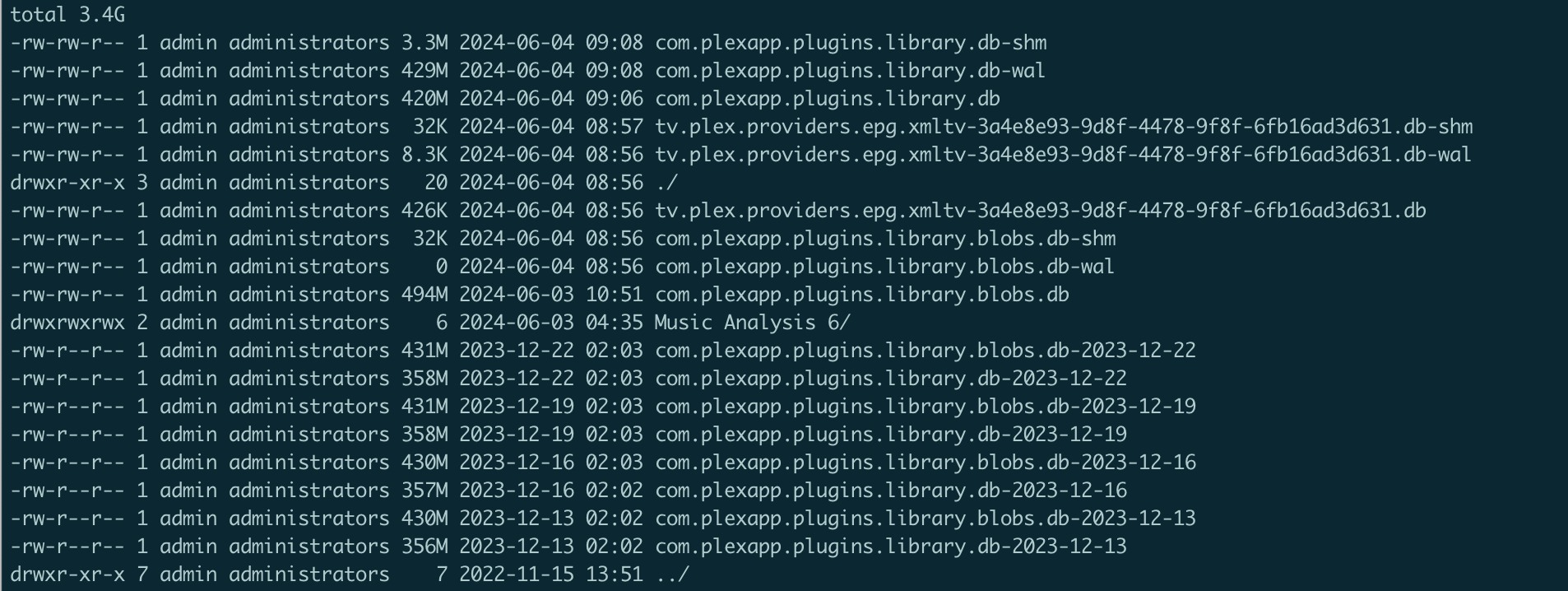
Looking on my Plex Server running on QNAP TVS-h474, I believe the most recent backups I see are from December, 2023 here. I have “Backup database every three days” checked in “Scheduled Tasks”.
My backup directory is listed as /share/ZFS530_DATA/.qpkg/PlexMediaServer/Library/Plex Media Server/Plug-in Support/Databases and this is what I see when I go there from SSH:
PMS won’t run backups if they don’t pass the integrity check.
At some point, your DB got some (not significant) damage to it.
The first step is to repair the damage in your current DB so PMS can make backups normally.
Given you’re in the NAS at the shell level, have you tried my DB tool to see if the damage is minor enough to be removed that way?
Thanks, @ChuckPa! I didn’t know about your DB tool, but that sounds like a GREAT place to start. Do you have a link to the tool/instructions so I can try that, please? Thanks!
@DaveTheNerd
Take the current release 1.06.02
Click the ‘Releases’ → Grab the tar.gz or ZIP → Upload to the Syno → Unpack following the instructions in the README.
Thank you (yet again!), @ChuckPa. I believe that did it. I was able to successfully do a “Download Database” from the UI, which I was not able to do previously. I’m presuming this will let Plex do its own every-three-days downloads now, too.
I’m going to mark this solved, and will keep an eye on it and return if it continues to be an issue (though I don’t think it will!).
Indeed, yes. I can confirm that Plex’s automatic database backups happened on their every-three-day schedule this morning.
Thanks again, @ChuckPa, for the assist, my friend!