Still looking for info on the SQLITE3 error.
Two additional items: Database Optimization and Scheduled Tasks
Please optimize your database. I’m not seeing any entries in the log files for this.
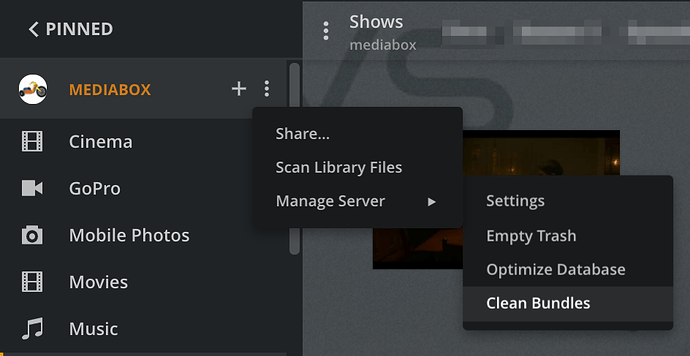
Please Empty Trash, Clean Bundles, then Optimize Database. See screenshot below. Clean Bundles & Optimize Database are also available via Settings → Troubleshooting.
Note that your system may become non-responsive during the optimization, and it may take several minutes to complete. You will see a spinning semi-circle around the activity icon while the optimization is occurring.
Scheduled Tasks
Do you leave your system on during the window for maintenance tasks (Settings → Scheduled Tasks)? These tasks help with system stability. It is also when chapter thumbnails, intro markers, etc may be generated (Settings → Library).
These show up in the log files as Butler tasks, and I do not see any such entries in your log files.
Example:
May 13, 2022 04:01:30.662 [0x7f14b4c57b38] DEBUG - Butler: we're in the window, starting.
May 13, 2022 04:01:30.662 [0x7f14b4c57b38] DEBUG - Butler: Waking up!
....
May 12, 2022 17:21:00.654 [0x7f14b87e1b38] DEBUG - Butler: refreshing metadata for 6 movies because they haven't been refreshed in the past month
....
May 12, 2022 18:01:30.589 [0x7f14b4eb5b38] DEBUG - Butler: we're outside the window, stopping.
Suggest you leave your system running during the maintenance window. You might want to expand the window to allow more tasks to complete.
Schedule the window when the system is least used for streaming movies/shows.
Some of the tasks can cause CPU utilization to spike.
Also, if your media is on a NAS/network drive, generating video preview thumbnails can cause a lot of network traffic (I regularly see 600 Mbps+ traffic between my Plex server & NAS during the process).


