Thanks for coming back to me one this. I’ve been running ESXi for years now and migrated from Windows to Ubuntu about 2 years ago. Transcoding is not an issue, as in I can happy run around 10 streams from 4k to 1080p. There has been issues in the past couple of months, when watching on an Android TV that I’ve not bother to investigate, until the update (yesterday) completely stopped everything from working…
My father-in-law is happily (remotely) watching a show right now. Transcoding through Nvidia, no problems at all… But as soon as I try and upgrade, and/or the odd hick-up with Android TV, things are now going wrong.
ESXi and passthrough are rock-steady, or at least, they’ve been perfectly fine until recent events.
All of this has been done (VMs and pass-through ). Been rock steady for around 3 years in total, with the last 2 years being on Ubuntu (I migrated from Windows a while back).
It’s a shame I can’t just tell Plex not to “attempt” to use QuickSync as it’s a bit of a waste of time trying when it’s obvious, even during it’s own install/upgrade (where it knows there is no iGPU).
Worth knowing we can’t disable to QuickSync check every-single-time a transcode starts. Might be something to look at adding or maybe just “testing for” when Plex first starts (after a reboot)??
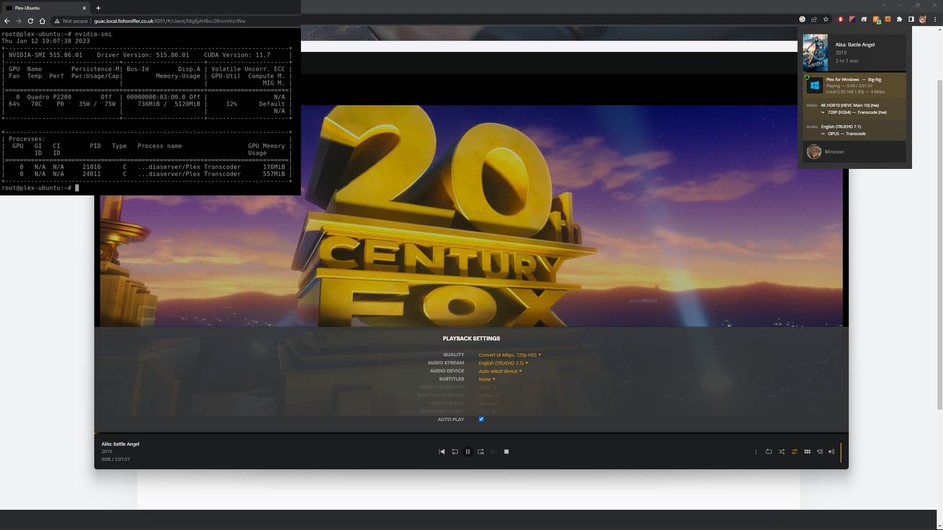
I’ve just downloaded the Windows Plex Client and got that up and running. It’s seems fine, I’ve got a 4k film transcoding down to 720p.
So generally there is nothing wrong with the setup/config. My issue still comes back to certain things just not wating to transcode properly, in that, from the plex logs I uploaded before, something is a miss in general.
But… Again (and again)… When I updated to the latest PMS, it all fell apart?
I have been and create a brand-new Ubuntu (22.04.1) VM, installed the latest version of PMS, but used an older graphics driver (v495). Here’s an a portion of the PMS log…
I don’t know why this is failing? I cant see anything obvious. I’ve tried to change the audio stream from TrueHD to just AC3 5.1, but nothing seems to be working? It just refuses to transcode?
Plex Media Server.zip (938.9 KB)
So after some more messing around, I’ve create a 3rd VM. Ubuntu 22.04.1, Nvidia 525 drivers, but this time with an older version of PMS plexmediaserver_1.27.2.5929-a806c5905_amd64.deb.
The Plex web player/viewer is not particularly stable, but using the Windows Plex Client, I can watch the very same film and switch between bandwidths, with no issues. It’s seems very stable during this test!
I still don’t know what the root cause of the problem is, but I feel I’m able to demonstrate that there is something fundamentally wrong with later versions of PMS? I’ve tried older Nvidia drivers, and newer, with no change. My main PMS VM is on a slightly older version of Ubuntu (20.xx LTS), but I’ve made two new VMs with 22.04.1.
I don’t really want to see if I can downgrade my main PMS VM/instance, as this could cause all sorts problems, especially if databases/tables have changed. But without finding the real problem, and putting in some form of fix, I’m left with only one option. Try and create a new VM, use an older version of PMS, and find a way to capture/transfer “previous watched” history.
The irony is, if I spin up Jellyfin, on my original PMS VM, I can watch the file and get it transcoded!
There should be no need to do that. It plays fine without transcoding, it plays and transcodes in a slightly older version on PMS, it plays and transcodes in Jellyfin.
Also, the problem isn’t specific to this video file. It does it with others.
I would at least try it with one file. There’s many instances where re-encoding has fixed issues even when the file plays “fine” on other platforms. FFmpeg is very picky.
I think the Plex apocalypse may be upon is… I’m looking through forum posts and there are plenty of people saying they’re having problems. It seems the main transcoding engine was update around 1.30.xx?
If anyone has read this far, I downgraded to PMS 1.29.2, made sure I was running Nvidia drivers v515, and everything is back to how it was. Transcoding seems to be fine and working for all sorts of different files; I’d add that one of the biggest problems was a remote user with a Roku, so transcoding is needed for a lot of formats.
Anywho, it seems to be fine for now. Though I have no idea how to progress further when new versions come out. But I’ll tackle that as/when it happens.
Thanks … The messing around and downgrade has gotten my PMS back to a usable state thankfully, but really happy to hear you guys are on it.
It did wander around the forums, after posting my one issue(s), and did work out that something was amiss. Hopefully you gals and guys have figured out what the issue is so you can plan on how to move forward
Ok, so I’m still having issues. I’ve updated to the .deb file you shared and updated Nvidia drivers to 525 (CUDA v12), and then attempted to re-watch files that seems to have a problem when I tried all of this before. PMS debug logs should be enabled and TranscoderLogLevel=debug should be on also.
I literally started PMS, attempted to play 1 file (1080p HEVC), and after telling it to play at varying lower mbps, it stopped working from the client perspective
I restarted PMS (so the logs name would switch, hopefully making it easier to read) and then tried to play a different file (1080p HEVC). Same thing, when I asked it to change mbps (force a transcode), it would fall over again.
I then restarted the PMS service again, and this time tried another file (4k HEVC) and it fell over again.
Another question for you – Which Hypervisor are you using and what’s the configuration?
The E5-2690 v4 is a 14 core (28 thread) CPU – I own one
Jan 27, 2023 14:53:57.037 [0x7f8309370b38] INFO - Plex Media Server v1.31.1.6617-cbcbc6f56 - Ubuntu PC x86_64 - build: linux-x86_64 debian - GMT 00:00
Jan 27, 2023 14:53:57.037 [0x7f8309370b38] INFO - Linux version: 20.04.5 LTS (Focal Fossa), language: en-US
Jan 27, 2023 14:53:57.037 [0x7f8309370b38] INFO - Processor: 6-core Intel(R) Xeon(R) CPU E5-2690 v4 @ 2.60GHz
Jan 27, 2023 14:53:57.037 [0x7f8309370b38] INFO - Compiler is - Clang 11.0.1 (https://plex.tv 9b997da8e5b47bdb4a9425b3a3b290be393b4b1f)
Jan 27, 2023 14:53:57.037 [0x7f8309370b38] INFO - /usr/lib/plexmediaserver/Plex Media Server
Jan 27, 2023 14:53:57.036 [0x7f8309606aa0] DEBUG - BPQ: [Idle] -> [Starting]
Jan 27, 2023 14:53:57.036 [0x7f8309606aa0] DEBUG - FeatureManager: Using cached data for features list
Jan 27, 2023 14:53:57.049 [0x7f8309606aa0] DEBUG - [CERT] Subject name is /CN=*.68074ebbd82541c2ae56e920be4107f3.plex.direct
Jan 27, 2023 14:53:57.049 [0x7f8309606aa0] DEBUG - [CERT] Installed certificate with fingerprint 2a:d9:16:33:4f:92:2f:52:ae:1f:ae:c8:68:d0:ea:89:12:8f:60:d2.
Jan 27, 2023 14:53:57.049 [0x7f8309606aa0] DEBUG - [CERT/OCSP] Stapling requests will be made to 'http://r3.o.lencr.org/'.
Jan 27, 2023 14:53:57.049 [0x7f8309606aa0] INFO - [CERT/OCSP] Successfully retrieved response from cache.
Jan 27, 2023 14:53:57.049 [0x7f8309606aa0] DEBUG - HttpServer: Listening on IPv6 as well as IPv4.
Jan 27, 2023 14:53:57.049 [0x7f8309606aa0] DEBUG - HttpServer: Listening on port 32400.
Jan 27, 2023 14:53:57.049 [0x7f8309606aa0] DEBUG - HttpServer: Listening on port 32401.
ESXi 7 will cause the CPU / GPU to swap positions with QSV. It happens on my HadesCanyon NUCs all the time.
Think maybe you can tell me straight up what your configuration is?
 ). Been rock steady for around 3 years in total, with the last 2 years being on Ubuntu (I migrated from Windows a while back).


 … The messing around and downgrade has gotten my PMS back to a usable state thankfully, but really happy to hear you guys are on it.
