Player Version#: 7.2.1
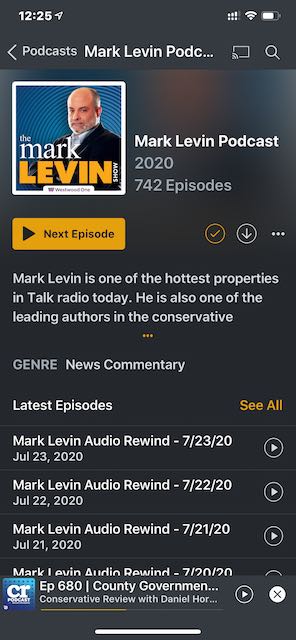
In the iOS app when viewing a podcast you are presented with this view. It is inconsistent with the rest of the app where the play button is orange/yellow if unplayed.
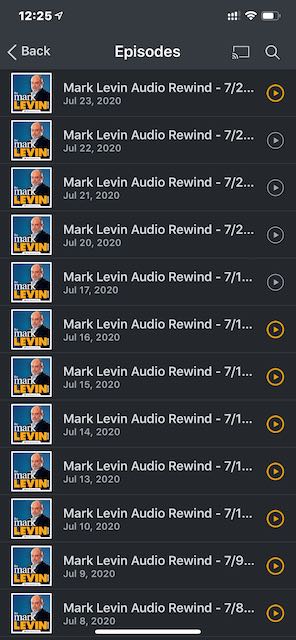
After clicking See All, the user can clearly see which episodes have not been played.
Can you fix this bug or add it as a feature so that its consistent? Many a time I clicked the See All button thinking the 5 listed “Latest Episodes” really weren’t the latest since I’d already played them. Thanks!
I am not quite sure what you are asking. It doesn’t matter when I view the podcast page whether they are played/unplayed/playing the play buttons on the right side are always gray instead of orange/yellow like the rest of the Plex ecosystem for unplayed episodes.
I was asking if it was always grey or if it changed when an episode is fully played.
Regardless of the behavior it’s still a bug if its reversed, but if it never changes than it likely means we don’t track state there (and we should) and grey is just the default.
On Android i.e. this does track state but only for fully played episodess, ideally it should actually track “in progress” as we do in the rest of the app (other media types) or in web.
From your last comment I think I can assume it never actually changes.
That’s my point, it does not change. They are always gray on the Podcast page. But when you click “See All” it properly indicates playback status. See the screenshots in the OP. All 12 episodes from #1047-1036 show as unplayed, but the playback icon is gray on the podcast show page.
If you look at my screenshot from the desktop the podcast show page does indeed show playback status with the orange/yellow dots to the left, WITHOUT having to click “See All Episodes”.
Here are 3 more screenshots. The first two illustrate the podcast show page with all episodes showing gray, or unplayed. When you tap “See All” it shows 4 played episodes.