Local - Installed plex client on windows 10(3.47.1)
Remote - Plex Server - Plex Official Docker for Unix(unraid) - 1.12.3.4973
Library type = “Other Videos”
Scanner = “Plex Video Files Scanner”
Agent = “Personal Media”
I place my video files into a library folder on a remote server. I also place poster images in that same folder.
Then I open a local plex client to modify/manage my new content, The poster, which is named using similar text and in same folder, is not automatically used. Instead Plex has created 3-5 screen grabs, and used one of those. Then I ‘Edit’ the file, switch to ‘Poster’ tab, and I must now drag-drop from my local machine to this local app. (1)It would be nice to choose from the same folder(and same computer) as the media file I’m editing. (2)Maybe you could auto add my files you find at the same location with same name and I wouldn’t have to edit at all.(Personal Media agent bug? user error?)
I then move onto the next file in this same folder, similar named file, I want it to have the same poster. (3)allow editing Poster of multiple files at once(poster tab and more are removed when multi-editing). (4)Provide a list of recently used or similar-filepathname posters as options.
Poster related bug in ‘Edit’ window - ‘General’ tab:
(5) Open the ‘edit’ window(defaults to general tab) and drag-drop an image file onto this popup. Plex opens the image in it’s main window, and has removed/covered all other controls. The only interactive objects are the scroll bars. Closing the window is the only way to escape this image view mode.
if you have all media in 1 master folder, name the poster art exactly as the movie (except for the extension)
if you use individual folders per movie, name the poster art e.g. poster.jpg, cover.jpg, folder.jpg
From your description it looks like scenario #2 applies to you – hence you need to fix your file names for the posters!
as for your edit bug…
only the drag & drop area on the top of the screen can be used to drop the file. if you drop it anywhere else in the popup or browser window, your browser’s standard behavior kicks in and will simply show the picture.
Edit: “drag & drop area” refers to the shaded/ruled area with the text “choose an image drag & drop enter a url”
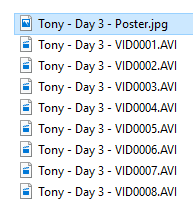
My folder/file structure is more like this.
and I want the one image applied to all files in that folder. (files are sometimes distinguished by English titles instead of simple numbers)
“name the poster art exactly as the movie”(or any current name scheme) does not allow for 1 poster to be applied to many movies. It would require that I (every user) manually create copies and rename them. This is a poor alternative to coding up a multi-edit function for posters, and defies the purpose of this forum.
“only the drag & drop area on the top of the screen can be used to drop the file”…yea, but mistakes happen, and when a program unintentionally locks up and must be restarted…its a bug. The proper(expected) behavior of dropping to an incompatible area, is to do nothing.
is that actual movies or personal videos?
in your example, Plex will require the poster file to match the actual video name (e.g. Tony - Day 3 - VID0001.jpg instead of Tony - Day 3 - poster.jpg). if you want to save the extra space you could try creating a shortcut/link/alias to the original poster (1 original poster file, 7 aliases matching each individual video).
it’s a web app and the browser determines how it deals with a file being dropped in its content area… so don’t blame Plex
Don’t troll around a FEATURE forum handing out manual instructions to solve a problem. ;D
I have manual methods already, and while doing them, I came up with FEATURE ideas I shared. ;D
Each and every part of the plex app replaces a default part of the underlying web browser. Pointing out an undesired default behavior that should be replaced with a plex specific behavior, is a bug report. Whether it is important enough to fix is a separate issue. No blame,only observation.