Server Version#: 4.87.2
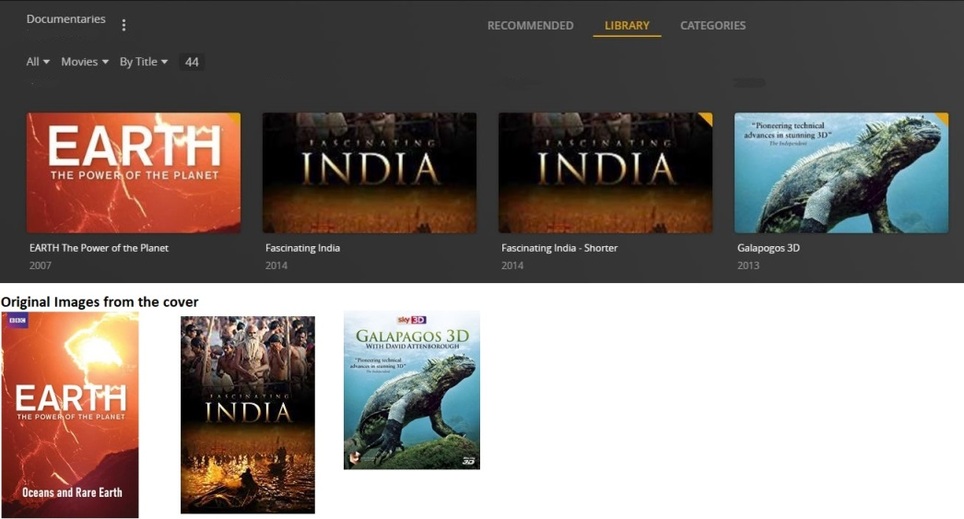
Poster images that I manually added into Plex are getting cropped from top and bottom. A solution provided in this forum is to edit the advanced option of the Library to change it to “Plex Movie” instead of “Personal Media”. Unfortunately when I did this it says “Your changed could not be saved”. I have tried all possible enable / disable check boxes, still it says it cannot be saved.
Attached screenshot of Plex’s display and their respective actual cover image.
The cleanest solution is to create a new library. Use “Plex Movie” right from the start.
Many documentary movies are actually present in TheMovieDB.org database. So make sure to look them up on there and then use the same title and release year.
If there is a documentary, which cannot be matched to a record on TMDB, perform “Unmatch” in Plex on it. It will stay unmatched and you can supply your own metadata.
Doing so enables you to use all the Plex features for movies, like trailers and local extras and Editions.
If you have several versions of the same movie (like “Fascination India” above), make use of the Editions filename sytax: https://support.plex.tv/articles/multiple-editions/
Make sure to place posters as jpg files beside the video files. https://support.plex.tv/articles/200220677-local-media-assets-movies/
Do NOT use the “upload” feature for posters.
Thanks for the quick response.
Just to let you give background, these are basically Documentary Blu-ray / DVD discs that were ripped to create .mkv video files. Since I could not get the exact image of that disc’s cover, I scanned the cover, created .jpg files and used “Choose an Image” option to map the display. Initially when I did this, everything looked perfect. After an update sometime about a year back, don’t remember the exact version, all these images became like this (something like, earlier images were displaying in “Portrait” format, post update all these became “Landscape” format). Such change of “Portrait” to “Landscape” display of Images happened to my personal Videos that I shot, copied to the server along with own created artwork.
I will check out creating new library using “Plex Move” instead of “Other Videos” and include the content library folder. Thanks again for your suggestions.
Yes, this is a known change. It is connected to the use of the “Personal Media” metadata agent in a Plex library.
That’s what I meant with “uploading” a poster.
Avoid doing that and place the poster.jpg beside the video file instead.