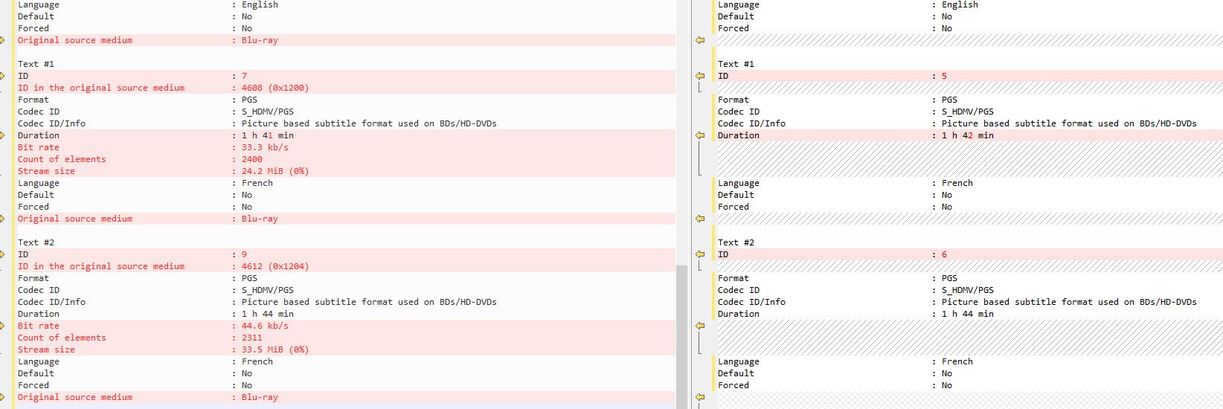
Some movies have multiple, similar subtitle tracks. For example, you may see one track for “English” and one for “English for the Deaf & Hard of Hearing” (aka English SDH). The SDH track will include entries for non-dialog items such as [floor creaks], [door opens], etc.
Some movies have duplicate tracks for whatever reason.
There are also Foreign Language tracks, which leads to…
Like in Avatar when the humans speak Na’vi and the translation appears onscreen.
Sometimes it is already part of the video and not a separate subtitle track.
Sometimes it is included as a separate subtitle track. You will see it referred to as a “forced” track. If you played the disc in a DVD/Blu-ray player, the subtitle track would appear automatically, w/o user interaction.
Handbrake may or may not pick up the Foreign Audio track. It looks for the “forced” flag on subtitle tracks in the MKV file. If the flag is not set, then Handbrake will not automatically include the subtitle track.
How to tell what is in the movie:
Play the disc and look at the menus. Some movies will list standard & SDH subtitle tracks separately (they won’t list foreign language tracks).
After ripping, check the movie with MediaInfo. It will list Count of Elements for most subtitle tracks. This is the number of lines. The SDH subtitles, if present, will always have more entries than the standard tracks. Foreign audio tracks will always have much fewer entries.
Example:
Avatar, English SDH: Count of elements: 3343
Avatar, English Foreign Audio: Count of elements: 165
After ripping, load the movie into SubTitle Edit and analyze each subtitle track. You don’t have to convert them, just look at the first few lines.
Or just play the movie with VLC (or Plex for that matter). It may be obvious which track is which.
You don’t necessarily have to do all those steps. You’ll get the hang of it after a few discs.
How to handle Foreign Language subtitles:
You basically have two choices: a) leave as a separate subtitle track; b) burn into video when converting with Handbrake.
Personally, I burn in the foreign language subtitles. This makes them part of the video stream and they cannot be turned off.
You can also leave them as a separate subtitle track (if using MKV container). You’ll want to set the default flag. I’m not sure if Handbrake can set the “forced” flag.


 again !