I’ve been a PLEX user for ~2 years now without many issues once I got it all set up. My normal setup has been using my Win10 desktop PC as my PLEX server and a Fire Stick as the only client, connected via my home WiFi. I recently decided to stop paying Comcast since I hardly use the internet at home and have a huge catalog of movies and TV shows on an external drive.
For ~3 months after cutting the Comcast my local PLEX setup worked, but not without some hiccups. First, the Fire Stick doesn’t like not having internet access (have to launch PLEX app through “settings>app mgmt>PLEX>launch”). Second, the PLEX app on the Fire Stick would take ~1-2 minutes before it found and connected to my local server (desktop PC). Third, once finally playing a movie, every ~20 minutes I’d get a message saying the PLEX server has been disconnected or something along those lines, but upon clicking “retry” it would resume playing instantly.
That was all annoying but manageable. Now, seemingly out of nowhere, the system has stopped working altogether. The Fire Stick PLEX app no longer is able to find the PLEX server at all. On my PC I can see the PLEX server in “This PC>Network>Media Devices”, so I’m pretty confident everything’s set up correctly on the server side (although I could easily be wrong). The Fire Stick and PC are both still connected to the same router, both on the 5G network, and I can even see the Fire Stick in “This PC>Network>Other Devices”.
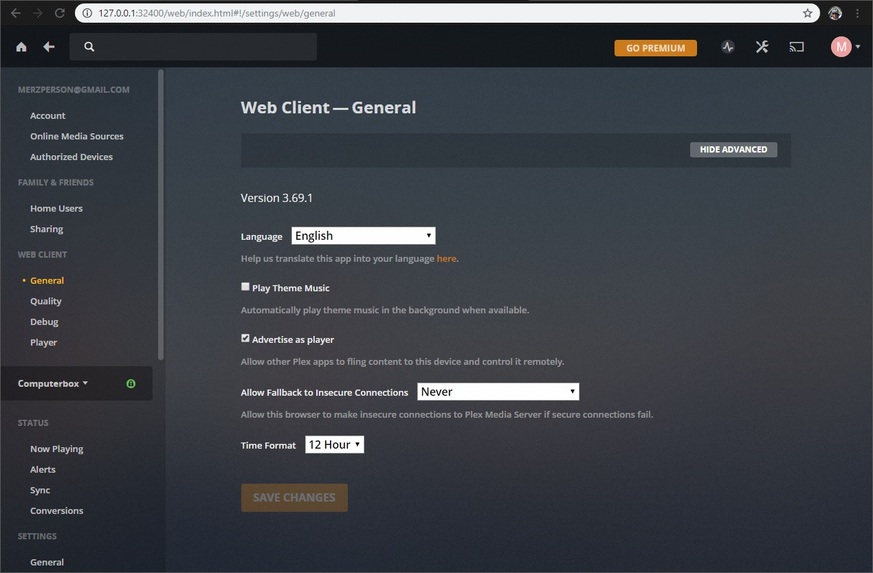
I’ve tried resetting the router and signing out and back in PLEX on both Fire Stick and PC (this is tricky without internet…). I was following this PLEX support article and noticed that on step 4 my screen looks much different, I don’t get the tabs for web, server, users, and devices. Mine only shows the settings for “Web Client”. What does this mean? How can I get my PLEX setup working again?
I come to the same problem with this article: after clicking the “wrench” (settings) the view I get is much different than theirs (see my settings view below). I don’t have access to the “server” settings. This seems like a pretty big problem, but I have no idea how to gain access to the server settings. Any thoughts?
Ok, I see that now, the UI must have been changed in an update since those directions were written. Anyway, I followed the article you linked to and it doesn’t appear to have affected anything on my network. The Fire TV PLEX app still can’t find any servers. I tried restarting both the PC and Fire Stick.
Ok I started everything over from the beginning and now I’m back to where I was before, PLEX app on Fire Stick will eventually find my PLEX server (PC) after a minute or so of waiting. I’m not sure what the problem was but here’s exactly what I did in this order that resolved it:
Sign out of PLEX account on both PC and Fire Stick app
Power off PC and Fire Stick
Power on PC and temporarily connect to internet via mobile hotspot
Sign in to PLEX on PC
Power on Fire Stick and temporarily connect to internet via mobile hotspot
On Fire Stick start PLEX app and sign in, follow prompts to get a 4-digit code
On PC go to plex.tv/link and enter the 4-digit code
Disconnect PC and Fire Stick from hotspot
Connect PC to home WiFi network (without internet)
Connect Fire Stick to home WiFi network
Open PLEX app on Fire Stick and after about a minute it found the server
Thanks @Balthazar2k4 and @sa2000 for your prompt responses trying to help me resolve my problem.
EDIT:
After reading the links @sa2000 provided it seems like the issue was that a login needs to be performed while connected to the internet for PLEX to be able to subsequently connect offline. I’m guessing this “cached login” was somehow cleared when my problem began, but logging in while temporarily connected to an insecure/public network created a new “cached login”.