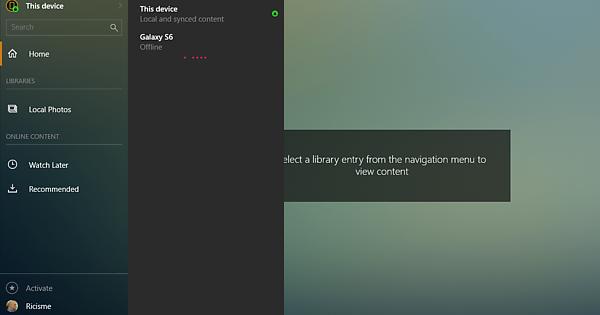
Help - I have downloaded plex on new computer and just get a constant ‘Looking for servers…’. I am signed in to web and to PC server but no link is being established… any ideas?
Under Libraries on the server there is no option to Add a Library - just ‘Local Photos’
Always Chrome. ( This site can’t be reached 127.0.0.1 refused to connect.)
The PLEX Server - the web app just constantly says ‘Looking for servers’ - the server app is downloaded and open on my desktop.
No. The screenshot you’ve shown is from a Plex client, which doesn’t do anything without a Plex server.
Plex server needs to be installed somewhere. It doesn’t have to be on the same PC. It doesn’t even have to be in the same house, as long as the server has a functioning remote access and the client has an internet connection.
Your logs say that your server was running last time on Sep 05, 2018 13:40:31
Is this about 9 hours ago? Probably before you uninstalled everything?
So, did you only install the Plex app from the Microsoft Appstore?
If so, then it is totally expected that the app can’t find a server.
You need to download and install Plex Server (see the Download link below)
I did download the PLEX app from the bottom of this page. (I rarely use Microsoft app store).
I have just done it again and selected ‘Repair’ - but I have done that once already and no change.
I have uninstalled and reinstalled the app (restarting PC) twice already and always the same: ‘Looking for Servers…’ on the web app.
The problem initially occurred after I had being trying to get CyberGhost to work - and with online guidance I changed a few network settings… but I changed them back…
So a VPN?
Apparently, there are still some settings not back at their defaults. Unfortunately I have no experience with this VPN software. So I cannot help you further.