http://forum.kodi.tv/showthread.php?tid=158880
add copy paste please ;)
http://forum.kodi.tv/showthread.php?tid=158880
add copy paste please ;)
Night Skin already has this feature for some channels but I assume you already knew that. Yes, I might add additional features like that but before I do so I want to have a stable build environment and beta clients up for OSX, Windows and Linux ... (btw. OSX beta client will be available for testing this week)
OSX beta client? OSX beta client? This week officially ended 15h ago... :D
Can't wait to try this! Thanks for making this a reality!
BTW:
Could UI support for 3D modes also be possible with openPHT? With Kodi the UI (Menus, etc.) display correctly when switching 3D-modes like side-by-side (SBS).
OSX beta client? OSX beta client? This week officially ended 15h ago... :D
Can't wait to try this! Thanks for making this a reality!
Well, sometimes things don't work out as planned :-)
BTW:
Could UI support for 3D modes also be possible with openPHT? With Kodi the UI (Menus, etc.) display correctly when switching 3D-modes like side-by-side (SBS).
* Ubuntu 14.04 package is now available for download ...
I haven't setup a ubuntu 14.10 build environment for testing yet, I'm not sure but this package might also work with ubuntu 14.10 ... for those who want to test it, let me know if/how it works.
Windows build will follow (hopefully) early next year :)
Great! I'm not running Ubuntu 14.04 atm, but i'm willing to test in a virtual machine. Looking forward to the windows client build.
* Ubuntu 14.04 package is now available for download ...
I haven't setup a ubuntu 14.10 build environment for testing yet, I'm not sure but this package might also work with ubuntu 14.10 ... for those who want to test it, let me know if/how it works.
Windows build will follow (hopefully) early next year :)
First of all, big thanks for this great effort!!!
I cannot download, I am getting connection time out. Is this only on my side? Anyone else?
I cannot download, I am getting connection time out. Is this only on my side? Anyone else?
My bad (typo in URL), try again ...
My bad (typo in URL), try again ...
Thanks, now is OK, I had already a taste at the mac version, but my main player is Ubuntu. I will play longer with this one…
Ok. I've installed the Mac beta and played with it. Installed Kodi addons which seem to work pretty good.
One big issue i have is the extrem slowness when accessing PMS data. Everything keeps loading forever an ever before being displayed. Fanart, Deck items on home screen and all library sections.
One big issue i have is the extrem slowness when accessing PMS data. Everything keeps loading forever an ever before being displayed. Fanart, Deck items on home screen and all library sections.
That's weird, make sure that your PMS/Network connection isn't busy ... OpenPHT uses different directories to store cache and other data, so when you first start it openpht has to pull every image/cover from the server but even that shouldn't cause your problem.
If you are sure that your PMS/Network is working fine and you still have this problem every time you start openpht then please "enable debug" and send/pm me your logs.
thanks!
Any timetable for Live TV working ?
Really looking forward to migrating away from MCE someday :-)
Thanks so much for adding dvd support. Will test it out next week when I setup my new system.
Sent from my iPad using Tapatalk
Any timetable for Live TV working ?
Really looking forward to migrating away from MCE someday :-)
No, not really ... that depends on how much (free)time I have to work on it and to be honest it could take a while. It's hard to spend even more (free)time on my plex projects without financial support as things are getting more complex and time consuming.
I will try my best to drive this project forward and work on it as often as I can ...
Dude this is one of the greatest things I've read. I await with baited breath for the windows build. thanks a bunch for doing this.
I’ve just attempted to test the Ubuntu package of OpenPHT under ‘VMware Workstation 10’ using a VM running Ubuntu 14.04 LTS (64-bit), but I run into two issues. One of these is probably of no importance and can be ignored, though I report it here for completion.
When installing the ‘.deb’ package through the Ubuntu Software Center, I got a complaint about ‘Bad package’ as shown in the screenshot below: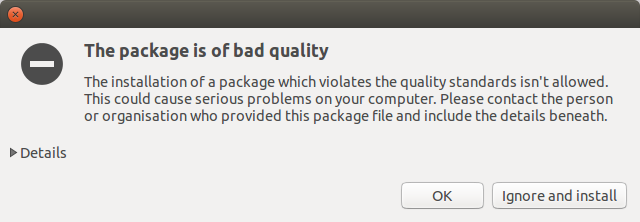
Unfolding the “Details” info showed the following text.
Lintian check results for /home/ronald/RA_temp/OpenPHT-0.1~ubuntu14.04_amd64.deb:I chose to ignore the problem and complete the installation anyway, which seemed to work properly.
E: openpht: maintainer-name-missing support@openpht.orgUse of uninitialized value $name in pattern match (m//) at /usr/share/perl5/Lintian/Check.pm line 203.
When installing the '.deb' package through the Ubuntu Software Center, I got a complaint about 'Bad package' as shown in the screenshot below:
Thanks for the info! I tested/installed the package with "dpkg -i" which worked without errors, didn't notice that ubuntu software center has additional .deb checks in place, will fix that in the code ...
I've also tried launching OpenPHT directly from Unity's application search window, with similar lack of results (that window closes on clicking, so I didn't even see any icon flashing).
I'm not sure what I could have done wrong, but am open to suggestions.
I agree with your reasoning on this, but standard PHT runs fine on the same VM. I installed it several versions ago, and have since then autoupdated it several times, currently running PHT 1.3.5.dev-git.Is PHT running on the same vm host without problems? (if PHT isn't working it's very likely that openpht won't work either)
That does seem to be the case, as that terminal window command immediately terminated with an error message complaining about a missing file.Please open a terminal (within X) and enter "/usr/bin/openpht.sh", copy/paste output here (my guess is you might be missing some dependencies or I forgot to add them in the package requirements)
ronald@ubuntu:~$ /usr/bin/openpht.sh
/opt/openpht/bin/plexhometheater: error while loading shared libraries: libpcrecpp.so.0: cannot open shared object file: No such file or directory
ronald@ubuntu:~$
Presumably your Ubuntu test system already has that file installed from some earlier work, so that you never see this error in your own testing.
ronald@ubuntu:~$ /usr/bin/openpht.sh
/opt/openpht/bin/plexhometheater: error while loading shared libraries: libpcrecpp.so.0: cannot open shared object file: No such file or directory
ronald@ubuntu:~$
Presumably your Ubuntu test system already has that file installed from some earlier work, so that you never see this error in your own testing.
Best regards: dlanor
I see, just install the package "libpcrecpp0" (sudo apt-get install libpcrecpp0) and try again ... will add this to the package dependencies, please report back if there are more missing shared libraries after you installed libpcre. thanks!
Installing that libpcrecpp0 package fixed the main issue, so that OpenPHT now starts without problems in this Ubuntu VM.I see, just install the package "libpcrecpp0" (sudo apt-get install libpcrecpp0) and try again ... will add this to the package dependencies, please report back if there are more missing shared libraries after you installed libpcre. thanks!
Did you install VMware Tools in the VM?
