Proxmox, ubuntu, Nvidia PMS transcoding?

Hey Guys,

I am using proxmox VE, on a pretty OK machine with an Nvidia Quadro 600.
Now I liked to use the HW transcoding to actually have a fast transcode. I could run it on the CPU itself, but I have the Quadro and I want to use it.

My system:
mobo: supermicro x9drl-if
CPU: 2x Xeon E5-2680 V2 @ 2.80ghz (40 logical cpu’s)
RAM: 256 GB LRDIMM ECC
GPU: Nvidia Quadro 600

I have followed this guide: https://www.reddit.com/r/homelab/comments/b5xpua/the_ultimate_beginners_guide_to_gpu_passthrough/ But I wanted to use Ubuntu, I’ve tried windows before, didn’t work.

LSPCI output gave me:

03:00.0 VGA compatible controller: NVIDIA Corporation GF108GL [Quadro 600] (rev a1) (prog-if 00 [VGA controller])
        Subsystem: NVIDIA Corporation GF108GL [Quadro 600]
        Flags: fast devsel, IRQ 11, NUMA node 0
        Memory at dd000000 (32-bit, non-prefetchable) [disabled] [size=16M]
        Memory at d0000000 (64-bit, prefetchable) [disabled] [size=128M]
        Memory at d8000000 (64-bit, prefetchable) [disabled] [size=32M]
        I/O ports at 8000 [disabled] [size=128]
        Expansion ROM at de000000 [disabled] [size=512K]
        Capabilities: [60] Power Management version 3
        Capabilities: [68] MSI: Enable- Count=1/1 Maskable- 64bit+
        Capabilities: [78] Express Endpoint, MSI 00
        Capabilities: [b4] Vendor Specific Information: Len=14 <?>
        Capabilities: [100] Virtual Channel
        Capabilities: [128] Power Budgeting <?>
        Capabilities: [600] Vendor Specific Information: ID=0001 Rev=1 Len=024 <?>
        Kernel driver in use: vfio-pci
        Kernel modules: nvidiafb, nouveau

My VM qemu config:

balloon: 1024
bios: ovmf
bootdisk: scsi0
cores: 4
cpu: host
efidisk0: local-lvm:vm-100-disk-0,size=128K
hostpci0: 03:00,pcie=1
ide2: none,media=cdrom
machine: q35
memory: 8192
name: plex
net0: virtio=8E:E4:0F:FF:E7:26,bridge=vmbr0,firewall=1
numa: 0
ostype: l26
scsi0: plexdisk:vm-100-disk-0,cache=writeback,size=20G,ssd=1
scsihw: virtio-scsi-single
smbios1: uuid=bf9e524e-ab1c-438b-adae-4949b9959fb8
sockets: 1
vga: virtio
vmgenid: 87e05838-3267-46c4-b5ea-7b33e4d790a3

I already fiddled with the settings rombar on, rombar off and such.
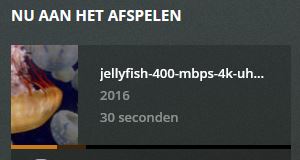
To test the HW transcode I have turned it on on PMS and I tried a HEVC try-out video clip from here: http://jell.yfish.us/ (those are swimming jellyfishes.
I am kinda losing it at the moment since loads of stuff isn’t helping

if you can tell me which plex log you need I also can provide that :slight_smile:
Thanks in common guys!

Cheers,
Dennis

Dennis,

Are you wanting to switch from ProxMox to Ubuntu?

Hi Chuck,

Sorry I guess wrong grammer;
I have proxmox and I want to use the GPU inside a ubuntu VM

Two problems:

  1. Proxmox - Not a supported distro
  2. Ubuntu in a VM on Proxmox - Seriously difficult if not impossible passthrough

Ubuntu with the nVidia drivers is trivial. Throw it in a VM and it’s bad enough, Proxmox killed it. sorry.

Your best hope is to ask in the Proxmox forums.

Ah too bad! AMD was working fine though. but that card doesn’t fit the rack case.
it seems Nvidia is the horrible dragon to slay here :frowning: I have literally no luck with any of the nvidia cards in any VM. but thanks

nVidia cards in VMs ARE a problem - which is why I stated it the way I did.

If you ran nVidia cards, in a VMWare (bare machine hypervisor -type 1) VM, you’d have an easy time. Otherwise, it’ll ‘bust body parts’ if you hear what I’m saying.

1 Like

Hi Chuck,

Got it to work… kind of.
I had this GTX 750 TI laying around so I gave that a spin.
Drivers installed and everything looks okay.

This is the nvidia smi output inside a vm:

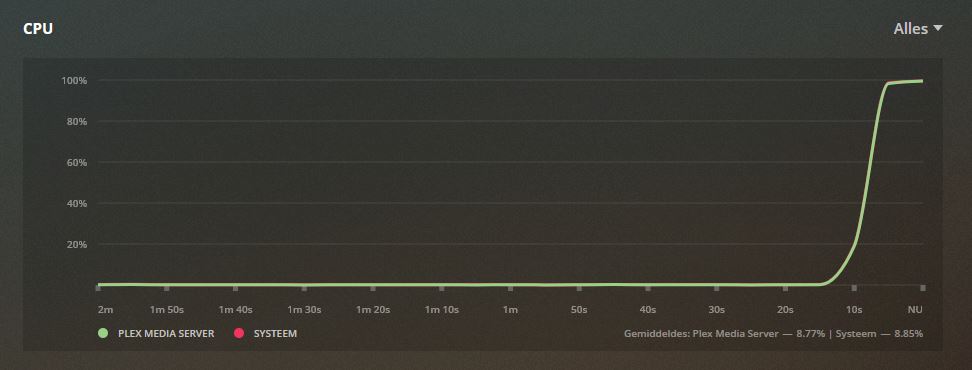
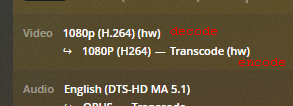
But still hurting my CPU:

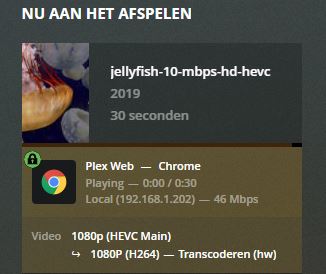
← no HW sign

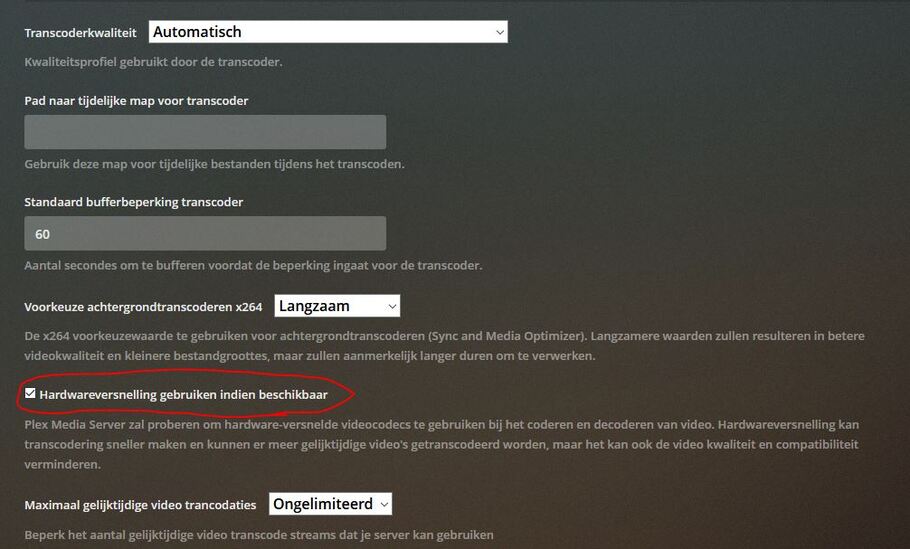
But it is enabled:

Is that the GPU, Proxmox or some plex issue?

Thanks,
Dennis

Video Encode and Decode GPU Support Matrix | NVIDIA Developer

your gpu does not support 4k/hevc decoding

your best bet is a 10, 16, or 20 series gpu. Or p2000 quadro.

see also Plex, 4k, transcoding, and you

hm thanks. what about 1080p?

stillnope

ANY hevc.

Thanks man! it works! but only at a maximum of 10bit
itsalive

It does not work.

otherwise you would have TWO (hw).

like this

image

Please read the 2 links I provided above.

They provide all the answers.

I know, but it actually is working.
I’ve read the two links you provided, changed nothing.
For my previous post it had 2% cpu usage and the GTX showed a spike.
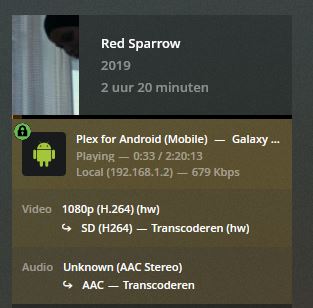
When I started the converting for a lower quality it gave me:

itsalive

Thanks for the push in the right direction! it works now, IN A VM :smiley:

your red sparrow picture is working.

but your other picture above with jellyfish-10-mbps-hd-hevc is not working.

because your gpu does not support HEVC.

you can do x264, but not HEVC.

the nvidia link has a chart of exactly what CODEC’s are supported for your gpu and others.

I have looked at the coded for 4 times now. Maybe I’m stupid but for GTX750 TI it says: H.265 (HEVC) 4K YUV 4:2:0 inside the chart you sent over

no, unfortunately you have a 750TI

the gtx 750 (no TI) does support hevc decode.


the difference is 750 ti is 1st gen, the 750 is 2nd gen.

This topic was automatically closed 90 days after the last reply. New replies are no longer allowed.