So I made a new tv show library for a folder with a mix of tv shows and movies. (I actually only had one movie in the folder at the time of doing this). I was surprised that plex found just the TV shows in this folder. I thought it would still add the movies as well.
I had to make a whole new movie library with the movie category pointing to this folder and it was finally able to pick up my movie.
Is there any way to merge the two categories into one.
Nope. You must have separate Libraries for TV Shows and Movies.
See:
https://support.plex.tv/hc/en-us/articles/200288916-Overview
Further… this is because Plex uses different Scrapers/Agents to collect the metadata from different online sources for each library type.
Imagine what Plex would have to distinguish if you had a Movie called “Lost in Space” and the entire TV Series “Lost in Space.”
Sometimes.
TheTVDB has movies, if a movie corresponds to TV series it is often added as a Special.
Similarly, many tv movies are also considered tv miniseries and will have entries in both TVBD and the movie one. The main difference is that a TV library requires strict naming to get it to recognize anything.
One major annoyance with TVDB is that as a one off drama or documentary is not a TV series they refuse to catalogue them. Here in the UK we have plenty of one off dramas but they have to be added as Movies (as they usually appear in IMDB) even when they are clearly TV Shows. This absurdity was highlighted with Agatha Raisin which was initially a one off drama on Sky One & this had to be added as a Movie but subsequently there was a series & TVDB then decided that the one of was now a Special & was worthy of cataloguing.
Many of these things can be found in ‘interesting’ listings at TVDB. Particularly the BBC Documentaries or Specials sections.
I joined TVDB and TMDB and became a contributor. It only takes a few moments to add a listing at TMDB for something that can’t be found or has fallen into some listing crack at TVDB.
Alternately a quick google or gimp for a suitable poster image and an appropriate and compliant file name and/or structure is often even faster:
A Movie Library/
…Why I became an Axe Murderer (2017).xxx
…Why I became an Axe Murderer (2017).jpg
Done and done.
@nigelpb said:
One major annoyance with TVDB is that as a one off drama or documentary is not a TV series they refuse to catalogue them.
What you mean are “tv movies”, which are just like ‘cinema’ movies - with the only difference that they were never played in cinemas.
Just silently replace the term “TV Show” by “TV series” and it starts to make much more sense.
TheTVDB only catalogues tv series.
Analogously, a ‘tv show’ library in Plex is only suitable for tv ‘series’ and not one-off ‘movies’.
@OttoKerner said:
@nigelpb said:
One major annoyance with TVDB is that as a one off drama or documentary is not a TV series they refuse to catalogue them.
What you mean are “tv movies”, which are just like ‘cinema’ movies - with the only difference that they were never played in cinemas.
Just silently replace the term “TV Show” by “TV series” and it starts to make much more sense.
TheTVDB only catalogues tv series.
Analogously, a ‘tv show’ library in Plex is only suitable for tv ‘series’ and not one-off ‘movies’.
It’s illogical though. I have two Plex libraries. Movies & TV Shows not Movies & TV Series. Why should a one off drama from the BBC be lumped in with Hollywood blockbusters when it’s only ever been shown on TV & never in a cinema?
The distinction for Plex and for TheTVDB is not one of ‘quality’ or ‘budget’ or ‘production values’.
It is simply caused by the fact that ‘series’ require a different approach in terms of metadata.
With series you need to track the order of episodes, you need to track which episodes have been watched yet, there are things like ‘seasons’ etc.
A movie is a ‘standalone’ item. (Let’s leave the minefield of ‘sequels’ and ‘prequels’ out of the discussion for now please.) It has a title, a poster, some cast members and a few other metadata. And that is exactly the same, no matter whether the movie was made for broadcasting per tv or for the cinema.
2 Likes
Defining series is all so arbitrary. Not all series are like the US majors with 24 x 43 minute episodes in a season. There are series with just two or three episodes & only one season so I see no logical or conceptual issue with having a series containing a single episode. Then we have occasions where in one country the show will be transmitted in one part & in another as two episodes therefore in Plex & TVDB terms in one country it’s a Movie & in the other it’s a series with two episodes.Tracking watched items is common to both TV episodes & Movies.
1 Like
With very rare exceptions I just place even one off TV shows or made for TV movies in a TV library and in a series directory with a Season 01 sub-directory. That is:
TV Shows <— The library points here
---------TV Show Name (Year first aired if needed) <— This folder holds the season folder
------------------Season 01
-------------------------ShowName - s01e01 - Episode Name.ext
Then in all the clients I use when I want to play it I simply press “Play” when the “Show Name” folder is highlighted.
There is no extra key presses or navigation issues and it works great.
The same setup works for shows with any number of episodes and Plex remembers where I left off and resumes playback correctly if it gets interrupted.
If there is more than one episode I do have to press play to start the next episode after one ends because I detest all forms of autoplay and I ALWAYS turn it off but that is not a problem as my thumb rarely gets too tired to press a button.
Of course there are a few TV movies or specials that are not in the TVDB but are in The Movie Database. Those go in a movie library as needed.
I really see no need for anything more or for any changes.
BTW: Sometimes it is the naming that causes problems for the TVDB finding a one off show and for that I usually check and see how FileBot wants to name it and go with that.
If all else fails I might just manually look it up OR place it in the TV library with unmatched naming. It still appears in the listing and plays fine but there is just no metadata or artwork. That really does not bother me too much as by then I have it named so that I know what it is and I can add metadata if I choose to.
This is all fine BUT what about Documentarys? They come as Series like BBCs Natural World and they come as Movies like the IMAX Documentations. Sooo … i have to have 2 Librarys for them. Which is … not nice to look at. i am browsing my library till i find something i want to watch and if i have 2 seperate locations i get lost.I dont get why plex wont allow mixed content in one Library or at least show me a movie just unknown and let me tell plex to use the Movie Scanner. Frustrating
5 Likes
What would be wrong with when adding folders to a current library, you choose whether that incoming folder is a movie folder or a series folder. The files themselves would have to be saved in movie or series directories - this would not be an issue for those that want this feature. Then when viewing the library from a tv/device, if you click on a move, it acts like a movie, but when you click on a series you get season selection like you do now. Surely this would only take a Boolean in a database somewhere and some ‘if’ statements in the code. Those that don’t want to mix and match won’t have to, but those that have movies and series as a collection can view them all together.
1 Like
I would like to mix TV Shows and Movies in my library too, it cant be that hard to give that Option?
3 Likes
I have to agree a media server needs to mix TV + Movies in a single library. More and more series’ use both and it’s pretty poor that you can’t put them together (even in a collection apparently).
A simple method would be to define content type at the folder level, rather than the library level. Or keep the library type as a default (eg TV), with option to override it for a particular folder (eg this folder has movies). Or add “TV”/“Movie” to each filename. Or use a sidecar file. Or a new menu item to tell Plex what content type an individual file is.
Presently, I dump such TV/Movie mix series’ into a folder, start each filename with the airdate so it sorts correctly, and add it as “Other Video” libaray. Voila it works. But there’s no metadata, posters etc., and that would be nice to restore.
It’s 2019, hard to understand why TV+Movies isn’t supported.
Regards
There is already a way to do what your want by using a “Season 00” folder or a “Specials” folder in a TV series setting.
That is what I do for series like “Babylon 5” or “Stargate SG1” that have several movie associated with them. Many movies associated with TV shows even have a “Special” entry in the TVDB that allows them to automatically pick up meta data.
For those that do not have metadata available it is not too hard to provide it yourself.
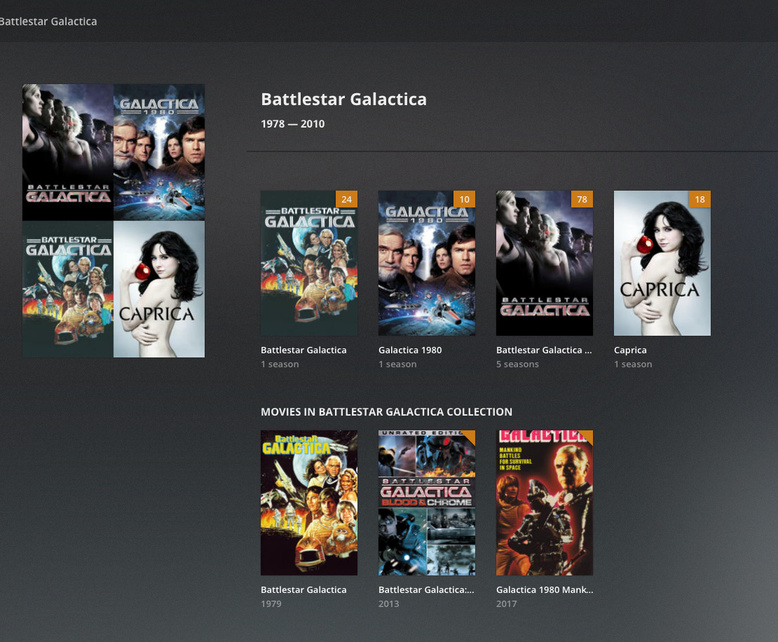
You actually can by using the same collection name:
Thanks for the response - however there aren’t any movies in your image… Try this: Tag a TV show into collection “XYZ”, then navigate to a movie library and tag a movie with collection “XYZ”, on my server they do not show up together. The movie library will have a collection XYZ and the movie will be in it, and the TV library will have its own (but separate) XYZ collection with the TV show in it.
If you can get both to show up in one XYZ, I’d appreciate knowing how you did it, thanks.
there are three movies at the bottom of his image
It would really be much nicer if collections were actually global and not divided up into libraries or types.