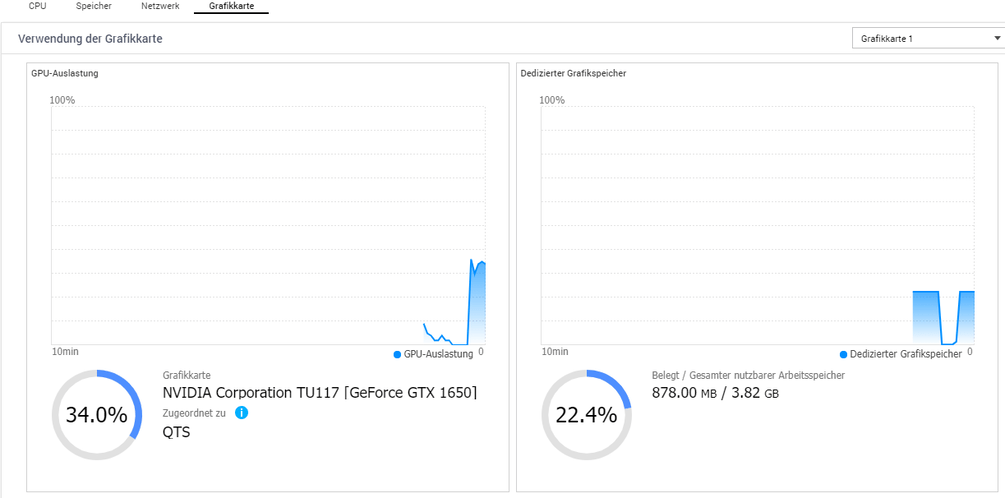
General: graphics card is recognized by NAS and also used for transcoding (qts mode).
The problem is that when a video is transcoded (for example because of subtitles) the cpu is fully utilized but the gpu is only used at 3-10% and the gpu’s memory is only used up to 700mb of 4 gb and the film playback stutters permanently.
Oct 23, 2020 19:56:34.294 [0x7fac8d9ea700] ERROR - getaddrinfo(192-168-178-33.abcdefghijklmnopqrstuvwxyz012345.plex.direct) failed: -2
Oct 23, 2020 19:56:38.393 [0x7fac7d9e9700] ERROR - [Transcode] [FFMPEG] - cu->cuInit(0) failed
Oct 23, 2020 19:56:38.393 [0x7fac7d9e9700] ERROR - [Transcode] [FFMPEG] -  -> CUDA_ERROR_NO_DEVICE: no CUDA-capable device is detected
Oct 23, 2020 19:56:38.393 [0x7fac7d9e9700] ERROR - [Transcode] [FFMPEG] -
Oct 23, 2020 19:56:38.422 [0x7fac7d9e9700] ERROR - [Transcode] [FFMPEG] - cu->cuInit(0) failed
Oct 23, 2020 19:56:38.422 [0x7fac7d9e9700] ERROR - [Transcode] [FFMPEG] -  -> CUDA_ERROR_NO_DEVICE: no CUDA-capable device is detected
Oct 23, 2020 19:56:38.423 [0x7fac7d9e9700] ERROR - [Transcode] [FFMPEG] -
Oct 23, 2020 19:56:38.461 [0x7fac7d9e9700] ERROR - [Transcode] [FFMPEG] - cu->cuInit(0) failed
Oct 23, 2020 19:56:38.461 [0x7fac7d9e9700] ERROR - [Transcode] [FFMPEG] -  -> CUDA_ERROR_NO_DEVICE: no CUDA-capable device is detected
I would address this first:
Oct 23, 2020 19:56:58.333 [0x7fac7d11f700] WARN - SLOW QUERY: It took 52700.000000 ms to retrieve 10 items.
Oct 23, 2020 19:56:58.355 [0x7fac7cb43700] WARN - Got a request to stop a transcode session without a session GUID (or with an invalid one).
Your system is in extreme distress. 52 seconds to respond to a database query!
It’s in distress because, as I stated, it’s taking 52 seconds (elapsed) to make a database query. Such queries should complete in fractions of a second (typically single millisecond).
First thoughts are:
Database fragmentation (automatic optimization was disabled in Scheduled Tasks)
CPU so grossly overloaded that PMS itself can barely run.
My real question is: Why would you transcode 4K to 4K ? This does not make sense.
Consume the 2160p as-is, converting only the audio
to #1: Check the subtitle type. Samsung TVs can overlay SRT (text based). Almost none of the currently available TVs can overlay image based (PGS, VOBSUB, or DVDRIP). The best solution here is to check and curate the media ; removing any image based subtitles in favor of text based (SRT is by far the most widely accepted)
to #2: If the subtitles are sent as the third stream (text), as they should, no video transcoding (subtitle burning) is required.
Point 3: GPUs don’t help with subtitle burning in any case. The CPU must always perform this task. The APIs available to Plex do not support burning subtitles.
If all media is cleanly curated then no transcoding will be required aside from the possible audio conversion(s)