I would love nothing more than somebody to call me an idiot for missing something obvious, but I’ve read through quite a few forum posts and haven’t found a solution yet.
4K is GREAT… for my 4K TV. The older HD TVs however obviously need to transcode to something usable, And at present, the only way to get decent 4K transcoding is to spend enough on a GPU/CPU to pay for every streaming service on the planet for the next three years. LOL.
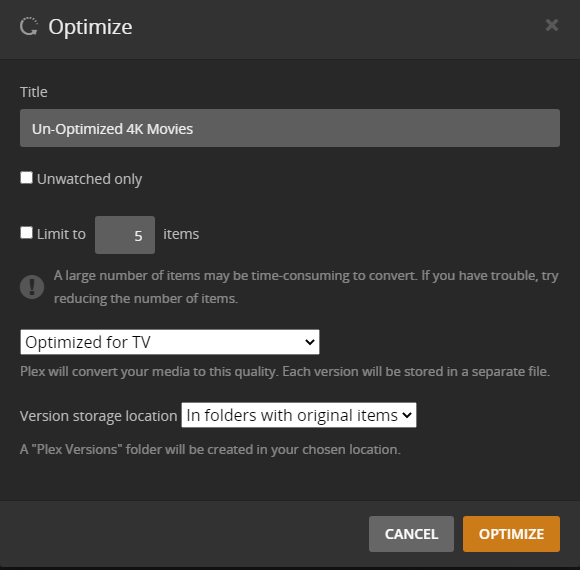
Enter optimization. Works great! I so far haven’t had the kinds of problems reported in the forums, except for one dumb oversight. I created a filter based on two criteria:
One, that the resolution is 4K
Two, that the file is not a duplicate.
This selects all of my 4K movies that haven’t already been optimized. Sort by date added, setup optimization and off they go.
Oops! Problem… Once the movie converts it is now a duplicate and doesn’t fit the filter. Plex now DELETES the optimized version. The next movie starts to optimize, but once the other version deletes, it now fits the filter again and goes back into the list. So, I keep optimizing the same two movies over and over.
I have tried some other filter configurations, but they all run into a similar limitation in that I can’t remove the optimization job without losing the subsequent versions. Now I’m stuck with a whole bunch of optimized movies and my only option appears to be an optimization job with an unlimited number of spots to finish optimizing the entire library (and deleting each one that’s already optimized)!
Seriously, why? LOL
Suggestions; and barring that… Feature Request: Make deleting optimized versions a strickly manual process.
That doesn’t sound right. Plex does not remove optimized versions. The optimize job only creates new versions. There is nothing that removes them.
If the optimized version is getting removed, something else is doing it. Can you reproduce and get me your server logs? I want to see the end of the job where it finishes and you think it is getting deleted.
FYI - I just tested with some TV episodes, so it’s faster. I made a criteria for the episode title and duplicate is false. It found 2 items, I hit optimize, and it optimized both of them. These optimized versions are still there for me.
The only possibility I can think is that the optimized file is initially saved in another folder then moved to the final location. If this move doesn’t happen, it could think the process failed so it starts over.
Absolutely! I will recreate the procedure and then provide as detailed info as I can. Should be tomorrow, but I wanted to right away say thank you for helping out.
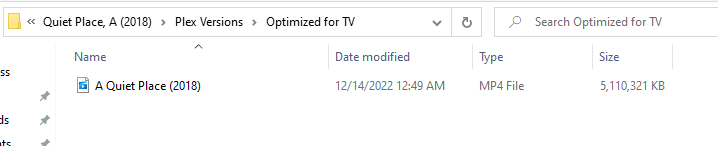
What I didn’t think to do was get a picture of the file info after the first conversion was completed. For a time, there was a duplicate version of the movie in the subdirectory “Plex Versions”. At some point afterward the job apparently refreshed and the file went away.
Looks like the transcoder failed. I think it’s because PMS lost track of the duration for the movie so it’s using it’s default of 120 minutes. The movie is 126 minutes so it stops early which could look like a failure, so it removes the file thinking it’s bad and adds it back to the queue to try again later. Try increasing the transcoder’s default duration to a higher number and see if that helps.
I will make that change this evening, but I doubt it will solve the problem. If I just optimize that one movie separately, it will be complete and stay in place; no problems. The only thing introducing the aberrant behavior is the optimization by filter.
Unless of course, I remove it from the optimization queue, in which case the Plex Version goes away. Which brings me back to my first point: feels like removing versions should be a user-controlled option.
Generally if the option is not in the preferences.xml file you would go ahead and add it if it’s mentioned in the link @anon18523487 provied. So you should be good to do that and then test again or wait until MovieFan.Plex confirms.
Including logs to reevaluate again. Left running so maybe it’d do it a couple times.
I also included the XML file. I made the change, but I noticed a DefaultDuration in there, but I can’t remember what time I made that change. Did restart the server after.
The two movies that keep flip-flopping this time are:
The King’s Man
All Quiet on the Western Front
It has to be the optimize process deleting the Plex Version. I successfully optimized the Batman movie from the previous example as a one off. Plus, since manually deleting a movie from this screen
removes the converted copy without question, it’s probably not a big conceptual leap that if it comes off the list through an automated process that deleting would still be its default behavior.
I need to check some file permissions. I KNOW I added that setting to the XML, but it’s missing from the current version on the server. I still think that’s not the problem, but I can’t expect you to move forward if I haven’t successfully attempted your last suggestion.
Dec 11, 2022 02:40:29.381 [0x811c43500] DEBUG - [Req#91e1c] Extras: Checked extra ‘Thor: Ragnarok’ and found matched: 1 Media matched: 1
Hmm. I wonder if the scanner is somehow seeing the new optimized version as being an extra. This will effectively remove it from the library, so PMS no longer treats it as an Optimized version and therefore there is no more duplicate so the Optimize job is triggered. Next time you see a movie go missing but before the next optimize process for that movie finishes, can you check and see if there is an extra. Also grab the xml info so we can double check.
Ok. Latest info… To simplify things I made a filter with just one movie in it but had the duplicate attribute.
Left it to its own devices (been busy for a couple days) and it has optimized it several times. The time I caught, it finished the file at approximately 12:49 am
I have manually queued up a bunch of movies at the request of my family, so it might be a day or two before I can try something different, but I’d sure like to solve this.
Well over a month now, nearly two, and no word from anyone.
If I were a regular user, I could chalk this up to the price of using free software… But I’ve been a Plex Pass user for years, so I’ve sent way too much money your way for this kind of delay in getting at least an update!
I need some sort of status on this issue within a week. AGAIN… I’m aware the developers may not have a FIX yet as the server product I’m sure is being constantly worked on, but there is no excuse for not having confirmation that it is a bug, or some other issue being investigated.