<Would it be possible to add a random category within the options found under: Settings/Manage/Libraries/(highlight specific library or playlist)/Manage Recommendations that allows Movies/TV shows to appear randomly on the home page within that section/library, eg: Movies; TV Shows; etc.? I know that you can go into each library and from there view how you want to view them (dropdown box beside ‘By Title’, wherein ‘Randomly’ is last on the list. This is okay, however, it doesn’t affect the view when you go back to that library/category on the home page. The reason I’m asking for this feature, is that it doesn’t help to cultivate any ideas for watching movies in my collection, when those homepage library/category views keep showing you the same titles over and over again; day after day. A random category feature would help to stimulate/sustain interest in watching movies, especially ones you may not have seen or haven’t watched in some time.
You can already do this.
- Select the Library view for your movies library.
- Select the Advanced Filters filter and sort the library randomly (without adding any actual filter).
- Optionally set a limit on the number of displayed items.
- Click the save button and save as a smart collection.
- Move to the Collections tab of your movies library.
- Hover over the poster for your newly created collection, click the vertical ellipsis, select “Visible on,” and select Home or Library.
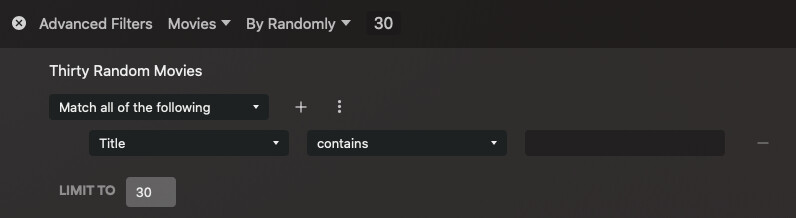
Now, you’ll have a hub in the location you selected with the name of your smart collection, showing your randomly-selected movies. You can also select it and reorder it via Manage Recommendations (after making it visible).
I’m not certain how often it updates but my test one updated in the few minutes I’ve been testing and writing this post (navigating around the interface a bit).
That works great! Thanks for the excellent step-by-step instructions to achieve that. I doubt if I would have ever figured out that method without your help! Still wonder if there couldn’t be a checkbox option in ‘Manage Recommendations’ dropdown menu beside each library, for simplicity; but since this method results in the desired feature I was looking for, I’m very grateful.
You might want to take a look at
Setttings - [Server name] - Manage - Library
(using the hosted web app)
https://support.plex.tv/articles/manage-recommendations/
Official documentation on collections and publishing collections:
https://support.plex.tv/articles/201273953-collections/
https://support.plex.tv/articles/publishing-collections/
You’re welcome, glad it works for you!
2024 clean-up: can already be achieved with Plex out-of-the-box features (implemented)
