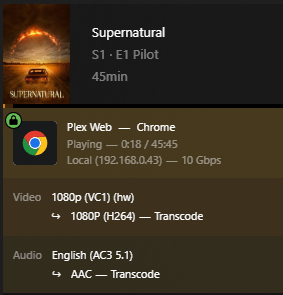
Server Version#: 1.41.0.8992
Player Version#: 4.138.0
It appears today’s update has broken VC1 transcoding. Direct play appears to work on mobile though begins to buffer endlessly when transcoding. Setting it down to 720p and below appears to begin playback though. Turning on subtitles makes it super pixelated. This is occurring regardless of the player. On Windows 11 with a 12700K. HW transcoding and tone mapping is working great otherwise with other files. Any thoughts on what is going on?
Yep. It plays when disabling hardware-accelerated video encoding. At this point I presume there is no way for it to automatically switch to CPU when hardware-accelerated encoding is enabled then.
Sure. So when leaving both on, at least on chrome browser, it stalls.
When turning off “Use hardware-accelerated video encoding”, and leaving on “Use hardware acceleration when available”, it does transcode and plays properly.
Here are the logs with “Use hardware-accelerated video encoding” turned off. Prior to this update, I did have both setting turned on and had no problem with playback with this filetype. Plex Media Server Logs_2024-09-13_08-01-16.zip (2.4 MB)
In theory, Plex should see that it is not compatable with the hardware side and start transcoding on the software side correct? Is this a bug or am I just misunderstanding?
“Intel dropped support for hardware accelerated decoding of VC1 video starting with the 11th gen CPUs.”
This is inaccurate information. VC1 hardware decoding is supported through the 14th generation. Going forward (starting with Arc cards) it will not be supported.
The latest version of PMS broke ALL hardware transcoding for me on both of my servers. I had to roll back to get it working.
I also ran into this issue a few days ago. Thought a Windows update maybe broke something because it used to transcode just fine.
What I wanna know is: if one decides to upgrade to a 15th gen or Intel Arc GPU, is hardware encoding still possible? Meaning software decode and hardware encode, or is that not a thing?
EDIT: Also seems to affect 1080p MPEG2 files (old Blu-rays), but not 576p/480p MPEG2 files. Weird.
I’m having the exact same issue with one addition.
However, my Plex server will occasionally hang when starting a video wit the latest update. I’ll get a black screen instead of the video playing; I have to hit “play” to get the video to start at this point. Again, this is occasional and random, but I never saw this behavior prior to the latest stable release. I7-12650, 32 gb ram.