Server Version#: 1.40.4.8679
Player Version#: 4.132.2
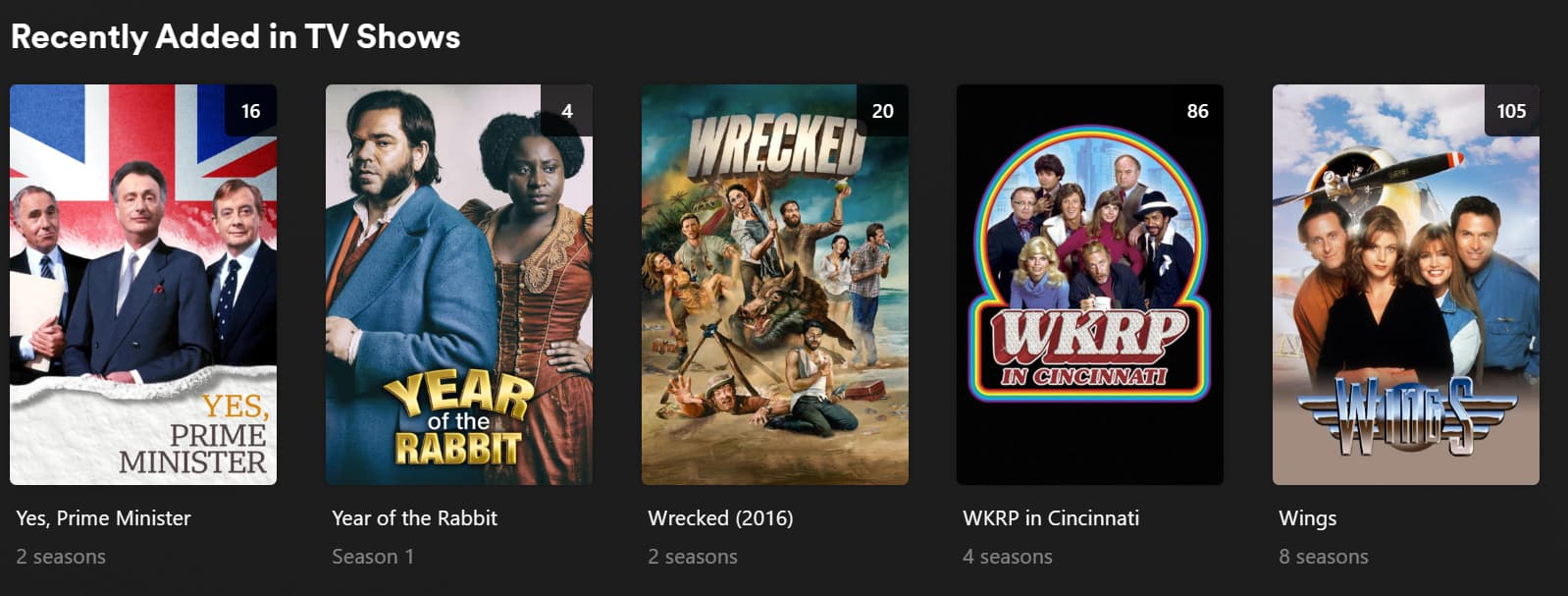
I have a show called “Year Of The Rabbit”
The episodes are in a folder called “Year Of The Rabbit”
The folder and the files have a creation date and modified date of 11/21/21
I woke up today and it is now the first item on my “Recently Added” section.
Because this is a docker install of plex. I created a new container, created a new db, and pointed to the same dataset and it still indexing “Year Of the Rabbit” as the first thing in my “Recently Added” section.
I am not sure what else to do to fix it.
It is recently added, not recently created. If you added it recently it will make the list.
i haven’t touched it since 2021
Settings - Server - Library - “Empty trash automatically after every scan”
You want to keep that off if there is any chance that access to the media storage can sometimes have waiting times. Like for instance because the hard drive first needs to spin up its platters from idle state. Or because sometimes the network file share will not react promptly.
this is a vm that boots after the NAS comes online so you would be correct that there are times where Plex is up but the dataset is not up. I will uncheck the box and rebuild the database. Thanks for the help!
argh… sadly that did not fix it.
It isn’t supposed to fix it. It’s just meant to prevent this from happening again.
If it’s very important for you to fix it, go back to a database backup from before the incident: https://support.plex.tv/articles/202485658-restore-a-database-backed-up-via-scheduled-tasks/
sorry let me explain.
I am using docker. So I deleted the container and recreated the it using a new path for the config, and transcoder locations BUT using the same dataset. I then unchecked that box and it still indexed it wrong.
I am not sure what is going because all of my file attributes show that nothing has changed on my box for 2 weeks as that I have not updated anything in my library so i really dont know why this is happening.
If you throw away your Plex data folder and recreate the library from scratch, two things can happen:
- all items show the same date as “Added at” on them. Namely the date when the first library scan was performed. Which was already mentioned above. “added at” doesn’t mean “released at”.
- if the first library scan was performed in the course of creating the library, then Plex tries to use the date/time stamp of each video file as the “Added at” date.
But in order for this to work, you really must start the library scan from the same dialog window which you used to create the library.
firstly thank you for the help.
upon further inspection. it seems like my Recently Added is in reverse alphabetical order. As seen below.
I have a backup copy that is 24hrs old and a redundant copy that is 30 days old. They are air gapped backups meaning no one can write to them accept for the rsync script that runs every 24hrs for one and every 30 days for the other.
When i brought them online for general consumption and tried a fresh docker install of plex each one did this reverse alphabetical order issue.
I then looked at the folders and file attributes for these shows.

there is no way these should be in recent so i am kinda stuck trying to figure out what could be going on.
I already told you the most likely reason above.
I have seen this before too, all bets are off if you re-create the library, I have found this sometimes sticks but it is not guaranteed.
Funny thing is my TV shows have been re-ordered when ive done this, however I have a movie that is at the bottom of the list and it says added 20 years ago, didn’t even have plex then, dont know if it even existed, i think this got pulled from the file download date. brought back memories and made me feel old as s***
I’ll pass along my experience and you can take it as you wish. I typically rebuild my server from scratch once or twice a year for various reasons I’ll not get into here but this has given me a lot data having to deal with recently added.
Anyhow, on the INITIAL FIRST scan of a library plex will use the timestamp of the media to build the recently added list. This is because the scanner, scans, the media based on systems dates. So if you have media with a timestamp from 20 years ago (or the folder its contained in has a timestamp of 20 years ago) then that will be the oldest on the list as its scanned first etc…
- Now, what WILL effect this, and I cannot emphasise this enough, is the heavy CPU tasks activity like video thumbnails, intro & credits detection, chapters, loudness etc… If you have these set to
as a scheduled task and when media is added then it can randomly cause the scanner to pause/fail/retry as its doing its first initial scan due to overloading the system. To counter this you should set all these tasks under settings / library to never until the first pass of added everything to you library is complete. Then you can enable what you want after that.
- If you are using multiple folders in your library, make sure to add them ALL before starting the initial first scan. Adding another one later will dump anything it finds at the beginning of the recently added list.
- Never have two initial first library scans happen at the same time. Let one finish and then add the next library etc…
Once the library is scanned then anything you added after the fact will go to the front of the recently added list, which of course is obvious