We’re up to 6 now
My Plex library is set up to use:
- Episode Sorting: Oldest first
- Collections: Disabled
- Seasons: Hide
- Scanner: Absolute Series Scanner
- Agent: YouTubeSeries
I can’t seem to get episode sorting working properly. I’m trying to order the episodes from oldest to newest but instead Plex shows the episodes in a jumbled order that I can’t understand. I’ve downloaded my videos from the YouTube channel and I’ve written some automation to ensure that the date created and date modified of each file is set to that of the upload date in YouTube. When I look in Finder I can sort the files by date created or date modified and they’re in the right order. I can also verify that the dates in Plex appear to be correct. But in Plex, the episodes are jumbled up in some random order that I can’t understand.
Any ideas on how to get this working? I’m so so close…
remember that the episode creation date and the episode publish date are different things.
Just because an episode was published on FB on the 10th July does not mean it was created on 10th July. YouTube metadata contains the creation/upload date, not the publish date. This might be why things are in the wrong order for you.
As long as your shows are being paired with metadata (Getting descriptions etc) from youtube they should be picking up the upload date from there.
Hey, I just discovered this awesome agent so that I could grab the metadata for the few YouTube videos I have on my server.
It has worked fine apart from three videos. Two of them I was to just unmatch then rematch and the data came up but there is one video that is just not working for me.
Here is the log for the specific video. It seems to be retrieving the metadata but it’s just not displaying it in Plex.
2020-07-23 22:29:59,461 (25e4) :  INFO (logkit:16) - =============================================================================================================================================================
2020-07-23 22:29:59,461 (25e4) :  INFO (logkit:16) - update() - guid: lVH7sGGqBGA, dir: On My Own - Les Misérables, metadata.id: youtube|lVH7sGGqBGA|On My Own - Les Misérables
2020-07-23 22:29:59,484 (25e4) :  DEBUG (networking:138) - Fetching 'https://www.googleapis.com/youtube/v3/videos?part=snippet,contentDetails,statistics&id=lVH7sGGqBGA&key=AIzaSyC2q8yjciNdlYRNdvwbb7NEcDxBkv1Cass' from the HTTP cache
2020-07-23 22:29:59,500 (25e4) :  INFO (logkit:16) - Movie mode3
2020-07-23 22:29:59,500 (25e4) :  INFO (logkit:16) - video_details - Loaded video details from: "https://www.googleapis.com/youtube/v3/videos?part=snippet,contentDetails,statistics"
2020-07-23 22:29:59,500 (25e4) :  INFO (logkit:16) - date:  "2012-12-18 12:54:06+00:00"
2020-07-23 22:29:59,500 (25e4) :  INFO (logkit:16) - series title:       "On My Own - Les Misérables"
2020-07-23 22:29:59,500 (25e4) :  INFO (logkit:16) - series description: Hey it's Millie, i decided to sing "On My Own" on my own! Hope you enjoy it. I'm still a bit nervous. Millie
2020-07-23 22:29:59,502 (25e4) :  INFO (logkit:16) - thumb: "https://i.ytimg.com/vi/lVH7sGGqBGA/default.jpg"
2020-07-23 22:29:59,502 (25e4) :  INFO (logkit:16) - poster: "https://i.ytimg.com/vi/lVH7sGGqBGA/default.jpg"
2020-07-23 22:29:59,513 (25e4) :  DEBUG (networking:143) - Requesting 'https://i.ytimg.com/vi/lVH7sGGqBGA/default.jpg'
2020-07-23 22:29:59,875 (25e4) :  DEBUG (networking:175) - Not caching 'https://i.ytimg.com/vi/lVH7sGGqBGA/default.jpg' (content type 'image/jpeg' not cacheable in Agent plug-ins)
2020-07-23 22:29:59,877 (25e4) :  INFO (logkit:16) - series duration:    "PT3M17S"->"197000"
2020-07-23 22:29:59,877 (25e4) :  INFO (logkit:16) - rating: 9.0
2020-07-23 22:29:59,877 (25e4) :  INFO (logkit:16) - genres: [u'Music']
2020-07-23 22:29:59,878 (25e4) :  INFO (logkit:16) - director: Millie Leaver
2020-07-23 22:29:59,878 (25e4) :  INFO (logkit:16) - =============================================================================================================================================================
2020-07-23 22:29:59,881 (25e4) :  CRITICAL (core:574) - Exception serializing Movie with guid 'com.plexapp.agents.youtube://youtube|lVH7sGGqBGA|On My Own - Les Misérables?lang=xn' (most recent call last):
  File "C:\Program Files (x86)\Plex\Plex Media Server\Resources\Plug-ins-b23ab3896\Framework.bundle\Contents\Resources\Versions\2\Python\Framework\modelling\model.py", line 190, in _write
    self._serialize(os.path.join(self._storage_path, subdir))
  File "C:\Program Files (x86)\Plex\Plex Media Server\Resources\Plug-ins-b23ab3896\Framework.bundle\Contents\Resources\Versions\2\Python\Framework\modelling\model.py", line 215, in _serialize
    el.set('id', self._id)
  File "lxml.etree.pyx", line 699, in lxml.etree._Element.set (lxml-2.3\src\lxml\lxml.etree.c:34531)
  File "apihelpers.pxi", line 563, in lxml.etree._setAttributeValue (lxml-2.3\src\lxml\lxml.etree.c:15781)
  File "apihelpers.pxi", line 1366, in lxml.etree._utf8 (lxml-2.3\src\lxml\lxml.etree.c:22211)
ValueError: All strings must be XML compatible: Unicode or ASCII, no NULL bytes or control characters
Anyone able to help work it out?
Excellent work on both “Youtube Metadata Agent” and “Absolute Series Scanner”.
My setup is a test Youtube library for Plex. The filename follows this format:
upload date - channel name - video title [video id].ext
I’ve tried different file naming conventions, including:
channel name - upload date - video title [video id].ext
channel name - Sxx.Exx - video title [video id].ext
I have 3 folders. One folder is “channel” folder (First We Feast [UCPD_bxCRGpmmeQcbe2kpPaA]), which includes the channel id in the folder name. The other two folders are playlists, also with their respective playlist id in the folder name. All video files have their respective video id in the filename.

In the channel folder (First We Feast [UCPD_bxCRGpmmeQcbe2kpPaA]), I’ve noticed that for a channel folder the ASS does not match in Plex the correct year by the file name date. I must change the file metadata (creation date) in order for the correct date to show up in Plex. Is this expected behavior? I was under the impression that the date in the filename would be utilized.
My main issue is with the playlist “The Burger Show - Season 02 [PLAzrgbu8gEMLapeK4z4mYVnFCyZ4PRhU9]”. In Plex, both season 01 and 02 playlists show in Plex the correct season number for the playlist.


Also, in Plex, season 1 episodes show the correct Plex data.
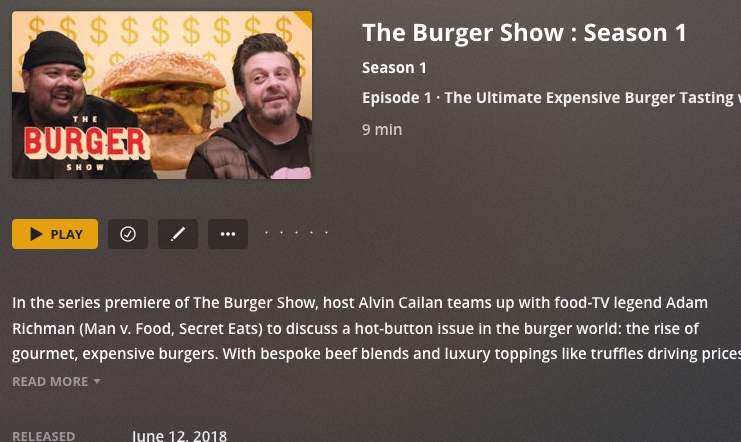
But, for season 2, the Plex data for each episode shows “Season 1”. I assume this is because these seasons on Youtube do not coincide with distinct calendar years: season 1 and 2 both show up in the 2018 calendar year. So, I assume the 2018 year associated with the season 2 files gets them labeled “Season 1”.

Logs:
com.plexapp.agents.youtube.txt (61.8 KB)
The Burger Show - Season 02 [PLAzrgbu8gEMLapeK4z4mYVnFCyZ4PRhU9].filelist.txt (1.8 KB)
The Burger Show - Season 02 [PLAzrgbu8gEMLapeK4z4mYVnFCyZ4PRhU9].scanner.txt (3.5 KB)
For the channel folders, I know that if I run a batch “setfile” or “touch” script to change the file creation date based on the filename date, that will work fine.
How do I best get the season to show correctly for multi-season playlists?
Thank you.
I’m guessing your filename contains a special character as the error you are receiving is…
ValueError: All strings must be XML compatible: Unicode or ASCII, no NULL bytes or control characters
remove the special characters from the file name and I think it will match correctly.
Awesome! That worked perfectly. Thanks so much.
I did see that line but I thought it might have been because of the special character in the YouTube title and I had no idea how that could be fixed.
i have follow the guide and renaming the file but there are no match on plex
i rename my file like this : Italiano medio - Il film di Maccio Capatondav[ID.MP3qVe8uh70].mp4
what i wrong ?
@hhhhnnnn Italiano medio - Il film di Maccio Capatondav [MP3qVe8uh70]
@rowdya22 ‘The daily videos are being counted as a single video with multiple “duplicate” items.’. The scanner decides the season and ep number, so definitely not an agent issue… First lines of the scanner Read-Me:
A Plex Series Scanner makes the video files showing in Plex and populate the following for the video files:
- Series name
- Series year
- Season number
- Episode number
- Episode title (not filled by plex default series scanner, but ASS fills it, but this will be overwritten by the metadata agent)
If a file is not showing in plex or showing at the wrong season and/or episode number, or is not passing through the forced id, then it is a scanner issue. Anything else is metadata related and agent specific.
…
Go read this post. It is how I worked around the problem you described using powershell.
That looks pretty interesting! I am currently experimenting with Epoch Time to ensure I have unique values for all episodes. I’ll have to see what I can do with powershell as I have not used it in some time.
I am on PMS 1.20.1.3252 with the latest YouTube Metadata Agent. All Episode metadata works perfectly. My issues is with Channel Metadata - Title & Sort Title are populated with actual file path of Plex Library. Studio and Summary are populated correctly. I saw a similar issue back in March due to a PMS version. Anyone else having a similar issue? Thanks!
May I have the YouTube agent logs ?
2020-09-12 16:05:17,581 (7fcff6ffd700) :  INFO (__init__:515) - =============================================================================================================================================================
2020-09-12 16:05:17,581 (7fcff6ffd700) :  INFO (__init__:515) - update() using api - guid: UCY1kMZp36IQSyNx_9h4mpCg, dir: /data/YouTube/Mark Rober [UCY1kMZp36IQSyNx_9h4mpCg]/Uploads from Mark Rober (Mark Rober), metadata.id: youtube|UCY1kMZp36IQSyNx_9h4mpCg|Uploads from Mark Rober (Mark Rober)
2020-09-12 16:05:17,581 (7fcff6ffd700) :  INFO (__init__:73) - [!] Library access denied
2020-09-12 16:05:17,582 (7fcff6ffd700) :  INFO (__init__:81) - [!] ASS root scanner file missing: "/config/Library/Application Support/Plex Media Server/Plug-in Support/Data/com.plexapp.agents.hama/DataItems/_Logs/_root_.scanner.log"
2020-09-12 16:05:17,582 (7fcff6ffd700) :  INFO (__init__:458) - [ ] dir:        "/data/YouTube/Mark Rober [UCY1kMZp36IQSyNx_9h4mpCg]/Uploads from Mark Rober (Mark Rober)"
2020-09-12 16:05:17,582 (7fcff6ffd700) :  INFO (__init__:459) - [ ] library:    ""
2020-09-12 16:05:17,582 (7fcff6ffd700) :  INFO (__init__:460) - [ ] root:       "/data/YouTube/Mark Rober [UCY1kMZp36IQSyNx_9h4mpCg]/Uploads from Mark Rober (Mark Rober)"
2020-09-12 16:05:17,582 (7fcff6ffd700) :  INFO (__init__:461) - [ ] path:       ""
2020-09-12 16:05:17,605 (7fcff6ffd700) :  INFO (__init__:466) - [ ] series_root_folder: "/data/YouTube/Mark Rober [UCY1kMZp36IQSyNx_9h4mpCg]/Uploads from Mark Rober (Mark Rober)/"
2020-09-12 16:05:17,605 (7fcff6ffd700) :  INFO (__init__:467) - [ ] subfolder_count:    "0"
2020-09-12 16:05:17,605 (7fcff6ffd700) :  INFO (__init__:490) - Grouping folder not found or single folder, root: /data/YouTube/Mark Rober [UCY1kMZp36IQSyNx_9h4mpCg]/Uploads from Mark Rober (Mark Rober), path: , Grouping folder: , subdirs: 0, reverse_path: ['']
2020-09-12 16:05:17,605 (7fcff6ffd700) :  INFO (__init__:581) - after
2020-09-12 16:05:17,607 (7fcff6ffd700) :  DEBUG (networking:143) - Requesting 'https://www.googleapis.com/youtube/v3/channels?part=snippet%2CcontentDetails%2Cstatistics%2CbrandingSettings&id=UCY1kMZp36IQSyNx_9h4mpCg&key=personalkey'
2020-09-12 16:05:17,713 (7fcff6ffd700) :  INFO (__init__:592) - [?] json_channel_details: ['kind', 'statistics', 'contentDetails', 'brandingSettings', 'snippet', 'etag', 'id']
2020-09-12 16:05:17,713 (7fcff6ffd700) :  INFO (__init__:593) - [ ] title:       "Mark Rober"
2020-09-12 16:05:17,714 (7fcff6ffd700) :  INFO (__init__:613) - [ ] role:        Mark Rober
2020-09-12 16:05:17,714 (7fcff6ffd700) :  INFO (__init__:617) - [ ] art:       https://yt3.ggpht.com/rmh7NPRWJt_xq2e4kSEH774-pPX2gX_uMDTV29K4-u1vUq2eNjcYr3PTDS5apEX-cfebIXE1d-U=w854-fcrop64=1,00000000ffffffff-k-c0xffffffff-no-nd-rj
2020-09-12 16:05:17,714 (7fcff6ffd700) :  INFO (__init__:620) - [ ] banners:   https://yt3.ggpht.com/rmh7NPRWJt_xq2e4kSEH774-pPX2gX_uMDTV29K4-u1vUq2eNjcYr3PTDS5apEX-cfebIXE1d-U=w854-fcrop64=1,00000000ffffffff-k-c0xffffffff-no-nd-rj
2020-09-12 16:05:17,714 (7fcff6ffd700) :  INFO (__init__:626) - [ ] posters:   https://yt3.ggpht.com/a/AATXAJxOeBwKmjYvfuLwFuTuD3zFTffWCZbT5b5ufr8=s240-c-k-c0xffffffff-no-rj-mo
2020-09-12 16:05:17,714 (7fcff6ffd700) :  INFO (__init__:636) - =============================================================================================================================================================
Hi
Great scanner but I’m getting 100 aoi error. If I use default it works fine but if I use my own thne I have issues.
Set it up on the dev Google side as explained in the post but what an I missing do i have to set oauth to external?
Need to check if your personal key should be showing or showing here as ‘personalkey’
{
“error”: {
“code”: 400,
“message”: “API key not valid. Please pass a valid API key.”,
“errors”: [
{
“message”: “API key not valid. Please pass a valid API key.”,
“domain”: “global”,
“reason”: “badRequest”
}
],
“status”: “INVALID_ARGUMENT”
}
}
I removed my actual personal key before posting in this pubic forum. My actual key works fine as I see YouTube API traffic in google developer console. Metadata works for other fields of the Channel(Tags) and all fields for Episodes.
Can also confirm I’m getting this error as well.
update() using api - guid: , dir: /other/Youtube/Planet Zoo [PLrBjj4brdIRwKPWeZsnCG0UF6dIhifE0G], metadata.id: youtube||/other/Youtube/Planet Zoo [PLrBjj4brdIRwKPWeZsnCG0UF6dIhifE0G]
2020-09-14 23:45:32,546 (14fd50c13700) : INFO (init:73) - [!] Library access denied
2020-09-14 23:45:32,546 (14fd50c13700) : INFO (init:81) - [!] ASS root scanner file missing: “/config/Library/Application Support/Plex Media Server/Plug-in Support/Data/com.plexapp.agents.hama/DataItems/_Logs/root.scanner.log”
2020-09-14 23:45:32,546 (14fd50c13700) : INFO (init:458) - dir: “/other/Youtube/Planet Zoo [PLrBjj4brdIRwKPWeZsnCG0UF6dIhifE0G]”
2020-09-14 23:45:32,546 (14fd50c13700) : INFO (init:459) - library: “”
2020-09-14 23:45:32,547 (14fd50c13700) : INFO (init:460) - root: “/other/Youtube/Planet Zoo [PLrBjj4brdIRwKPWeZsnCG0UF6dIhifE0G]”
2020-09-14 23:45:32,547 (14fd50c13700) : INFO (init:461) - path: “”
2020-09-14 23:45:32,547 (14fd50c13700) : INFO (init:466) - series_root_folder: “/other/Youtube/Planet Zoo [PLrBjj4brdIRwKPWeZsnCG0UF6dIhifE0G]/”
2020-09-14 23:45:32,547 (14fd50c13700) : INFO (init:467) - subfolder_count: “0”
2020-09-14 23:45:32,548 (14fd50c13700) : INFO (init:490) - Grouping folder not found or single folder, root: /other/Youtube/Planet Zoo [PLrBjj4brdIRwKPWeZsnCG0UF6dIhifE0G], path: , Grouping folder: , subdirs: 0, reverse_path: [’’]
2020-09-14 23:45:32,548 (14fd50c13700) : INFO (init:581) - after
I’m having the same issue as WebFlix_Admin. My channel names are the full path instead of just the channel names.com.plexapp.agents.youtube.log (397.2 KB)
IOError: [Errno 2] No such file or directory: u'P:\\YT\\Channels\\Mitten Squad[UC7FldPQ7aT7Slikg7tZc30g]\\144-Outlast - Part 10 _ Breaking the Unbreakable Glass[r0-_N-mVuZI].info.json'
Looks like for whatever reason it cant find your json files.
