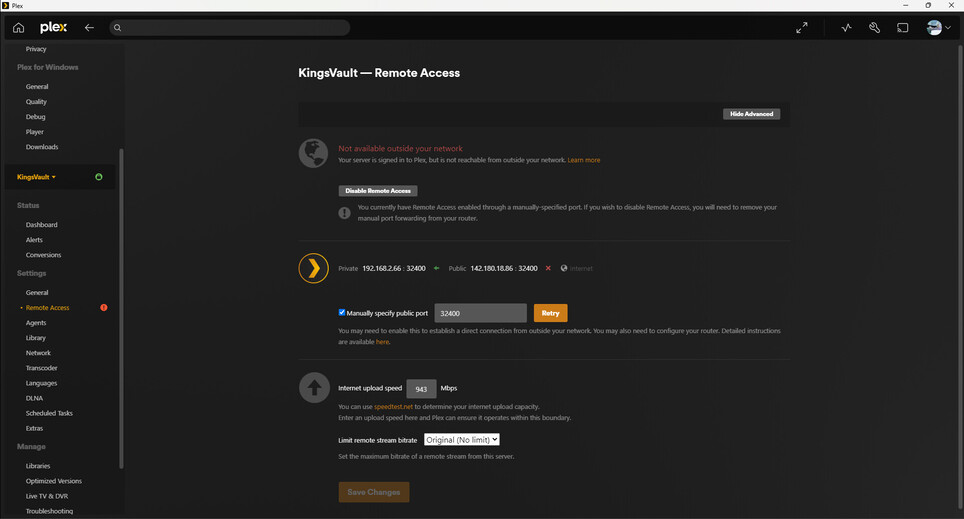
Remote access error and not enough power to convert video

Server Version#: 1.40.3.8555-7000
Player Version#: i don’t know what that means
<If providing server logs please do NOT turn on verbose logging, only debug logging should be enabled>

ok i had plex working for weeks. i leave my house and use my friends plex to access my stuff.

The first thing i got was “this server is not powerful enough to convert video” which is garbage. it should be. and i had this issue before and i changed my settings to lower the quality to 720 so that it CAN. its been like that for nearly a year and i have not seen that error since. So i KNOW its a lie.

so then i decided to log into my own plex (the reason i was using their login originally was cause their device was bigger than my phone and i didn’t want to change their login to my own. that clearly wasn’t good enough at this point) so i could download the video to their device to bypass any transcoding issues, since i have plex pass and they do not. this was not a solution but the revelation of how severely unfriendly this program i paid for, had become to me.

I logged in, tried to download, and it just wouldn’t even start. no error, just nothing. it was an insult to me. i paid for plex pass and it was refusing to do the one thing i bought it for.

then i got yellow triangles on all my stuff and couldnt even browse my files. i could browse other friends shared library stuff, so i needed to get HIM to download the movie (not from my library) so i could stream it from HIM on MY plex despite that i have this movie on my home server.

so I come home and find my plex server says there’s a new server update available. No excuse for it not working until then, unless plex has a policy to just not work if its not the latest update running. if that’s the case please tell me.

but i at least have a computer to access it with since my phone was NO help aside with its meagre settings in its app. one update later, and i checked the settings and see the red dot of hell over remote access.

then i stopped the service and restarted it on my synology package centre

same red dot mocking me.

then i retried the Manually specified public port (set to 32400 like it was the last time i had this error and got help for it) and it turned green, for all of 20 seconds. then back to red.

why does it refuse to work?
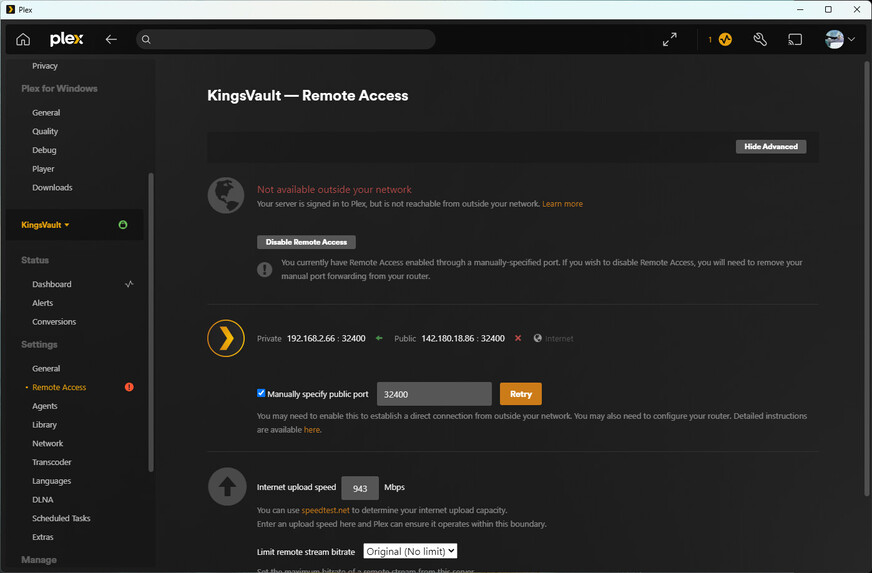
i wasn’t able to get anyone to access. one friend got a “something went wrong error” and another friend cant even see me as a shared library anymore like i removed him from my list. Which i checked to be sure, and he IS on my shared library friend list. so… i am hoping its the remote access issue. and then hopefully that will also help the convert issue. since they both happened at the exact same moment.

i am however able to stream tv shows to my tablet on the home network so its only issues outside my house.

anyone? its been several days. I still can’t get it working.

Remote Access can be a tricky thing.

What needs to happen is that a port on your firewall must be open so requests can come in.

PMS will always turn Green while it’s testing the connection.
If it stays green - THEN you’re good.

Questions:

  1. Do you have only 1 modem/router or do you have multiple?

  2. Have you tried both
    – Letting PMS pick the port via UPNP ?
    – Logging into your modem/router and Port Forwarding port 32400 to the LAN IP of your Syno ?

  3. Regarding the ‘not enough power’, Does the video have PGS subtitles in it?
    – Synology’s aren’t strong enough to transcode PGS. SRT is a better subtitle format.

i have one router/modem

i don’t know how to let plex pick the port, i had it forwarded in my modem from the last time i had issues, and it seems like it never deleted that forwarded port.

as for forwarding it to the IP i selected the name of the device from a list so i am assuming it looks for that identifer in the home network rather than a specific IP that might change when i reboot the NAS on occasion.

i don’t know what PGS is or how i would look for it. I am only familiar with SRT.

i did have issues with my Synology drive where i couldn’t login with DS finder or access any of it on my phone. i JUST finished fixing that. I was then able to stop and start the plex media server package. So i guess that might be the issue. I am able to acess it with my phon,e but its too late at night to get anyone else to confirm it. I am really confused because i had BEGAN my tech support journey WITH rebooting my NAS drive. i was unable to access it, even on my ethernet connect PC, with quickconnect. now i can. odd.

and remote access is green after 30 minutes.

update I spoke too soon. It’s back to red light on remote access and my phone cant play anything on data. I still need help. it gaslight me with 40 minutes of working and then pulled the rug out.

Then you need to look up the port number that is used for the external (WAN) port of that forwarding.
Then go to Settings - Server - ‘Show Advanced’ - Remote Access
and tick the checkbox “Manually specify public port”. Put the port number from above into the input field behind it.

(the checkbox is what switches Plex from automatic mode [which it uses by default] to manual mode)

its been forwarded for over a year. i changed nothing in the settings. the box is checked. i even provided the picture for it. or is that a different location and setting than what i provided?

This is very puzzling. If it works for almost an hour, but then suddenly stops working, and you can “repair” it by simply stopping and restarting the Plex server software, it is almost always caused by the automatic port forwarding which is triggering at the start.

You can only look for other things which would affect network connectivity after a longer time.
For instance some sort of automated power saving.
There’s a thing called Power Efficient Ethernet. If that’s active, it can cause an Ethernet link to lower its rated speed when it’s under rather low load. The ugly thing about it is, that when there’s demand for the full speed again, it can take a few seconds to switch the link speed up. Seconds during which there’s no communication possible and which can trigger some timeout in software.
That kind of thing is what you want to look for.

first thing i did. i can watch stuff at home but nobody can access things outside. they say it just says server cannot convert video but i still have it set to 720P output so that’s just not true.

would getting a log help? would it even show a log report when outside sources try to access it?

where would i look for that?

If the port forwarding is not functional, it would show nothing.
But then the clients would be seeing a different error message, i.e. not one about transcoding.

In the settings of network switches and/or network adapters. These switches are sometimes integrated in routers and NAS devices, so you want to look in their settings as well.

so…in my modem, or my ethernet network card or my bell modem? i see LAN port speeds in the ethernet settings, i tried googling the term but the results are only power over ethernet.

So what do i do? i cant use plex outside my house, what can i do to verify everything and find the problem? If a setting was changed without my knowledge where would i look to confirm or get logs or some information that will get an answer? I still need help. At one point (long after i posted here) my synology app just stopped running plex. once. I told it told to restart it and it worked locally again. i never ordered it to do that stopping.. so sometimes things just change without my input. so what can i do to make sure nothing else behind the scenes hasn’t been changed? how would i go about it, and what part of it would i send here? or just the whole thing?


in my original post, I showed the port i forwarded in plex,32400. Standard number used in the online help section. i had one forwarding rule before, the upnclient one, but then these troubles started so i added the plex rule to be certain. and still nothing works.

i am able to access my synology drive through various apps, both connected to my home network, and on data, without relying on home network connectivity. so this leads me to believe my NAS drive is not malfunctioning. it has WAN connectivity. so i need to troubleshoot plex.

Anywhere in the network path between the router and the Plex server device.

That’s a different thing and you should not enable it on your devices (if available at all), unless you need to supply power to a device over the network cable. (Which requires both the source to send power and the receiver device to actually be able to use it – which is still the exception and adds cost.)

Do you have more than one Ethernet port on your Syno?
If so, is there only a cable in one of them?
And if so, did you plug the Ethernet wire into a different port a while ago?
It is possible that the port forwarding is pointing actually to the IP address of the other, now vacant port.

my syno has just one Ethernet port , and its got a cable in it directly to my modem.

Do you mean did i plug my NAS into something that wasn’t my modem? not to my memory. Would plugging into a different Ethernet port on the same modem count as a different port? Are you saying its possible the IP switched around and the label which matches my NAS drive name, that the rule is assigned to, would be catalogued under a previous and somehow NOT instantly updated IP address? i can replace the label with the exact IP.

but the end result is the same

also when i hit save, on my modem, it changes the IP address to the name Kingsvault. So i can rule out this saving the old IP under the same label. it auto updates after all.

do i need to forward the port on the PUBLIC IP as well? or just my PRIVATE IP? cause looking at my server settings the private IP has the green arrow and the public IP is the one with the X.

No. This was all just in case that your NAS has more than just one Ethernet port.

Definitely not.

Have you compared the public IP that appears in Plex, with the public IP that appears somewhere in your router?
If they are different, you are in a double NAT situation.

ok well i modified the plex rule for the internal port to match the plex port cause they were not the same.

I’m surprised it went unnoticed by everyone here as well as myself, for this whole time.

i am able to stream to my phone using data, so until i can get confirmation from others, i will leave this as to be determined.

i am still confused because when this trouble began, i looked at my ports and saw ONLY that upnp rule in place on my modem. So either my NAS worked with that until unknown reasons required me to put this plex rule in place, OR somehow that rule vanished from port forwarding with no input from me, and i had to reapply it. I am confused. but i will keep this post open until i can confirm from others that it’s all working.

this doesn’t explain WHY that rule went away though. unless my ISP company did a FULL reset on my router and it just erased all the rules i placed on it?

Sorry, I didn’t catch that! 32000 and 32400 look quite similar in a small-ish screenshot.
The internal port number is always 32400. You cannot change it arbitrarily.

But you can (almost) freely define the external port number.
In fact, this is what I’d recommend if you find your server access blocked while using open WiFi networks while out and about. Because the number 32400 is by now well known and some network operators try to lower the traffic load on their network by blocking traffic on port 32400.
Just remember: if you change the external port number, you’ll have to change the port forwarding rule and put the new number into the Plex config as well.

If the previous rule was established automatically per UPnP: this kind of forwarding is often not permanent anymore. Routers are purging automatic port forwardings after a certain amount of time (hours to days). This change in behaviour can also be introduced by a router firmware update.
And Plex server is only initiating a forwarding per UPnP when it’s started, but runs usually much longer on a NAS device.

1 Like

well it seems i got confirmation from other people that they can in fact access my plex. So thanks for the time!

This topic was automatically closed 90 days after the last reply. New replies are no longer allowed.