I think we’re quite off-topic from Plex, at this point.
Yet another approach would be to use OpenVPN in a standalone Docker, and then connect other Docker’s networks to it.
That seems nice because then you don’t have to rely on “combo” Dockers and can instead use the nice/generic/good linuxserver.io ones - or indeed any that you like.
This page describes doing so; I’m unfamiliar with Synology and if all of the options are available there.
This link looks amazing! Thanks! It seems like exactly what I need to do and is very thorough. I have a lot of work to do to set this up. It’s using all the things I use and all in Docker containers and all mostly from linuxserver and he’s using PIA just like I am. The one thing I don’t get is why the only thing participating in the VPN is Deluge. I mean wouldn’t you also want at least NSBGet also going through the VPN?
I don’t think we’re that far off-topic for Plex. I’m sure there are other Synology users who want to run a Plex server and all of those other tools to download via a VPN while setting up the Plex server to not use the VPN.
The other thing that is different is that he’s running Plex as a docker container and I’m not. There have been Plex server updates and I’m not as certain how to update things when they are in a Docker container. Do I just stop the contain and do a docker pull to update?
Oh and another thought I had - while my videos, pics, and music are all on my Synology NAS (as well as backups, large VM files, etc) I have NFS mounted them to my desktop (e.g. synology:/Videos -> /Videos, etc.). Therefore I guess I could move Deluge et. al. to my desktop, which runs PIA VPN, but leave the Plex server on the Synology then tun off the VPN on the Synology.
Not sure if the solution would be for me too but I am having an issue with remote access as well. I upgraded my ISP service from cable to fiber and with that, I can only use their gateway/router combo which is whats messing me up right now. I forwarded 32400 from the gateway to my router, then in my pfSense router, under my firewall rules I set open up 32400 from my WAN net to my server.
Not really sure what to do to get this properly opened and staying open. I cant use UPnP on the gateway/router and using another port gets me the same results
Interesting on the NZBGet thing. Quite frankly whenever Deluge is used it takes forever to download things. NZBGet is much quicker and I use that most of the time. That said if I disable Deluge and rely only on NZBGet, in theory, I could just turn off the VPN right?
I was hoping that this thread would eventually help others.
If the only reason you are using the VPN is torrent privscy then yes, if you’re not using Deluge you don’t need the VPN.
It’s nice to have the choice of using the VPN though.
Well, then it seems my temporary solution is to turn off Deluge and the VPN.
Later I can work on getting Deluge and the VPN in it’s own Docker container as https://github.com/sebgl/htpc-download-box#setup-a-vpn-container talks about. He goes into much detail about how to configure all of those tools (Sonarr / Radarr / Jackett / NZBGet) from scratch and I already set all of those up, and as linuxserver supplied Docker containers.
If I understand his explanation about the docker-compose file he’s just packaging the openvpn-client docker image with the deluge docker image and then telling docker to use the openvpn-client for network access. That should be simple enough to set up.
I’ll probably also work on trying to replace the Plex app for Synology with the Plex Media Server Docker image.
Great discussion. I learned a number of things. I hope others find it useful!
Interesting because when I checked with canyouseeme.org I get “Error: I could not see your service on on port (32400) Reason: Connection timed out”. I believe closed is different than timed out.
General good practice on firewalls is to not return a closed status on a port connection request. That’s an immediate response, as opposed to the time-out which can be several seconds each, or longer. This is somewhat security by obscurity, in that what you are accomplishing is to extend a full port scan of your home firewall by a few orders of magnitude. It can still be done, conceptually, it takes eons.
Yes, you are right, a time-out really is different from a port that doesn’t not have a listener. The former should indicate that the destination either is not receiving the open request, or is taking far too long to respond. The latter is an immediate indication that nobody is listening. This difference is significant if you have control over both source and destination, much less so if you’re hitting a public Internet facing system.
Personally, I have 1gbps symmetric service, with a pfSense firewall behind the ONT & SmartSwitch from the ISP (this is not double NAT.) Using canyouseeme.org, ports that I have not specifically opened for forwarding time out and do not return an immediate failure. I can see that my chosen port for Plex remote access is open. If your check for TCP port 32400 is timing out, I’d be looking at your router first.
To clarify, I receive a time out from canyouseeme.org when I have the VPN on. That’s because, as I understand it, the VPN is on a different IP address than my router. IOW my router knows nothing about port 32400 because there is nobody listening on my router’s IP address at that port (they are listening on the VPN’s IP address at that port). Thus my router never responds with “closed” but merely times out after a few seconds.
So yes, @cmcigas is getting something different - a closed indication, probably immediately as you say.
When I turn my VPN off and go to canyouseeme.org it immediately says that it was able to open that port and things are cool. As I said, I’ve just disabled Deluge and will be working creating a Deluge with OpenVPN Docker image.
Yeah. Your router still has the port :32400 forward configured and active.
When canyouseeme.org tries to connect to your router’s public address, it sends a SYN packet. Your router receives it and forwards it to your Plex Server’s internal address.
Your Plex Server gets the SYN packet and responds with a SYN/ACK packet.
But when your VPN is connected as the default gateway, that SYN/ACK packet is routed out the VPN connection. The VPN provider drops the unfamiliar SYN/ACK packet, and it never gets back to canyouseeme.org.
Eventually canyouseeme.org gives up, times out waiting for a response.
It doesn’t affect port scanning speed at all.
To do a basic scan for open TCP ports you send SYN packets to all the ports you are interested in.
In parallel, asynchronously, you listen for responses.
You don’t wait for each port to respond. You don’t wait for a SYN/ACK or an unreach or an RST or a timeout on every port before proceeding to the next port.
You might not spam the SYN packets as fast as possible, but that’s to avoid detection, or overwhelming the destination, or breaking things, not because it makes a difference if the ports are open/quiet/closed/blocked.
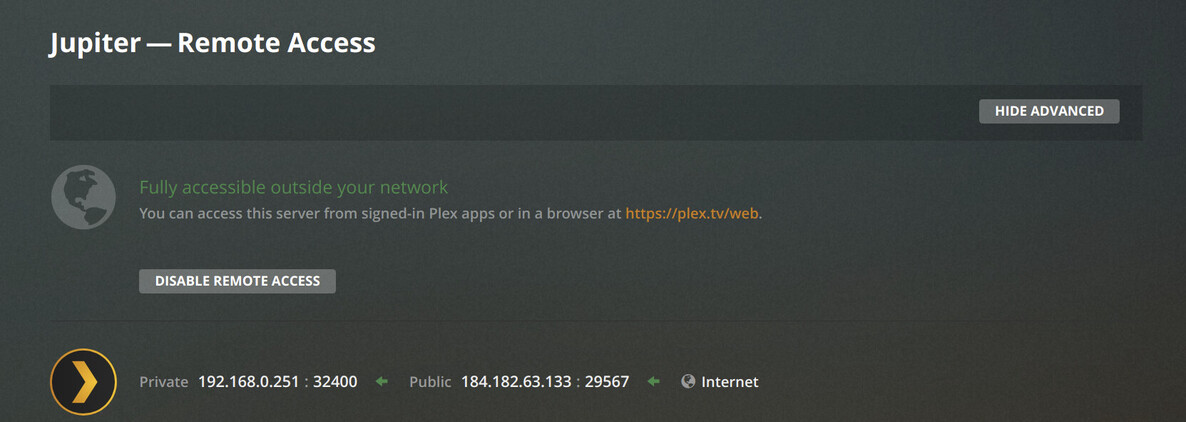
That stays or sticks until I refresh the web page and then it goes back to the first image. Ugh, why is this so difficult and unreliable? Why is it Plex can say “Not available outside your network” when it’s clear that it is available outside my network! When this says “Not available outside your network” I can use my cell phone on my cellular data and connect and play stuff from my PMS! And it doesn’t say indirect it says remote. Yet in the server config, it still says Not available outside my network. Isn’t that a bug? Isn’t that wrong?
Additionally, I can go to canyouseeme.org and it says port 32400 is open and working correctly. Who’s right? canyouseeme.org or PMS?
I can also use telnet from my cloud-hosted defaria.com to verify that yes indeed I can get to my Plex server:
Defaria:telnet 184.182.63.133 32400
Trying 184.182.63.133…
Connected to 184.182.63.133.
Escape character is ‘^]’.
quit
Connection closed by foreign host.
Defaria:
Do you have the option to manually specify a port selected and set to 32400 in the remote access settings? If you set a manual port forward for you router, you should do so. Right now it looks like it’s setting up a UPnP/NAT-PMP automatic port forward.
The Plex Remote Access status screen needs more than just an open port. For it to show Fully accessible … a bunch of things have to happen.
Plex has to open/identify the public address and port that are in use, communicate with the myPlex registration servers, ask myPlex do to a connection test, get the result back, register the address and port with myPlex, and confirm the registration.
When Plex detects a change in networking, it goes through some (or maybe all) of that process again.
Maybe Plex isn’t noticing when your VPN is disconnected? So manually disabling and re-enabling forces it to go through the process again. Or maybe it’s trying too fast. Or maybe it’s a bug, I dunno.
I suspected that it was more for Plex to do than for canyouseeme.org. IOW I thought Plex was doing more things. But is it really too much to ask to report properly exactly where and what caused it to fail?
“a few minutes” = 2 minutes.
Connect the VPN, wait a few minutes - OK
Go to the Remote Access screen, see what it says - OK, as expected it shown green for 1/2 a second then went red.
Disconnect the VPN, wait a few minutes - OK
Refresh the Remote Access screen - Page refreshed - initially flashed green, in 1/2 a second when red.
Disable/Enable Remote Access, wait a few minutes - OK, nothing happened. The screen remained green until I refreshed it. It did take about 2 seconds but it went back to red.
Share logs, and note the times you pushed buttons
Started at 9:30. Each “a few minutes” was timed out with Google Home.
Your logs don’t have debug logging enabled, so there is limited information available.
One of the bits of information available is the following warning:
Dec 02, 2020 19:32:50.148 [0x7f3567c30700] WARN - MyPlex: attempted a reachability check but we’re not yet online.
MyPlex is a core part remote access. I’ve seen that error in a few contexts:
The server was not actually online.
The server had IPv6 enabled and that was interfering with connectivity tests.
There was a widespread certificate issue a couple of months ago and that warning was present in many (all?) of the logs).
If you could repeat the same tests with “Settings -> General -> Enable Plex Media Server debug logging” enabled it may shed some additional light on that error and let us know if it is relevant.
Also, regarding my earlier question, are you specifying the remote access port manually on Settings -> Remote Access? The public port shown in the connectivity status should match what you’ve set there if so.