I’m referring to your remote access settings in Plex Media Server:
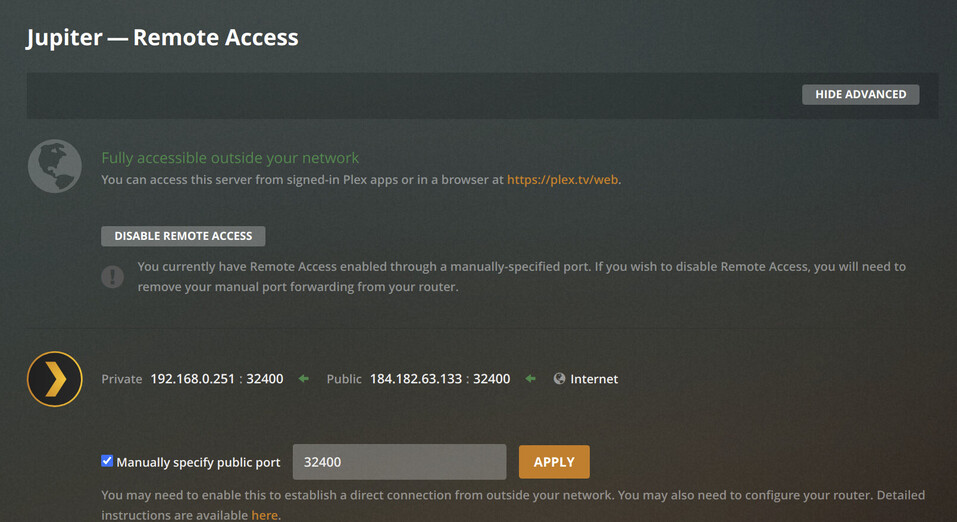
Settings → Remote Access → Manually specify public port
It should be checked, and 32400 should be entered. Don’t forget to click Apply after doing so. Make sure to disable/re-enable remote access if changes are made.
I checked Manually specify public port and put in 32400. There was a Retry button there (the Save changes button remained disabled) so I clicked that and it did its thing. It took a few seconds then the familiar green light
Interestingly the route there says my router’s public IP:32400 → my PMS internal IP:32400. Still says Not available outside your network. Still works from my cell phone.
Here’s a screen share of how remote access toggles off. Oops, apparently I can’t upload an .mp4 file. OK get it here - https://defaria.com/tmp/remoteaccess.mp4. Note this file will self destruct in 7 days…
Your server is definitely available via that IP address/port combination. I’m not sure why Plex is marking it as unavailable. However, there have been known issues in the past with that status shown and reality not matching. Are you able to access it via your phone app and actually play content? If so, what is the location displayed for the stream on Plex’s dashboard (Remote or Indirect)?
The debug logs I mentioned in my earlier post are probably going to be necessary to try to whittle this down any farther.
IMHO not properly reporting that remote access is available is, at best, a bug. I am able to access my server from my cell and play content and my remote users are able to access it too. It now lists as remote instead of indirect and I’m assuming that’s better. Just wish the reporting of remote access being available was accurate and reliable.
I have not doubled back to re-perform the tests with debugging turned on just as I have not doubled back to try to containerize that openvpn-client with deluge either. Some crap in my world went nuts and I need to attend to other things right now.
For now, I’m gonna assume that remote access being unavailable is just a lie/bug and I will leave my VPN off, and Deluge not running. I need to move which means getting a new ISP at a new place and getting this all up and running again.
I don’t disagree. Glad to hear it’s showing as remote. That means you can properly configure quality/bandwidth limitations and your remote users won’t be limited to 2 Mb/s.
No problem. I hope the other stuff in your world works out for the best.
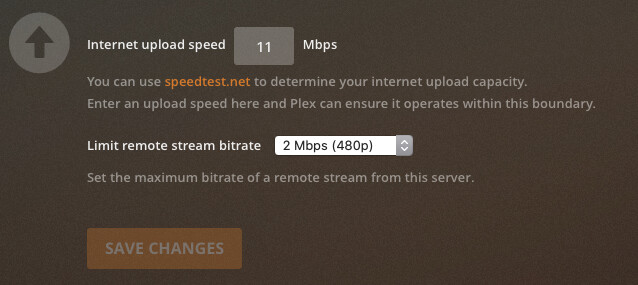
Please describe to me how I can configure quality/bandwidth limitations so as to not limit my remote users to 2 Mb/s. I want to provide my users with the best experience and this would be one of the things I want to improve.
Those settings at the bottom of the Remote Access settings page. You can tell Plex what your maximum upload speed is and it will use 80% of that value to calculate available bandwidth. You can also specify a remote stream bitrate limit to set the maximum it will use for any stream.