Hi
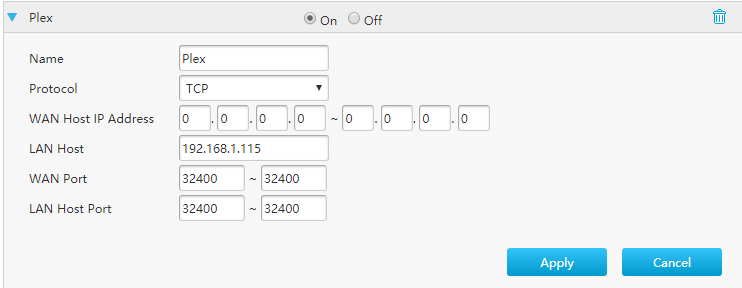
I am wondering if anyone could help me trying to solve an issue I’ve had for a very long time. I have tried all the solutions that I’ve managed to find in this Forum but I have been unsuccessful. Plex_Remote_access|690x283
I am using Player Version#: Version 1.16.3.1402 running on a laptop on Windows 10, and I have my media content on a My Home Cloud server, which I access it over WiFI My Home Cloud Server
Your server is changing IPs too often for my taste. Look around your router’s menus how to reserve a certain IP for your server – so it always gets the same.
Have you tested to set up a Plex server on your PC and forward the port to it instead?
If that isn’t working as well, your ISP might have put you behind CG-NAT. (more and more ISPs do that, particularly with new customers)
If that is the case then there is no chance to have remote access at all.
Some ISPs can be talked out of it, some want more money for removing it and some just leave you hanging. You will need to ask your iSP what it’s gonna be with them.
Thank you
I will read the article and check it out. I called the ISP and they tried to sell me a static IP for a monthly fee, although I declined the offer as I wasn’t sure that’s what I needed to solve this issue, but now you’re mentioning it, this might be the case. Right?
Regards
The IP doesn’t have to be really static. If it changes every few days, Plex can cope with this quite well.
The main issue is to have a publicly accessible IPv4 at all, so you can actually use a port forwarding. If you don’t have a publicly accessible IPv4 address, then Plex remote access won’t work.
You download the plex server software below for Windows.
You install it.
You determine the local IP address of your PC.
You change the portforwarding in your router accordingly.
I´ve done what you suggested and it got fully accessible but it only lasted for a few seconds and then got No Remote acess again. Is that an issue of my ISP?
That is just a cosmetic issue. It shows ‘accessible’ by default, until the accessibility check is actually performed. It is not acessible from the start.
The check with canyouseeme.org shows you that the port forwarding doesn’t work.
Provided, you didn’t do any mistakes while setting it up, it kinda confirms that it is probably something about your internet connection or your ISP in general to blame.
Due to the shortage of IPv4 addresses, we use Carrier Grade Nat (CGN) which allows for more efficient use of our IPv4 address range. This means that each time you access an IPv4 website, our network seamlessly allocates you a dynamic, rather than static, IP address from our pool of public addresses, with no disruption to service. This has no impact on the security of your connection – it’s simply about how we manage the allocation of our available IP addresses.
There are, however, some applications that may be affected by this. These include applications such as online gaming, VPNs, P2P applications and hosting at homes. If you do notice any issues with any of these applications, or would like to purchase a static IPv4 for £5 a month, please contact our Customer Service team who will be happy to assist.
Thank you so much both for helping with this issue.
Indeed my ISP had Carrier Grade Nat (CGN) enabled and after subscribing an add-on service for a monthly cost, now it’s fully accessible from outside my network
Your help is much appreciated
You can close this forum please
Kindest regards