Strangely though the Public DNS may not be the best possible. I was shocked when I ran the app, it can take hours and is quit conclusive and informative. The best results can be different for everyone, a worth while exercise.
DNS servers don’t really speed anything up, certainly not downloads. They can remove a small amount of initial latency of a web page loading by using a faster one if available, but typically we are talking milliseconds unless a DNS server is faulty, then you would see an error message in the browser.
Once a lookup is done the computer normally caches it for some time anyway, so the initial lookup might take a few hundred milliseconds, but after that you can browse the same website without any requests being made to any DNS server.
Once a server’s IP address is found and a download commences, the DNS server plays no further part.
Your ISP provided DNS server is usually the closest to you on the network and typically the fastest. You might find one that an app claims is 50% faster, but if your ISP DNS takes 100ms and you find one that takes 50ms, well you aren’t going to notice! Also once your own ISP has looked up some bizarre little used random domain name, and the app were to test the same domain name again, it would be cached with your ISP DNS and will beat the one it said was faster by several fold.
Context is everything.
On the other hand, your ISP may want to try and use its DNS servers in a way which is detrimental to your needs:
- trying to filter out certain websites (For various reasons. It may even be by good intentions like filtering out known “risky” [malware] URLs or domains which are deemed “illegal” by the country’s laws.)
- trying to catch misspelled domains and forwarding the user to its own “portal” website and ‘search mask’, to sell him additional goods and services, or profit from affiliate links
(The above may also be major reasons why some ISPs are forcing their users to use only ISP-supplied routers, with locked-down settings.)
Also, a rapid update of DNS records is crucial for Plex’s use of the DNS system. The plex.direct domain in particular, since each Plex server is automatically assigned an exclusive subdomain on there, which is then used for remote access and secure connections (a “pinned” cryptographic security certificate for this subdomain is issued as well to each server).
Some ISP-operated DNS servers simply suck at this and deliver either none or only hopelessly outdated DNS records.
1 Like
Not sure how it works over “The Ditch” in NZ, but in Australia although all the wholesale infrastructure is likewise built/run/maintained by the NBN, each ISP has their own international transit arrangements, so in fact you CAN get radically different speed/latency results to a given destination depending on which retailer you use … so perhaps don’t rule it out as a factor without investigating further? And don’t forget with OneDrive you are uploading/downloading from whatever Microsoft data centre is deemed “closest”, and they continually sync/replicate I assume …
1 Like
Of course I am aware of continuous syncing of MS servers over the world… But they use the same way (submarine fibre line) to get it to NZ. But, obviously, they have no speed issues as I do. Do really DNS servers influence the speed when connecting directly to the IP address? Do you think changing DNS would solve something? On which side? Should I change it on the side of the server, or in NZ? Should I rather use Google DNS?
Talking about ISPs, I have tried 3 NZ ISPs so far, and all of them worked the same.
LmHome, I have quite the same ping from NZ to the UK, as you have the opposite way. The speed between NZ and the UK doesn’t seem like much of issue either…
Those latency numbers really aren’t that great, but some of those jitter values are truly bad. I don’t know if Plex’s streaming code utilizes a jitter buffer but, if it does, values such as these could easily result in packet loss and TCP retransmissions. This would likely manifest to the user as very frequent stuttering/buffering.
One more interesting thing - I have much better results from the opposite direction - I have just tried the speed test from the Czech server to my NZ ISPs server, and the numbers are much better (though still quite low comparing to the official connection speeds).

And again - connection from the Czech server to my ISP in NZ:

…much better results (why is it not working the opposite way)?
Another try…
From my NZ ISP to Prague speed test server:
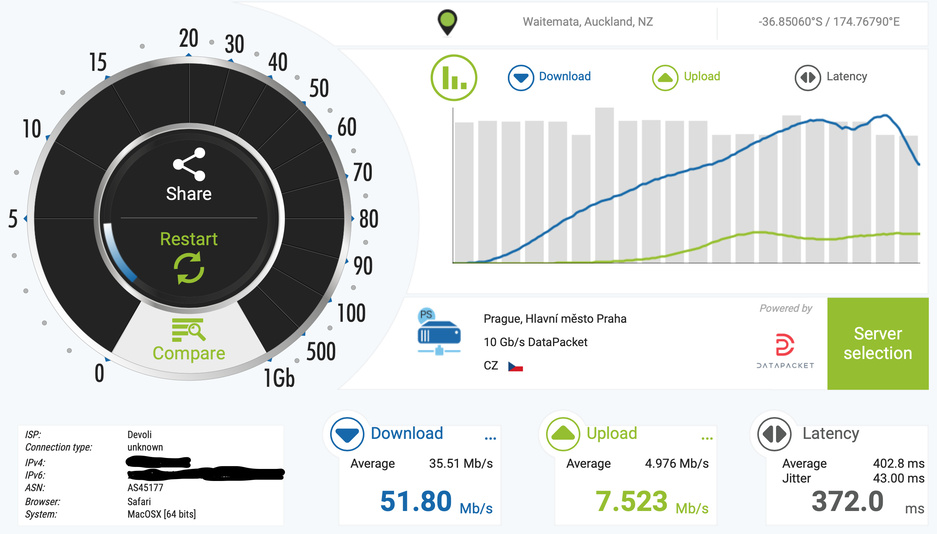
From my CZ ISP to my NZ ISP’s speed test servers:

It is quite clear that the issue is on the side of the NZ ISP as the connection to Europe is just bad. The question is why it happens with Devoli/Stuff Fibre, 2degrees, Bigpipe, and Vodafone (all NZ ISPs I have tried so far).
Maybe they are all skimping on their international transit bandwidth/routing and keep the best for their “business” customers (who get charged more). That is definitely the way it rolls in Australia for most ISP’s, with a few notable exceptions.
I have received a reply from my NZ ISP:
Hi,
I’ve included a result below testing to the NS for the provider indicated in the info provided via an identically configured service within the Auckland area which does not seem to be experiencing the same variation you have noted.

As for the speed/performance, the variety of results indicated do match roughly within the expected ballpark we’d expect for performance to the various servers tested, performance to different locations within each country will vary significantly taking into account performance of the upstream providers hosting the services as well as peering relationships between their providers and the wholesalers further along the chain in our services.
Unfortunately we are unable to place any guarantees on speeds/performance to international destinations as is standard for residential/consumer grade services we offer.
This topic was automatically closed after 90 days. New replies are no longer allowed.
