Slow server speeds (2mbps) despite high iperf test

Sometime last year my plex server speeds became unbearably slow. I’m using a client in WA, while the server is hosted in MA. Firstly the server is getting slower speeds than it should (advertised as 880 mbps upload but I’m getting about 160) but that’s probably an issue with the networking setup. What I have no clue about is that the plex speeds from the server to my client are like 2 mbps (at least when using convert automatically, that’s where it ends up after a couple minutes). Yet when I ran an iperf test from the server to my client, I got about 300 mbps, which aligns with the upload speed the server got from the speedtest-cli. (added tests below that show actual speeds in both directions)

Anyone have any idea how to debug this? At first I thought it was my ISP throttling me but if that were the case then iperf would’ve been bad? Or could it be a specific port being throttled?

Here’s a comparison of speedtest-cli running on the media server, first to WA, then to a nearby one:

❯ speedtest -s 1782

   Speedtest by Ookla

      Server: Comcast - Seattle, WA (id: 1782)
         ISP: Verizon Fios
Idle Latency:    75.39 ms   (jitter: 0.69ms, low: 73.64ms, high: 76.14ms)
    Download:   715.17 Mbps (data used: 1.2 GB)
                111.14 ms   (jitter: 32.00ms, low: 71.61ms, high: 151.41ms)
      Upload:    15.93 Mbps (data used: 31.4 MB)
                107.95 ms   (jitter: 29.96ms, low: 70.75ms, high: 144.84ms)
 Packet Loss: Not available.
❯ speedtest

   Speedtest by Ookla

      Server: Verizon - Boston, MA (id: 29094)
         ISP: Verizon Fios
Idle Latency:     7.69 ms   (jitter: 1.66ms, low: 4.67ms, high: 8.24ms)
    Download:   589.56 Mbps (data used: 288.0 MB)
                  7.25 ms   (jitter: 7.62ms, low: 4.00ms, high: 223.35ms)
      Upload:   168.80 Mbps (data used: 157.9 MB)
                  5.22 ms   (jitter: 0.71ms, low: 4.41ms, high: 29.39ms)
 Packet Loss:     0.0%

Now here’s an iperf test from the media server to my client (and then reverse for the other direction):

❯ iperf -c xxx -p 5201
------------------------------------------------------------
Client connecting to xxx, TCP port 5201
TCP window size: 85.0 KByte (default)
------------------------------------------------------------
[  1] local xxx port 35420 connected with xxx port 5201
[ ID] Interval       Transfer     Bandwidth
[  1] 0.0000-11.0835 sec   382 MBytes   289 Mbits/sec
❯ iperf -c xxx -p 5201 -R
------------------------------------------------------------
Client connecting to xxx, TCP port 5201
TCP window size: 85.0 KByte (default)
------------------------------------------------------------
[  1] local xxx port 41334 connected with xxx port 5201 (reverse)
[ ID] Interval       Transfer     Bandwidth
[ *1] 0.0000-12.0158 sec  9.09 MBytes  6.34 Mbits/sec

Actually after looking up how iperf works, it seems that 6.34 mbps is the server (MA) to client (WA) speed, which aligns with the plex speeds actually. So then the question is how do I fix this?

Check to see if you are being forced into the Plex relay:

If you see the yellow (!) on the client icon, and the word “Indirect” appears to the right of the client logo, then your server is unreachable from the outside of the house, and the Plex Relay is kicking in. Fix this issue (port forwarding?).

If it’s not a relay, let us know.

Unfortunately nope, it’s on direct play and still has this issue

Dang. Was hoping it was something simple like a relay. If it’s a slow speed between two points like that, I’d immediately lay the blame on the internet infrastructure. Talk to your ISP (ick) and try to get someone knowledgeable about routing to pay attention to your iperf test. If the communication between two points in the world are not performing according to your ISP numbers on either end, it’s a bad link somewhere along the way.

You try a tracert?

Try using the client app for your remote computer, rather than the Browser.

https://www.plex.tv/media-server-downloads/?cat=plex+desktop&plat=windows#plex-app

Here’s WA (client) → MA (plex server):

❯ traceroute 108.49.220.18
traceroute to 108.49.220.18 (108.49.220.18), 30 hops max, 60 byte packets
 1  Voidrunner.mshome.net (172.22.64.1)  0.221 ms  0.251 ms  0.247 ms
 2  192.168.0.1 (192.168.0.1)  0.928 ms *  0.922 ms
 3  * * 136-27-5-1.cab.webpass.net (136.27.5.1)  2.713 ms
 4  10.160.96.6 (10.160.96.6)  2.448 ms  2.170 ms *
 5  10.160.0.145 (10.160.0.145)  1.596 ms  2.160 ms *
 6  * sea-b1-link.ip.twelve99.net (62.115.167.66)  1.762 ms  2.202 ms
 7  * * *
 8  HundredGigE2-0-0-1.BSTNMA-LCR-22.VERIZON-GNI.NET (140.222.1.17)  76.500 ms HundredGigE2-2-0-0.BSTNMA-LCR-21.VERIZON-GNI.NET (140.222.3.167)  76.015 ms HundredGigE1-9-0-0.BSTNMA-LCR-21.VERIZON-GNI.NET (140.222.236.11)  76.468 ms
 9  ae204-0.BSTNMA-VFTTP-329.verizon-gni.net (100.41.138.165)  68.616 ms  68.539 ms  68.520 ms
10  * * *
11  * * *
12  * * *
13  * * *
14  * * *
15  * * *
16  * * *
17  * * *
18  * * *
19  * * *
20  * * *
21  * * *
22  * * *
23  * * *
24  * * *
25  * * *
26  * * *
27  * * *
28  * * *
29  * * *
30  * * *

And the other direction:

❯ traceroute 136.27.5.38
traceroute to 136.27.5.38 (136.27.5.38), 30 hops max, 60 byte packets
 1  * CR1000A.mynetworksettings.com (192.168.1.1)  1.440 ms *
 2  lo0-100.BSTNMA-VFTTP-329.verizon-gni.net (108.49.70.1)  1.772 ms  1.770 ms  1.704 ms
 3  B3329.BSTNMA-LCR-22.verizon-gni.net (100.41.138.164)  2.551 ms B3329.BSTNMA-LCR-21.verizon-gni.net (100.41.138.162)  7.060 ms B3329.BSTNMA-LCR-22.verizon-gni.net (100.41.138.164)  2.483 ms
 4  * * *
 5  * * *
 6  ae5.mpr4.bos2.us.zip.zayo.com (64.125.31.67)  6.055 ms  6.810 ms  4.801 ms
 7  * * *
 8  ae6.cs2.sea1.us.eth.zayo.com (64.125.29.28)  72.898 ms  68.942 ms  68.843 ms
 9  ae12.ter1.sea1.us.zip.zayo.com (64.125.23.47)  70.255 ms  69.596 ms  69.495 ms
10  * * *
11  * * *
12  * * *
13  136-27-5-38.cab.webpass.net (136.27.5.38)  73.292 ms  69.956 ms  69.437 ms

Hmm first time actually the traceroute from client to server looks like that. Here’s tracert from client to server to give a Windows view:

PS C:\Users\Rudhra> tracert 108.49.220.18

Tracing route to pool-108-49-220-18.bstnma.fios.verizon.net [108.49.220.18]
over a maximum of 30 hops:

  1    <1 ms    <1 ms    <1 ms  192.168.0.1
  2     3 ms     2 ms     2 ms  136-27-5-1.cab.webpass.net [136.27.5.1]
  3     2 ms     1 ms     1 ms  10.160.96.6
  4     *        *        *     Request timed out.
  5     1 ms     1 ms     1 ms  sea-b1-link.ip.twelve99.net [62.115.167.66]
  6     *        *        1 ms  verizon-ic-356975.ip.twelve99-cust.net [213.248.94.149]
  7    68 ms    71 ms    71 ms  HundredGigE2-1-0-0.BSTNMA-LCR-21.VERIZON-GNI.NET [140.222.226.205]
  8    67 ms    68 ms    67 ms  ae203-0.BSTNMA-VFTTP-329.verizon-gni.net [100.41.138.163]
  9    68 ms    68 ms    70 ms  pool-108-49-220-18.bstnma.fios.verizon.net [108.49.220.18]

Trace complete.

No improvement, anything above 2mbps quality (SD) will buffer, and dashboard shows direct play the same as via web.

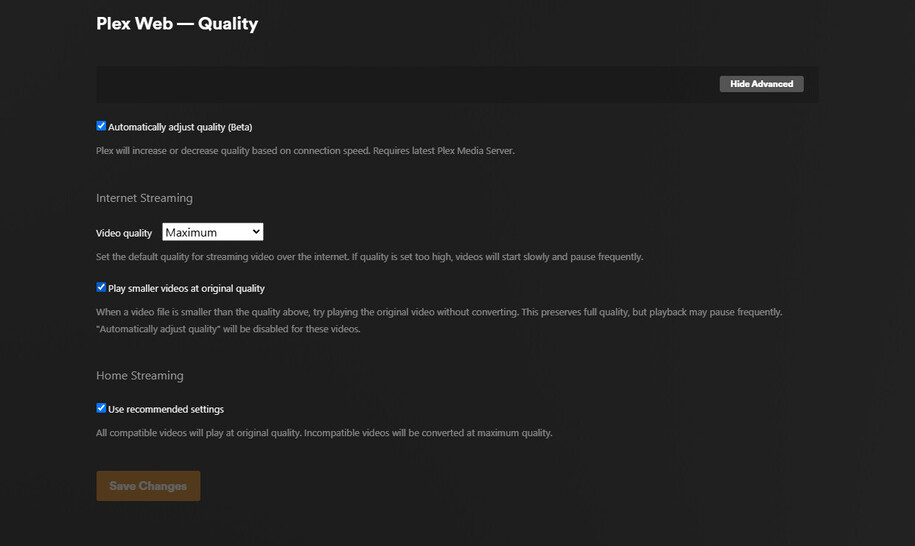
Your Streaming settings.

Video Quality is what you need to explore

I’m 100% certain this is not a quality settings issue but a networking issue but here’s what it looks like anyway

I would try backing off from Max and yes i know you have better bandwidth.

This is at Client and Server

Right but that’s just the default quality. As I mentioned earlier I’ll switch to convert automatically and it drops to 2mbps. On the Plex for windows app there is no convert automatically options but picking anything higher than SD results in buffering, so it seems pretty clear that for some reason the speeds are limited to around 2mbps.

If you don’t have a DirectConnection to the server (Remote Access ports are NOT open)

then the connection must route through Plex.tv

Plex.tv will impose a 2 Mbps limit on all transcodes for PlexPass subscribers
and 1 Mbps for non-subscribers

I thought I verified here that it’s not going through the relay? Slow server speeds (2mbps) despite high iperf test - #3 by SOOPEROODAY

Based on the iperf results (particularly running iperf -c -R on my WA client to the MA server, it looks like I’m only getting about 6-7 mbps from the server to my client, and at this point it looks like it may be an issue with ISPs. Not sure if I have any recourse other than setting up another server closer to me and making my own CDN lol, but I still don’t get how speeds one way (client to server) are so fast and so slow the other way (server to client).

I checked your machine.

I can open your server’s plex/web page as expected.
(cannot see anything unless you authorize it but Plex/web loaded as it should)

Are the remote players set to request more than the default 2 Mbps ?

Are the remote players set to request more than the default 2 Mbps ?

By this do you mean whether the quality settings are higher? If so, yes, I’ll try original quality but that never stops buffering as most of my content is like 16-20 mbps. Switching to convert automatically is what brings me to really bad speeds, it’ll go anywhere from 0.2 mbps to 4 mbps but tends to stabilize around 2mbps.

Based on the iperf results I’m starting to believe it has to do with ISP peering which I won’t have any control over. :pensive:

Don’t set “automatic”.

Do this as a controlled test.

Start at 8 Mbps. See what you get.

From there, go up or down a step

Peering from point-to-point is beyond your control
however,

you can find out what’s happening.

get mtr (apt install mtr)

It’s a ncurses-based traceroute. You’ll see the weak points from you to that remote IP address.

Yeah nothing works without buffering unless it’s below 4mbps. Here’s the MTR results in both directions, definitely asymmetric:
MA → WA

❯ mtr -rw WA Client
Start: 2025-02-06T01:21:15-0500
HOST: MA Server                                Loss%   Snt   Last   Avg  Best  Wrst StDev
  1.|-- _gateway                                  0.0%    10    1.0   1.2   0.8   1.7   0.3
  2.|-- lo0-100.BSTNMA-VFTTP-329.verizon-gni.net  0.0%    10    2.7   4.1   2.3   8.0   1.6
  3.|-- B3329.BSTNMA-LCR-21.verizon-gni.net       0.0%    10    9.2   8.1   6.5   9.6   1.0
  4.|-- ???                                      100.0    10    0.0   0.0   0.0   0.0   0.0
  5.|-- customer.alter.net                        0.0%    10    8.2   6.8   3.4  14.9   3.2
  6.|-- ae5.mpr4.bos2.us.zip.zayo.com             0.0%    10    5.7   5.8   3.7  10.6   2.0
  7.|-- ae12.cs4.ord2.us.zip.zayo.com            90.0%    10   70.6  70.6  70.6  70.6   0.0
  8.|-- ae6.cs2.sea1.us.eth.zayo.com              0.0%    10   76.6  76.2  72.1  79.9   2.7
  9.|-- ae12.ter1.sea1.us.zip.zayo.com            0.0%    10   69.6  70.1  69.4  71.1   0.6
 10.|-- ???                                      100.0    10    0.0   0.0   0.0   0.0   0.0

WA → MA

❯ mtr -rw MA Server
Start: 2025-02-05T22:20:52-0800
HOST: WA Client                                        Loss%   Snt   Last   Avg  Best  Wrst StDev
  1.|-- 192.168.0.1                                       0.0%    10    1.4   1.3   1.2   1.5   0.1
  2.|-- 136-27-5-1.cab.webpass.net                        0.0%    10  221.1  39.3   2.7 221.1  74.2
  3.|-- 10.160.96.6                                       0.0%    10    2.6   2.8   2.1   6.7   1.4
  4.|-- 10.160.0.145                                     80.0%    10    2.1   2.0   2.0   2.1   0.0
  5.|-- sea-b1-link.ip.twelve99.net                       0.0%    10    3.1   2.6   2.3   3.1   0.2
  6.|-- verizon-ic-356975.ip.twelve99-cust.net           60.0%    10    2.5   2.3   2.2   2.5   0.2
  7.|-- HundredGigE2-1-0-1.BSTNMA-LCR-21.VERIZON-GNI.NET  0.0%    10   70.2  72.5  69.3  76.5   2.4
  8.|-- ae203-0.BSTNMA-VFTTP-329.verizon-gni.net          0.0%    10   69.5  69.1  68.8  69.5   0.2
  9.|-- pool-108-49-220-18.bstnma.fios.verizon.net        0.0%    10   73.3  71.4  70.2  73.3   1.2

Yep, the peering points are the problem. (Hop 2 is a problem).

Not much you can do about it either except someone change ISP.

I had similar problems until I got the same ISP as friends on the west coast.

Even now, I still have some difficulties crossing the country but it’s not as bad given both source & dest stay within the ISP’s network.

Yeah I think the best solution here (given I don’t want to change ISPs) is to just make another server locally and clone the content. Oh well.