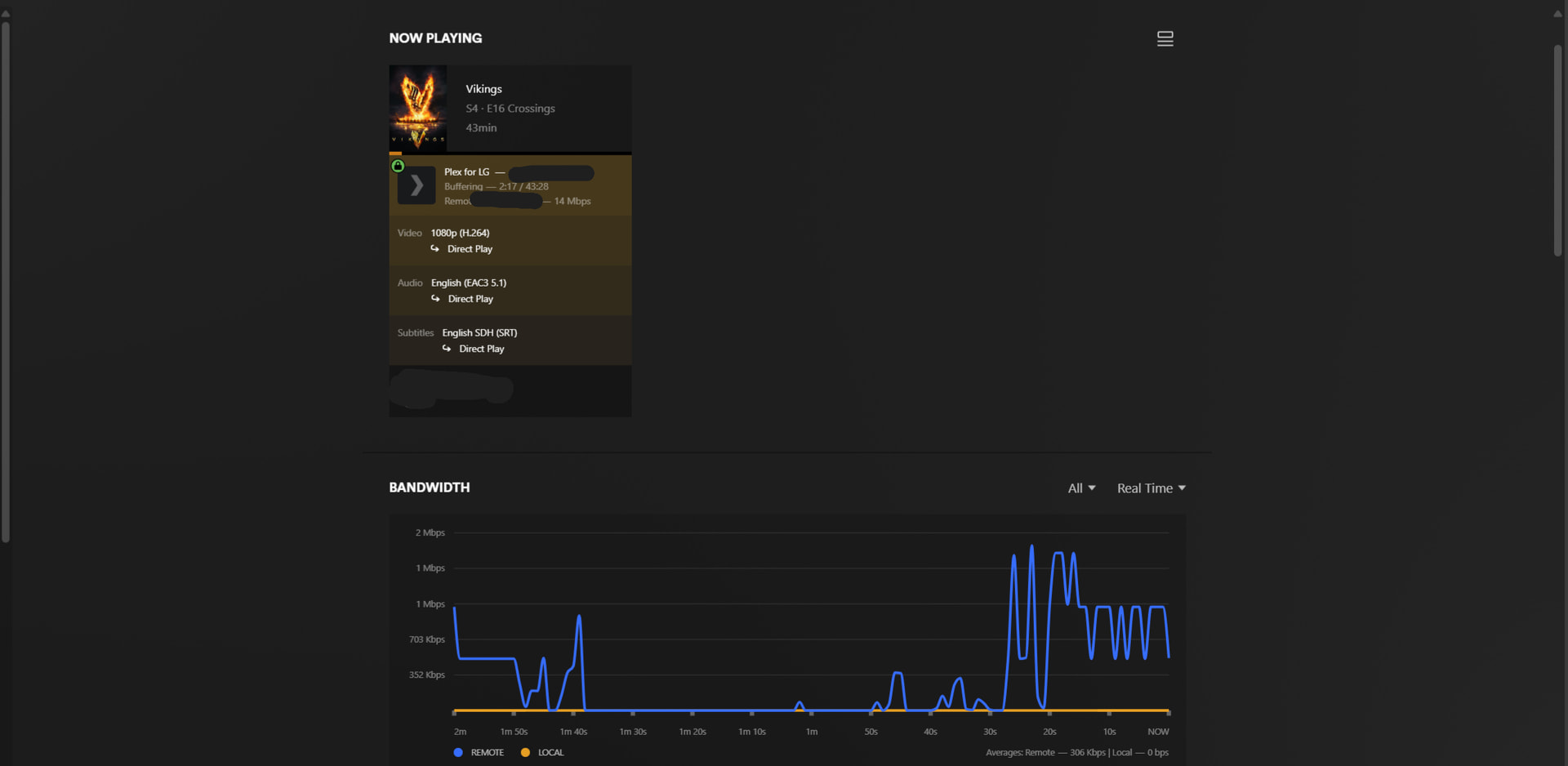
Remote play buffers randomly and starts throttling at 500kbps-2mbps

Server Version#: 1.42.2.10156
Player Version#: latest

This issue started about a month or a bit more ago. Remote Play does work fine without buffering on my end (Although I didn’t test for a prolonged time). The only user I have is having these buffering issues on their LG TV and iphone. Tried restarting router on both my end and theirs. I reinstalled Windows 11. Server connected with ethernet cable. I also tried on WiFi. We didn’t have any issues with it for 2+ years now. same isp. we didn’t change anything or any settings.

Subtitles are direct streaming on tv… idk if they always been like that or not. on iphone it’s direct playing.

in Authorized Devices, my plex server is stating Window 10 ( that’s what I initially installed it on before upgrading to Windows 11.. but it’s been over a year since I did with no issues.).. idk if it’s effecting it now?

Also in task manager it sometimes doesn’t display plex activities on my drives, but the stream is working fine without buffering… idk if that is another issue as well that can be related to this.

Edit: I forgot to mention we both have Fiber internet. My upload speed is 200mbps. They also don’s have issues buffering or any other internet issues other than on my plex.

It appears that you are using a manually created port forwarding in your router.
But you have set the public/WAN port number of this as the well-known Plex number 32400.
I recommend you to use a different public port number (but keep the internal/LAN port number at 32400).
You can either pick a random number from the range of 20000–50000, or use a well-known number of an “unsuspect” service, like e.g. 443 (for encrypted https).

After editing your port forwarding in the router’s settings, enter the Plex server settings
Remote Access - ‘Show Advanced’
and enter the public port number into “ Manually specify public port”.
and Apply.

The reason for this is that ISPs are tempted to “manage” traffic volume on their networks by either blocking or throttling traffic of well-known data-intensive applications – like private video streaming.

Thank you for taking the time to help. I tried to use different public port before, but it always stays red on the remote stream setting. Even though I opened the port on my router and entered it on remote access setting on plex. The only port that works is the plex one 32400. Any reason why that could be the case?

As for 443, is it safe to use? Excuse my ignorance on the subject.

I’ve always used the plex port number with no issues before for 2+ years now. Maybe like you said isp started throttling it now. I’ll try other ports again. Any solution for the no access outside your network when I try different port other than 32400?

And thank you again for your assistance. Much appreciated.

You need to let it sit for a few hours after changing the port number. Maybe throw in a server restart in between. Do the same to all the clients, because they need to contact plex.tv to get notice of the new port number.

A possible reason might be that you perhaps don’t use one router, but two.
And there are actually two port forwardings in place, one in each of these routers.
Then of course the public port number must be changed in the last router before the Internet, not in the one which sits inbetween.
A common scenario would be that you are using your own router, but your ISP is also insisting that you use their own router/modem “box” – so you connect the two in series.

I’m only using the ISP provided router. I’ll change the port now and see what happens.

Is opening 443 port safe?

It is exactly as risky as opening port 32400.

ok thank you very much. I’ll try the solution and get back to you.

Edit: one more thing i forgot to mention.. in my router the port forwarding that i did before i left the protocol at TCP/UDP.. should i change that to only TCP?

Ok so… I managed to make a different port work, it worked for a while like always… like 4 hours or so .. but it started throttling and buffering again. I haven’t tried port 443… I can try this one now if it’s different from the random port I choose above 20000

Another thing is my HDDs don’t have read activity in task manager. only at the start of an episode plex transcoder shows up in task manager and my hdd have activity.. but then 0 activity. Especially when this user plays something on my server.. is it because of the subtitles direct streaming instead of direct playing? If so, where doe it read from?

And again thank you for your patience.. this issue been like this for over a month now.. it’s annoying.

Edit: also in authorized devices my plex server shows Windows 10 instead of 11.. It’s been like this for over a year with no issue though.. I thought I’d mention it since idk if that’s an issue or not.

If you have plenty of RAM in that server, all the data are cached in RAM.

I have 32gb of ram. but also in task manager I don’t see plex using that much ram. or maybe i didn’t pay as much attention to ram usage as much as disk usage.

This is not a feature of Plex, but of the operating system. The size of file system cache is not clearly shown, but you can assume that most of the free space in RAM is used for it.

Oh I see. SO what can I do about the buffering issue?

I’m afraid nothing. There is no real proof of your ISP throwing a spanner in the works. Just certain hints and indications. Not enough to be able to point the finger.
Apart from using an encrypted tunnel between clients and server (i.e. a VPN, like Tailscale etc), or switching ISPs, I’m afraid there is no cure.

hmmmm… really strange. Ok would trying this port 443 help maybe? or is it same as the random port i picked? Could it also be their isp not mine? Thank you again for your time and patience.

Edit: also the issue is only on their end. it’s just weird.

Is there a way for them to use vpn on tv?

[sorry for earlier dup; bad cut-n-paste]

Seeing similar issues; currently out of the country; have tried direct VPN connection to my home server (WireGuard) - also tried going via my public port (both 32420 and some unused port <1000) - both of which are forwarded to my private.ip:32400

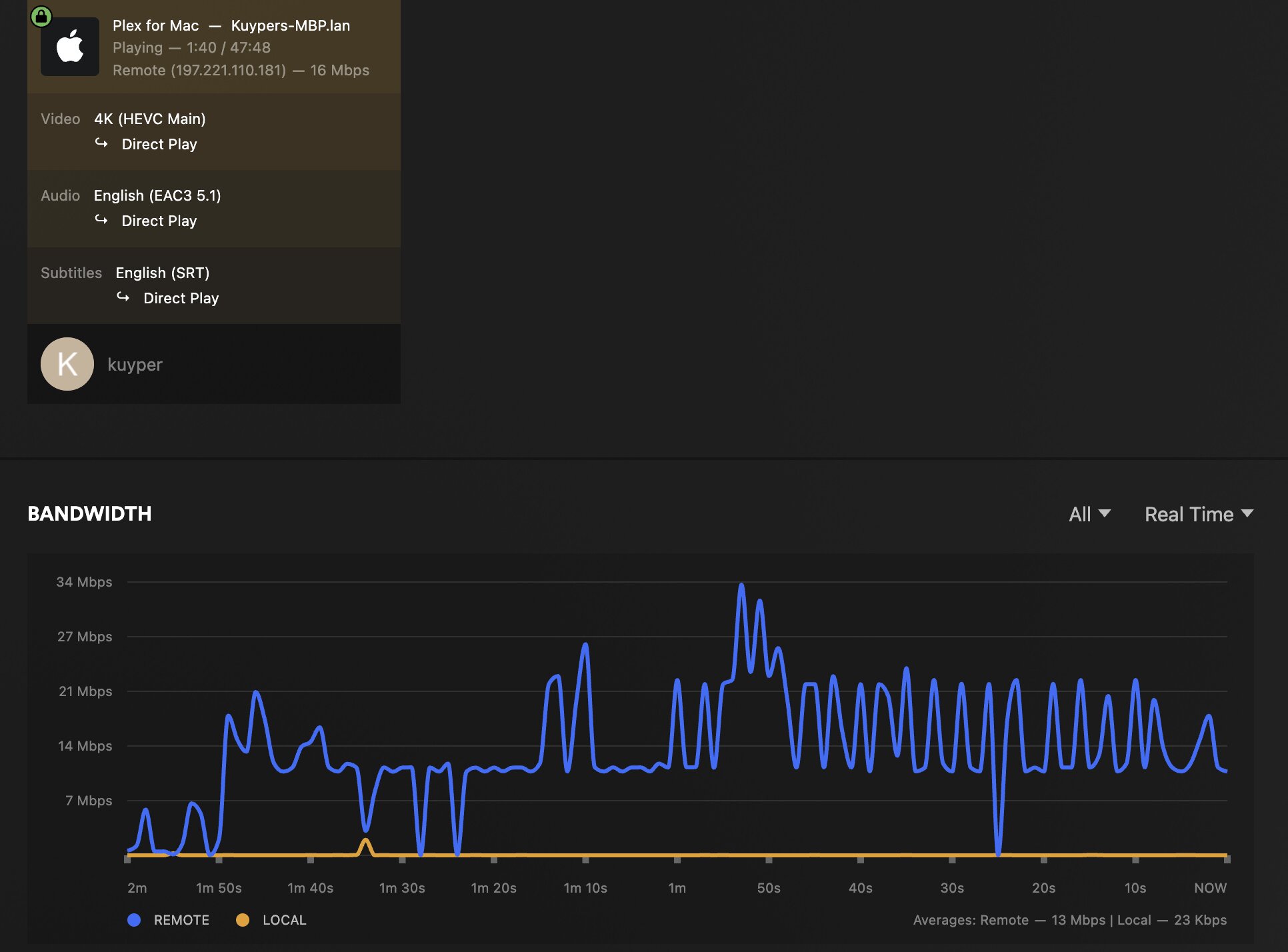
end up with this sort of graph:

but intermittent buffering - rather than “surging” ahead, and getting some deeper buffer, I have to pause the playback, let it build a deep buffer, and then watch (but it catches and passes the end of the buffer every few minutes. Tautulli reports ~16Mbps.

So, well above the 2Mibps in the thread title, but clearly not hitting close to the max possible to rapidly pre-fill the buffer

Native speedtest (even to a US Server in my hometown) shows that my ISP where I’m at allows ~80Mibps down, 60Mibps up (this all with VPN torn down, but similar results on VPN)

If I pause, I’ll intermittently get spikes up to native b/w

before it drops to zero (depth of buffer) - but as soon as I play, it starts falling behind, and soon I’m buffering again.

Server is totally unconstrained TrueNAS Scale

Latest PleX server (App Version: v1.42.2.10156-f737b826c Version: v1.2.20) and Client (PleX For Mac Version 1.112.0.359-0d79a49f) on M1 Max Pro with 32GB RAM (Tahoe 26.2)

Home network (where server is located) is Sonic Fibre 10Gibps symmetrical (realistically I can “only” achieve 5Gibps :slight_smile: ) - TrueNAS Scale Server is 10G connected to Ubiquiti Router, so that side is not the constraint either. And when I’m home, everything runs smooth up to 90Mibps 4K movies.

Using an HTML browser (Chrome) it’s pretty much unusable, but the official PleX App fares better, but still buffers all the time.

PleX App on the Mac is using ~14% CPU, system is 75% idle. PleX App memory is 1.6GB (yikes!) but I have plenty free (yeah, my Chrome chomps most of this on open tabs, but closing Chrome doesn’t help)

Mac Net usage maps correctly…

And nothing is being transcoded, but if it were, there’s a GTX1080 on the TrueNAS that would tackle that (but again, this is direct play at 4K to my MacBookPro)

Final look at PleX Dash graphs:

Also, just to humour the peanut gallery, I’ve even changed to port 443 as suggested (against my better judgment) but no-go, same issue…

Finally finally, this is the media that I was testing with (to be clear, this doesn’t happen with every title, but this isn’t even close to the “heaviest” file I have…

Don’t know how much more I can add, but this is not correct behaviour….

Please edit your post and remove the duplicate parts.

Hi @OttoKerner Weird - sorry, was a cut-n-paste of one paragraph, but must have accidentally selected the whole post - fixed now, I hope; thanks for pointing it out

Don’t forward UDP packets. Only TCP.

That speed test is unfortunately not relevant when it comes to international, or even intercontinental connections.
Your own ISP is but one station on the way from your server to the Plex client across the sea.
Multiple telcos’ and backbone operators’ networks can be inbetween. Each of which can do things to prevent their networks from becoming congested. The bandwidth of these intercontinental connections is always smaller than the total sum of potential users who are trying to stream 4K video across them.

Your bandwidth graph strongly suggests that there is some kind of “bandwidth management” in play.

There is a reason why commercial streaming video companies

  • rent capacity in more than one data center, selecting carefully which are close to the majority of their customers (“close” in terms of network topology)
  • negotiate special agreements with network operators about the use of these networks’ bandwidth (and ultimately compensate, monetary or otherwise)
  • reduce the bandwidth of their video streams to the very cusp before the quality gets unbearably bad

I think you need to adjust your expectations of what you can achieve with a single Plex server, and a domestic internet connection, over much larger network distances than the professional streaming providers.

Thanks @OttoKerner - yes, very familiar with the advantages of edge caches, and how ISPs can assure QoS etc. Will try a TCP-only forward to quash UDP (and related out of sequence packets etc) - that said, my SpeedTest is pretty similar when I force everything over a P2P VPN that exits at my home, to the same Sonic testpoint:

To the best of my knowledge, WireGuard is a UDP based VPN by default (you need some trickery to force it via TCP) which is why I tried disabling the VPN and using the public Internet to the PleX “proxy”

Is there a way to force the Mac PleX App to use my server’s private IP to effectively eliminate even the PleX “proxy”, and see how that performs? ie make it appear to be “local” traffic to PleX?

I don’t want to start mucking about with TCP Sliding Window sizes etc, as the TrueNAS Scale Server is primarily acting as a local store.

I guess I’m just going to have to live with buffering when on the road…

I will also have to fire up WireShark on my home network (I can access other gear there from remote) and see if we’re seeing excessive retries etc…

Thanks for your thoughtful reply

Cheers

@kuyper

Followup for everyone else - forcing my Firewall to forward only TCP connections to the private IP of my PleX server has made a marked improvement. Also, tearing down my WireGuard VPN (which would have routed it via a UDP-based tunnel) also improved matters; in this graph:

the trailing traffic slipping off the left of the graph was over the VPN; the right hand side (fresh traffic) was the TCP port forward through my firewall - although it still buffers occasionally, the average throughput is considerably higher, and close to the native resolution of the media I’m playing (I’ve used the same file for all of these experiments)

Thanks again to @OttoKerner for his insights, and patient explanations and pointing out what should have been obvious to me; I am not [yet :slight_smile: ] a Class 1 ISP and don’t have PoPs with caches in every major city :slight_smile:

Advice to all:

  • the port number (for me) made no difference, but ymmv

  • don’t connect via a VPN (at least not a UDP based tunnel)

  • force whatever you can to use TCP instead of UDP [for those who don’t know, TCP is a stateful connection (think of a telephone call) whereas UDP is a series of discrete packets fired across the net, and re-assmebled on the other end (think of sending a bunch of letters by mail) - making TCP more “expensive” but more reliable]

  • If your connection still can’t keep up (ie your average throughput is lower than the native requirement of the stream you’re watching) considering forcing a transcode to a lower bitrate:

Hope this helps others