Have Work-Around, Will Travel
Paladin
actually, I just re-tested this, and it does not seem to affect the left side nav bar.
It does however seem to work for the hubs, so you can link to a non-home hub.
I believe this is the best all around set of options. Everybody has their reasons and without needing to justify them. I believe simply having options is the best thing moving forward.
speaking of opinions mine is that pinned sits out of the way on the leftside and is unintrusive. there are features the devs time is better soent adding and or improving.
I have never delete a library in all the years I have been running Plex on any of the PMS servers but then again I only have a few libraries…

Just realized I have more servers then libraries…
Ugly and unnecessary feature.
A new user will see the bloatware from Plex like News, Web Shows and such but has to pin my server’s libraries.
Soon, we will have to resort to hacks and command line to display our libraries, but Plex’s unwanted features will be right in front of you.
It is almost like Plex is trying to be hostile towards it’s user base.
That’s not correct, a new user will get a wizard to select their primary server and then they will be prompted to select the libraries to be pinned from that server.
I wish.
I am willing to change my statement if I am wrong on this one, so…I tested.
- Create a new account on plex.tv
- Log in with that account.
- From my main account, send the newly created account an invite.
- From the newly created account accept the invite.
- Press home and marvel at the lack of libraries. Somehow, Plex’s bloatware is pinned. To get to my libraries, the user need to click on More.
This is so easily reproducible, I am amazed you still try to defend this.
No wizard or witch for the new user.
Proof:
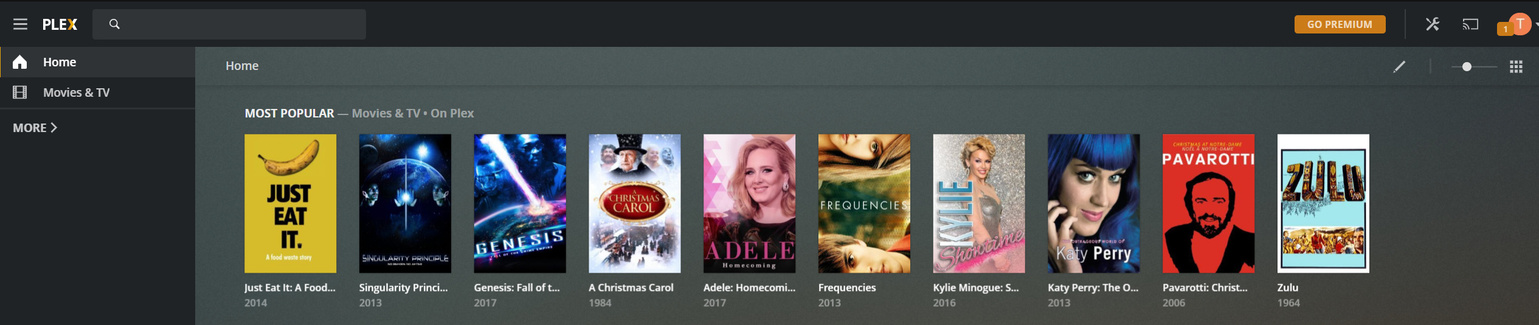
Well, crap, that is annoying and not what I see on other Plex apps. I’m poking the devs about this.
Every single time I enter PMP/FireTV (FireTV now random, so some progress is being made, at least) I am presented with a blank sheet - to customize once again, and again, and again, and again, and… well, you get it…
Press home and marvel at the lack of libraries.
Newly shared libraries are not automatically pinned to the sidebar (… yet).
I’ll bring this example up when we next discus the new user sign up flow. What you are experiencing isn’t perfect. Maybe we need to re-start the plex web setup after accepting the first share or similar 
During the plex web setup, where you chose your pinned sources. Did you select Movies & TV believing it would be ‘your’ movies and tv ? From your comment it seems unintentional that Movies & TV is in your sidebar.
Every single time I enter PMP … I am presented with a blank sheet - to customize once again
Are you saying each time you open PMP you are prompted with Choose your Preferred Server / Customize your Media ?
That is exactly what I’m saying… precisely… you have successfully described the annoyance perfectly…lol
just get rid of pinned all together or AT LEAST make it DISABLEABLE in the settings like the original post says, problem solved. -_- lol I thought this topic was dead and there’s 53 replies the whole thing is explained in the original post. xD
It’s a Bernie Sanders idea. PINNED LIBRARIES FOR ALL. DEFAULT PAGE. What about the people who don’t want them or need them? Usually when u add a feature outside the normal operation of something…you don’t make it the unchangeable default. It’s not like Plex is making money off the idea of Pinned Items…it’s just a add-on feature. It’s like if Google opened up to the Settings page instead of the Home Page (which can be user customized). SOME people might like to be greeted with the settings page…but for everyone else it’s just 1 more click to get back to their home page.
I like being able to see only the libraries I want when I open Plex… Pinned
one more for this… i dont think that the Pinning functionality should be removed entirely, but it should definitely be adjusted so that when I add a new library and share it out to my users, they are made aware of it and make it easier to find. I’ve added 2 entirely new libraries that my users requested and none of them even knew that they were there for over a month until I told them.
Pinning is fine, but the current system of having to go to “more” and not being shown when new libraries are available is not user friendly at all. I preferred it when I had the individual servers as expandable options in the left menu.
Maybe have it default to how it used to be if you only have 1 server available on your user and use pined libraries when you have more than 1 server?
I responded a little while ago with some options. I would like to add one more.
Have a setting so that if there is nothing pinned, instead of defaulting to “Your home screen is empty” default to the servers list (same as hitting the more link on the left). That way, it doesn’t change the way the pinning system works for anybody by default, but for those that don’t use the pinning system, if they just leave the list empty, it just defaults to the servers list.
I went ahead and made a separate feature request for this as I believe it is a fundamentally different request. If you like it please vote:
Some one well-liked in the Plex team must have come up with the “Pinned Items” concept because it’s such a bad feature and they refuse to remove it or to at least have options to disable it but rather force it down users throats a little bit more each update it seems. Now they Disable User’s home screens pretty much to force them to pin items. What’s next? Why is Pinning so important? The name of the App is “PLEX” not “PINNED” please remove pinning altogether it is a really stupid, unintuitive feature that I’m sure only a handful of people even use. The funny thing is when I started using plex I always had like 20+ Librarires going on 80 now and people said I was doing it wrong years and years ago that I “had too many” and now they got pinned items, why? Cuz people are making too many Libraries whereas I with 83 Libraries have never felt the need to Pin 1 thing it’s pretty ironic.
I like the pinning option.
I use it to set what libraries I need to see and adjust it over time.
I am now having this problem, though I run PMS on Synology and connect to the web app running on it directly. The Plex bloatware is pinned and the server isn’t, even when I’m going directly to the server’s local IP address. I’m literally connecting to my server, but I’m not seeing ANY of the content on my server by default! This is a defect, and it looks like a deliberately caused one at this point.
This just started a couple weeks ago (when I updated to the latest build as of early November) but I was running an older version of PMS for awhile, so I skipped several versions. I’m now on the latest 1.20.5.3600 and still having this problem.
