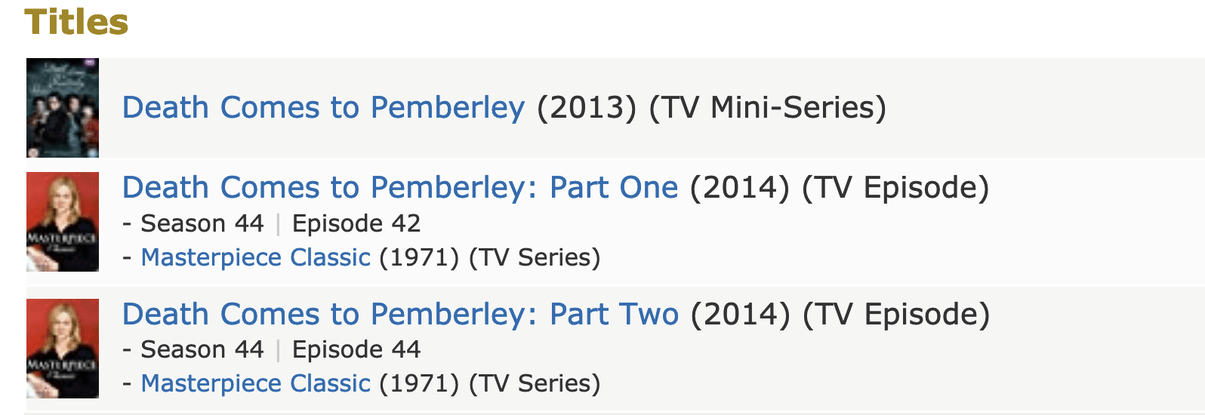
Looks like the listing confusion with the episode screenshot are two different and separate “Pemberley” things. One is a dedicated miniseries in 2013 and the 2014 listings are two episodes of a long running Masterpiece TV Series. The Masterpiece show is not represented at TVDB, TMDB or Trak.tv in any clear way - incomplete or mixed up between different runs and titles in different countries, etc. Even the IMDB listings are kinda messy.
@Pdeanb - I assume you’re dealing with the 2014 Masterpiece Episodes and not the miniseries since you mention 2 episodes in 2014 rather than 3 episodes in 2013.
Let start from scratch…
A Plex TV Show library or Movie library is not what YOU think the video file is, but categorizes Plex software for matching data (metadata) to the multimedia files. If you pick “Movie” Plex knows what you put in that library are movie titles that can be matched to movies at TheMovieDB\TVDB\IMDB. If you pick “TV Show” Plex knows what you put in that library are TV series titles that will be matched to TV series names at TheMovieDB\TVDB\IMDB and should be displayed with TV Show features like seasons and specials and episode numbering so shows will play in order.
This separation manages when you add Highlander to Plex it’ll know if you mean the Christopher Lambert movie or the Canadian TV show because of which library you put it in so it’ll match up, and manage the media, correctly.
It is not you telling it what YOU want as a TV Show vs Movie. It’s you telling Plex how to match your files with those services which means those sites dictate if something is a Movie or TV Show. Generally that’s pretty obvious but some things - particularly mini-series or special episodes of shows or even special movies that go with shows - it can be a mixed bag.
In your case, you have a TV Show, not a movie (a mini-series is not considered a movie for purposes of Plex). There is no movie called “Death Comes to Pemberley” at any of the database services, only the two TV shows, so Plex can’t match it as anything other than a TV show. So here are your 2 choices on how to proceed.
- Make your media match the services
This means, in your case, you have two episodes of the TV show Masterpiece Classic so you’ll put them in your TV Show library as something like:
..\Media\TVShows\Masterpiece (1971)\Season 44\Masterpiece S44E42 [Death Comes to Pemberley Part One].mkv
..\Media\TVShows\Masterpiece (1971)\Season 44\Masterpiece S44E44 [Death comes to Pemberley Part Two].mkv
This naming will line up with the show data - with one caveat. The miniseries from 2013 matches just fine to listings at TheMovieDB (link) and TVDB (link) but the 2014 Masterpiece series is not very conclusive or available at either TheMovieDB or TVDB and only has those show\season listings at IMDB (link) and even there it’s not complete.
It should match, but even if it does it may need some additional manual data added to it. The filenames I’m not sure about either because it’s messy so you may have to manually match or adjust the file names a bit.
- Custom Data in “wrong library”
Basically what I posted previously in this thread. You can add any media you want to either library but Plex won’t “know” it or be able to identify it if it doesn’t match the services. Once you add it to the Library you want, and when\if it doesn’t match correctly with listings at those services, you’ll add all the data yourself. You still put it in your library the same way as if it SHOULD match (follow the naming and organization rules OttoKerner linked) but instead of Plex being able to grab the info you provide that info yourself (see my previous post).
So… what do you do? Your choice…
You can either name the two episode files as TV Show episodes (which they are) and add them to your TV Shows library like option 1 above and they match up with IMDB and you’ll be done (maybe with some tweaks) or you can use your merged file, put it in the Movies Library and manage the data yourself as I described in my previous post above. Option 1 would be the “correct use case” for Plex and Option 2 would be your own fake exception way to have it as a “movie”.
As an example, I have an episode of National Geographic about the USS Tarawa (personal interest). It’s an old episode ripped to digital from VHS and none of the sources have it listed for a match. It’s just one episode so I put it in the Movie Library of my Plex as if it was a movie. As expected, Plex couldn’t match it (it’s not a movie). No surprise! So I just added my own details\art for it and it sits in my movie library just fine:
Technically that’s not the right way to do it, according to Plex, but it does work. I just know that it’s my responsibility to manage it because Plex will never “know it” to manage it for me.
That was a lot of detail but it sounded like there was some confusion and I thought laying it all out might help.
If you try either of those routes, just come back with some screenshots of what your results were and folks will help you sort it out. Sometime it just takes the right combination to have some of this stuff click.
Addendum - There is another type of video library called “Other Videos” which does no matching … it essentially shows you your video files raw. I don’t think this is what you want to do but wanted to mention it for completeness. People usually use Other Videos library for personal videos, like home movies, to host video files with minimal Plex management.