Server Version#: 1.20.3.3483
Player Version#: 6.6.12.6662
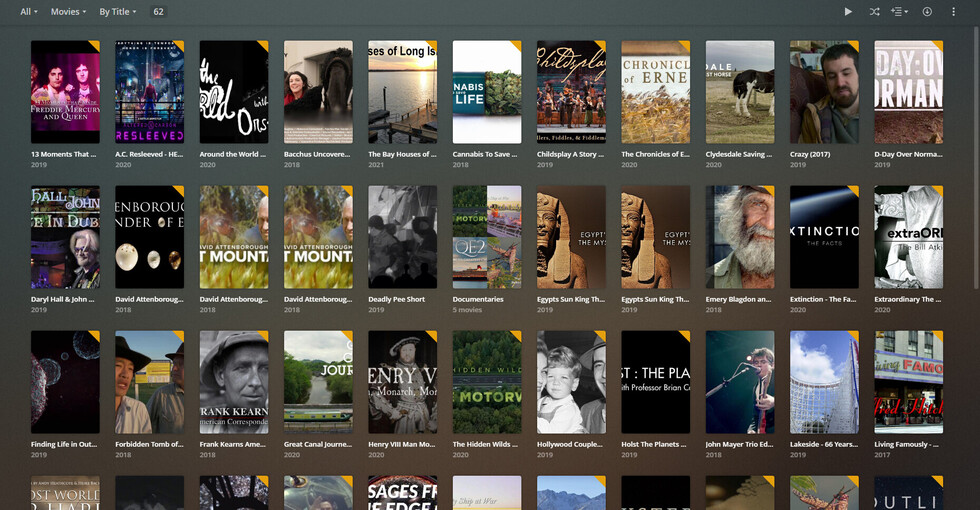
The posters for items in “Home Video” type libraries is incorrect. It is display the “Poster” metadata art as cropped landscape, when that metadata is meant to be displayed in tall portrait mode. This is inconsistent with all other clients (other clients display this poster art as tall portrait). If the client device wishes to display art for the library in a landscape manner, then it should display the “Background” metadata art, as that metadata is meant to be displayed in landscape manner.
Summary: Roku client is display art wrong.
To fix this glaring bug, Roku must either display “Background” art in landscape mode, or “Poster” art in portrait mode.
This bug has been present for years, and has never been fixed.
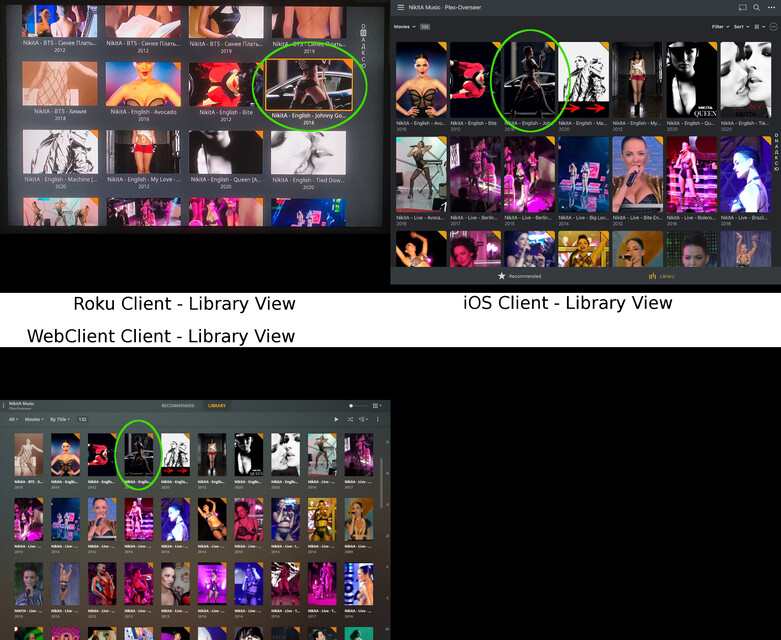
Examples of the issue. In this composite image, the ‘Library View’ is compared between 3 different clients. The library is an “Other Videos” type library. The top-left shows the library view for the Roku Client (where the cover art is displayed incorrectly). The top-right shows the library view for the iOS Client (cover art is displayed correctly). The bottom-left shows the library view for the built-in WebClient (on Chrome on PC) where the cover art is displayed correctly. To draw attention, a single item has been annotated with a green circle in all 3 clients, which will be further detailed in the next post.
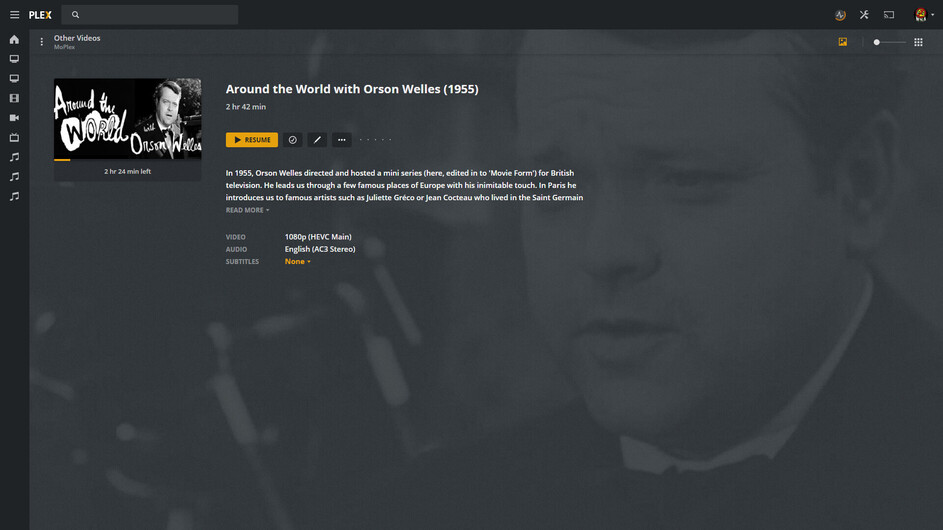
Continuing the example from the previous post. This composite image compares the view when selecting an individual item, between 3 different clients. The top-left shows the ‘Select Item’ view for the Roku Client (again, the cover art is displayed incorrectly here as well). The top-right shows the ‘Select Item’ view for the iOS Client (cover art and background art are displayed correctly here). The bottom-left shows the ‘Select Item’ view for the built-in WebClient (cover art is displayed correctly here). The bottom-right shows the ‘Edit Metadata’ view for the built-in WebClient, where the selected poster image is shown.
Updated to versions:
Server Version #: 1.21.3.4021
(Roku) Player Version #: 6.7.9.6822
Bug is still present. Poster art for “Other Videos” libraries is still being cropped to landscape, while other clients display this art as portrait aspect ratio.
I’m told the goal is Landscape for ALL Apps - as it should be - but an Employee told me that, so… the mystery continues.
If Plex wants to give us a choice - I’d pick Landscape for a library that for the vast majority a landscape screen grab will be the ONLY artwork. As you know Plex doesn’t offer ‘Choice’ and unless they’re going to start suddenly - I pick Landscape.
I would say their first priority should be to make it consistent across all clients. Without having a consistent standard, it will always look wrong on one client or another.
Secondly, I would say they should give us a choice. Make each library have a setting, to indicate whether that library’s poster art should be displayed portrait or landscape.
I wouldn’t be opposed to a ‘Choice’ - it’s just that Plex never provides one.
Roku is the first App on the block to incorporate - some of - the new artwork dimensions and my yes, some consistency would be nice considering, even on the Roku, one view shows The Poster as landscape, and the next view shows the background as the Poster… making it difficult to place images that do two different things.
My hope is that eventually - some of the madness is trimmed down to a dull roar.
Updated to versions:
Server Version: 1.22.0.4163
(Roku) Player Version: 6.7.15.6886
Bug is still present. Poster art for “Other Videos” libraries is still being cropped to landscape, while other clients display this art in portrait aspect ratio.
There was some speculation about which of the clients is displaying this artwork correctly, and which clients are displaying it incorrectly. However, until we hear from the development team regarding what the standard is, I have to assume the Roku is displaying it incorrectly. The reason for this is that the built-in webclient displays this artwork as portrait. The fact is, that the built-in webclient is the interface we use to create/organize/manage our libraries, and thus that is the most important client to show us how that data will be displayed. Therefore I have to assume that the webclient interface is displaying it correctly.
We’ve heard from the development team.
They’ve promised Landscape Artwork for Other Videos is their goal.
The Roku Team have reached the goal.
The other teams have shown reaching the goal in a timely fashion is an unreasonable expectation on the part of users and they’ll get around to it - eventually - or not at all. Users await an outcome they have no control over and no confidence in.
I’m a former software developer, so I don’t understand why this is so difficult for them. They should be able to get this going on all clients correctly in under a week. They already have the code to display landscape libraries; all they need to do is change a couple function calls, and then merge that onto the trunk.
It does mean I will now have to modify my artwork for thousands of library items, since I designed them all as portrait.
Does anyone here think Plex will use Landscape Artwork for an Other Videos Item in The New and Improved “Continue Deck”?
I don’t.
I predict status quo.
Looks like the Victims will be standing on this side of the Landscape/Portrait Fence after all. I predict you’re safe. Hope you haven’t started changing them yet. Wish I’d started a while ago.
I just wish they’d get this thing trashed the way they want it, so we can start changing the way we’re using it. We need a Developer’s Plex User Manual so we’ll know how they’re using it. Clearly we’re not doing it right and it’s difficult to know what’s right without an instruction booklet.
I’m having to deal with Dueling Recently Added TV - for the next 4 months, while I change Agents - and Plex is crazy if they think I’m gonna swap 650+ Shows with 12,500+ Episode with the easy push of one button.
Veterans know better.
Veterans know we need to do this in managable chunks - 'cause we’re flying this plane while Plex is swapping out the wings and the landing gear fell to the ground just after takeoff.
Newest version of Plexweb client (4.57.4) now shows this poster art as wide/landscape (consistent with Roku). iOS client still displays this poster art as tall/portrait.
Why the hell is the web client in landscape mode now? It’s terrible! Now I can create a new poster for several thousand music videos.
Just because 2 users wanted landscape mode as standard?
And when I have collections, the detail view (in webclient) still shows the portrait format !! That’s crazy.
And also all my other clienst (ios, Samsung app) still shows the portrait format!