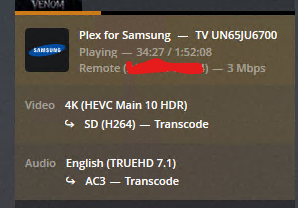
Sorry if this is the wrong place. But right now I have a movie playing to a Samsung Tizen Plex App, 4k TV and it is destroying my CPU transcoding the 4k to SD (Picture Below) Is this just the App? Do i have my server set up wrong? The File should be able to play 4k right? Also this is playing remotely.
#1 It is a remote play set to 3 Mbps #2 You can’t play TRUEHD on the tv, choose audio track 2(DTS) (EDIT) Forgot that Samsung dropped DTS support. Ok what other Audio tracks do you have.
The audio I’m not to concerned with. it is the transcoding of the video. I have my remote play set to Maximum. I have 1GB upload speeds. Is there a reason why this isn’t direct playing and being locked at 3Mbps dropping 4k to SD?
Check the configuration of the Plex client on the TV. Some Plex clients also have bandwidth settings for both local and remote play. The default setting on many is 720p / 4 Mbps.
Regarding the audio, choose the AC3 audio track if one is available (or any other track that does not transcode), at least while troubleshooting. Under certain circumstances, transcoded audio can also force the video to transcode. For example, transcoded audio + SRT subtitles will cause the video to transcode, but direct play audio + SRT subtitles will not force a video transcode.