Plex randomly stops playing 4k UHD on Samsung TV

Server Version#: 1.32.2.7002
Player Version#: 5.59.3
Greetings!
For the last years, I have been running Plex Media Server on Windows 10, on a i7 4790k. If i Direct Play or Direct Stream with that CPU - it runs great, but transcoding 4k is too hard. Often when I direct stream or direct play with it, it stops and buffer. It will never start again. I have to exit the movie, and then resume the movie for it to pick up and play again. I thought this was because the CPU was struggling, so I just bought my self a Ryzen 9 7900, just because the 4K movies are so demaning - especially when transcoding. I thought this would help the direct stream and direct play problems, but the same thing happens on the new CPU. I have also a new computer, with fresh installed PMS, on Windows 11. 1000mbps cabled ethernet network (But the TV only have 100mbps cabled network card - I have also tried the WiFi on the TV, but same thing happens there. I get 800mbps on TV Wifi, and have Wifi 6, so the speed on the network is not the problem).
Since I have same problems on my new computer, as I had on my old, I started checking the log files on PMS. I can see at the time the buffering/movie stops playing, I get “Transcode runner appears to have died”:

May 12, 2023 16:56:52.415 [14396] DEBUG - Request: [10.0.0.133:42909 (Subnet)] GET /video/:/transcode/universal/session/4djx62s5xcg2cg747ch1ld4y/0/1158.m4s (7 live) #54172 GZIP Signed-in
May 12, 2023 16:56:52.415 [14396] DEBUG - [Req#54172/Transcode/4djx62s5xcg2cg747ch1ld4y] Asked for segment 1158 from session.
May 12, 2023 16:56:52.415 [14396] DEBUG - [Req#54172/Transcode/4djx62s5xcg2cg747ch1ld4y] Returning segment 1158 from session
May 12, 2023 16:56:52.415 [14396] DEBUG - Content-Length of C:\Users\phobr\AppData\Local\Plex Media Server\Cache\Transcode\Sessions\plex-transcode-4djx62s5xcg2cg747ch1ld4y-1cbb606b-3eac-45c0-80d6-ec8515a252e4\init-stream0.m4s,C:\Users\phobr\AppData\Local\Plex Media Server\Cache\Transcode\Sessions\plex-transcode-4djx62s5xcg2cg747ch1ld4y-1cbb606b-3eac-45c0-80d6-ec8515a252e4\chunk-stream0-01159.m4s is 4569889 (of total: 4569889).
May 12, 2023 16:56:52.480 [14396] DEBUG - Request: [127.0.0.1:58512 (Loopback)] GET /statistics/bandwidth?timespan=6 (7 live) #54171 GZIP Signed-in Token (phobra) (Firefox)
May 12, 2023 16:56:52.480 [25572] DEBUG - Completed: [127.0.0.1:58512] 200 GET /statistics/bandwidth?timespan=6 (7 live) #54171 GZIP 0ms 1529 bytes (pipelined: 238)
May 12, 2023 16:56:52.803 [12800] DEBUG - Completed: [10.0.0.133:42909] 200 GET /video/:/transcode/universal/session/4djx62s5xcg2cg747ch1ld4y/0/1158.m4s (7 live) #54172 GZIP 388ms 4569889 bytes (pipelined: 75)
May 12, 2023 16:56:53.047 [18388] DEBUG - Request: [10.0.0.133:42909 (Subnet)] GET /video/:/transcode/universal/session/4djx62s5xcg2cg747ch1ld4y/0/1159.m4s (7 live) #54174 GZIP Signed-in
May 12, 2023 16:56:53.047 [18388] DEBUG - [Req#54174/Transcode/4djx62s5xcg2cg747ch1ld4y] Asked for segment 1159 from session.
May 12, 2023 16:56:53.047 [18388] WARN - [Req#54174/Transcode/4djx62s5xcg2cg747ch1ld4y] Transcode runner appears to have died.
May 12, 2023 16:56:53.152 [18388] DEBUG - [Req#54174/Transcode/4djx62s5xcg2cg747ch1ld4y] Sending back blank segment for 1159, we overestimated the number of segments.
May 12, 2023 16:56:53.152 [18388] DEBUG - [Req#54174/Transcode/4djx62s5xcg2cg747ch1ld4y] Returning segment 1159 from session
May 12, 2023 16:56:53.152 [18388] DEBUG - Content-Length of C:\Program Files\Plex\Plex Media Server\Resources\empty is 0 (of total: 0).
May 12, 2023 16:56:53.152 [18388] DEBUG - Completed: [10.0.0.133:42909] 200 GET /video/:/transcode/universal/session/4djx62s5xcg2cg747ch1ld4y/0/1159.m4s (7 live) #54174 GZIP 105ms 0 bytes (pipelined: 76)
May 12, 2023 16:56:53.183 [18388] DEBUG - Request: [10.0.0.133:42909 (Subnet)] GET /video/:/transcode/universal/session/4djx62s5xcg2cg747ch1ld4y/0/1160.m4s (7 live) #54175 GZIP Signed-in
May 12, 2023 16:56:53.183 [18388] DEBUG - [Req#54175/Transcode/4djx62s5xcg2cg747ch1ld4y] Asked for segment 1160 from session.
May 12, 2023 16:56:53.183 [18388] WARN - [Req#54175/Transcode/4djx62s5xcg2cg747ch1ld4y] Transcode runner appears to have died.
May 12, 2023 16:56:53.187 [25020] DEBUG - PublicAddressManager: Obtaining public address and mapping port.
May 12, 2023 16:56:53.187 [4712] DEBUG - PublicAddressManager: Obtaining public IP.

This happens also on direct play and direct stream. If i start movie again, mostly the times it manages to get passed this point where it stopped the last time, so I don’t think it is something with the movie file it self.
I have also added all the .exe-files for the PMS in the AV-exclusion list.

An other question: If i transcode a 4k movie, it uses like 90% of the Ryzen 9 7900 CPU resources - I thought with that kind of CPU - it would have no struggle? But sometimes struggle it seems.

Any help would be greatly appreciated.

-alex

You can use hardware transcoding if you have an intel CPU with Quick Sync or a dedicated GPU

https://support.plex.tv/articles/115002178853-using-hardware-accelerated-streaming/

When you transcode 4k in many cases you’re also tone mapping from HDR to SDR as well. That is going to tax even the best CPU

Being able to use hardware transcoding is one of the benefits of having a Plex pass

If you are playing content inside your network, in most cases you should be able to direct play most videos. Unless you want to buy an external GPU you’re going to have to figure out what exactly is causing most of your transcoding and avoid it the best you can

What kind of streaming devices do you use to watch things?

1 Like

Hi, and thanks for reply!
I have a AMD CPU, Ryzen 9 7900 which should have a lot of juice in todays standards. I have enabled hardware transcoding, and can see the CPU use drops like 40-50 % -so it helps on the load. Yep most of the 4k is HDR, so the tone mapping will also hammer the CPU quite a bit. The content is on my network yes, and most 4k movies is direct played / direct streamed, but still the movie stops randomly. Then I checked the logs and found that “Transcode runner appears to have died” about the same time the movie stops.

I use a Samsung TV to stream my content to - Tizen 6, and the Plex App on the Samsung TV. In a week or so, I will have a dedicated GPU on my computer, a RTX 4070, so hopefully this helps on the transcoding.
But the strange thing is, on my “old” computer, I had exactly the same problems, and I had a dedicated GPU on that one.
So it is really strange the behaviour is exactly the same on the old and new computer/PMS, with different HW and setup.

I have no experience at all trying to run an AMD chip. I didn’t think hardware transcoding worked with those chips but I’m only going by what the support article says

AMD GPU’S are not “technically supported” either, but I know that some of them work without any problem.

My first thought is because AMD chips aren’t “officially supported” maybe hardware transcoding is working partially but failing at some point causing your playback problem

Really this is just guesswork. The only real solution is to replicate the problem and then post your logs following the failure

Someone can review the log and find out exactly what’s going on. The 4070 will transcode whatever you want without any problem but I still think your best option is to find out why these items are transcoding to begin with and avoid it

I do not have any Plex apps that go directly on a TV. From what I can tell people have a lot of issues with things like this so I’ve avoided it. Subtitles, audio codecs, h.265. They’re just more temperamental about what they’ll direct play and I don’t have the patients to deal with it anymore lol

At some point I would suggest you look into something like (in this order depending on your budget) a Nvidia Shield, HTPC, or Fire TV… They all directly play almost everything you throw at them

Hi,
Yep I have been trying to avoid transcoding, but because the direct play and direct streams randomly stops, I have sometimes forced transconding - because this seems to reduce the video from stopping.
I will try to reproduce it several times, and fetch the logs, to see a pattern here, and come back if I’m still stuck.
Thanks for all your effort, and have a nice day.

1 Like

A little more research has been done:

I tried to direct stream/direct play a movie from a 2018 Samsung TV - No problems during whole movie. I can see it direct plays the video and audio.

I try the same movie on a 2021 Samsung TV - but this TV direct streams the video and transcodes the audio.

The settings on the plex player app on both the TVs are the same. Is it not a bit strange that one TV direct play, and the other direct stream? And it is the TV which direct stream who suffer the problems with the movie stopping some times.
It is Tizen on both, tho different Tizen versions.
plex2

Direct stream means there’s something in that file that your TV doesn’t like. It doesn’t need a transcode but it’s changing something like the file container (.mkv to mp4)

You may have to google the specs on the 2021 tv to see what it’s throwing a fit over

It looks like the 2021 tv doesn’t like the AC3 5.1 audio

A few tests I would try

If you disable direct stream in the settings on the 2021 tv what happens? Does it direct play or transcode?

I would think it would transcode but I have a Roku that was doing this exact same thing. Disabling direct stream fixed it and now everything direct plays.

My Roku doesn’t like the AC3 audio but only in an mkv file. If I convert it to mp4 it also plays fine. It was easier for me to turn off direct stream instead of convert everything I have to mp4 though

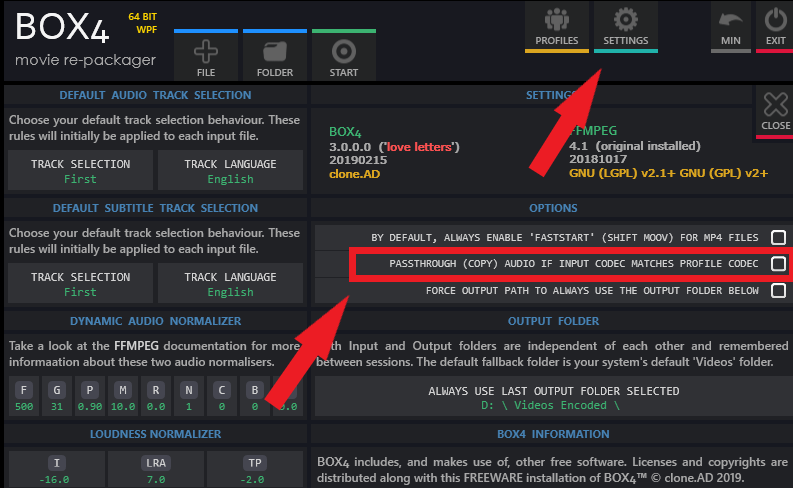
This program will convert mkv to mp4. If you have another one you use that’s fine too

In the settings you can either pass through the AC3 or convert it to AAC. You can try both

I suspect converting the file to mp4 or changing the audio will cause the file to direct play. I don’t know if this is a viable solution but it will let you know what the TV doesn’t like

Wow, thanks. Will try to convert to mp4 to see if it changes anything.

I also disabled direct stream, and tried all 3 audio tracks (ac3 5.1, eac3 5.1 and truehd 7.1) in the mkv-file. It transcoded both the video and audio with all 3 tracks, so the tv is quite picky on the audio obviously.

Will try the mp4 and let you know. Thanks and have a nice day!

Hi, tested Box4 and converted the file and played it on my TV. It now direct plays both video and audio. Seems like the audio is still ac3, but it manage to direct play.

So at this point the only problem seems to be .mkv?

Does the tv direct play other mkv files or you get this issue with all of them?

Did converting it to mp4 mix out your subtitles?

Also keep in mind, if you have the library setting “prefer local metadata” enabled, it may pick up on any embedded metadata in the mp4 properties causing you some matching problems

Hi,
The TV direct play other .mkv-files.
The converting to mp4 removed subs yes.


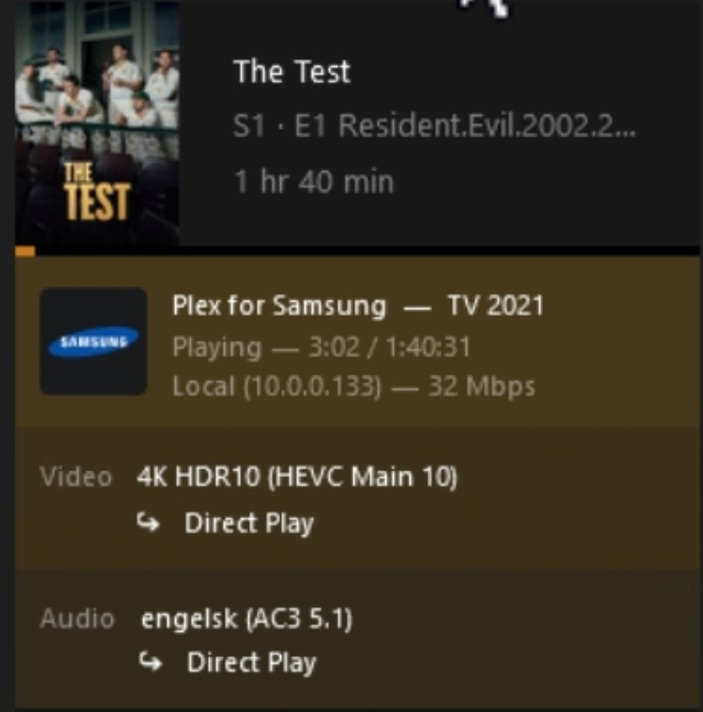
See screenshot for direct play for another mkv file.

Well, I guess that’s good news and bad news. You can get around it if you need to but almost all 4k HDR files come as mkv’s.

The only option left is to convert everything or buy a new streaming device.

Your best bang for the buck IMO is probably a Fire TV. I’ve had issues with certain Roku models and the Shield is a little on the expensive side. The Shield is probably the best for audio but you give up HDR10+ which is your only option with a Samsung TV

I know a lot of people use a Chromecast or Apple TV but I’ve never had one so I can’t say how they compare

Well, seems like I need to buy another streaming device then.

Still, thanks for the effort.

Have a nice day.

This topic was automatically closed 90 days after the last reply. New replies are no longer allowed.