I have two questions about adding a second server (backup server, same content) to my client:
.e.g. on my Samsung TV I can add both servers but I’m not sure what am I look at or where the stream is coming from. I don’t see any option that allows me to select server1 or server2, I guess the content is “both” but how does the client behave is one of the two servers becomes unavailable?
since I literally replicate the Library and media content from Server1 to Server2, I don’t seem to be able to prevent scan from happening on Server2 (no need for it since this is done on Server1 already and the library is replicated as well)
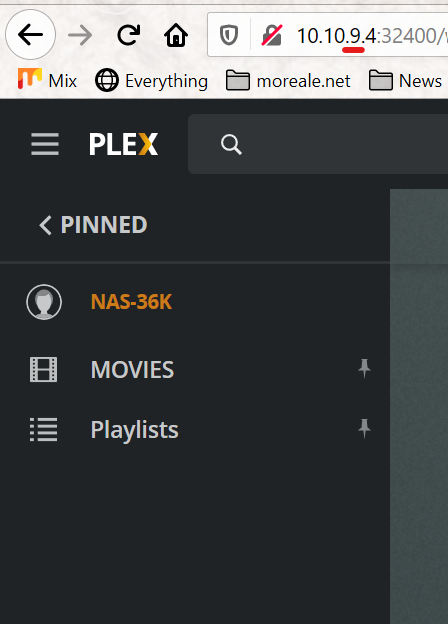
If you add libraries from both servers to the side bar, then one of these libraries will show the ‘Unavailable’ indicator, if the server is offline.
If you add libraries from different servers to the side bar, you should see the server’s ‘friendly name’ added to the library name. So make sure to not give both servers the same ‘friendly name’.
This might not work in old, unsupported clients.
Replicating the media files won’t replicate their ‘match’ and the metadata, which Plex does collect about them.
Therefore the scan is necessary – otherwise these newly replicated items won’t even show up on the backup server.
Ok first mistake of mine I had to change the Friendly name as it was indeed the same. Thanks for the input
About the other points :
Library: I don’t seem to be able to “control” what server to use. Windows Plex client has no way to see the secondary server and it just connects to my LAN Plex server, where the TV I had the settings to specify manually the two server,decides to use the remote by default.
Scan: I did mention that I replicate the full media (/mnt/hdd/movies) and the full Library (/var/lib/plexmediaserver) so the secondary server is always updated, I just don’t need the scan on the secondary, because of this. Can this be disabled at all?
I’m using Plex Media Player on Windows 10 (just for testing really).
On the TV it’s the SamsungTV client
About the scan, spot on, I though I had disabled it but I didn’t… However I must be missing something here because despite having moved the media AND the Library from primary to secondary I don’t see the new media added on the secondary. Essentialyl what I’m trying to do is to have the movies appearing but not re-match if that makes sense.
You can’t copy the database file while it is in use. I think your database is never (successfully) copied. So it always stays in an old state. Which explains why the new files are not appearing in it.
right… so I will try to stop server1, run rsync for media and Library and start again when finished.
I suppose I will need this at the receiving end too…
Great that stopping servers tip worked wonderfully
Now going back to the first point of mine: How can I specify on the client/s what server to use? Ideally I would like the idea to have all the clients set up with both servers and in case of reachability issue a manual/automatic switch can be made
There won’t be an automatic switchover.
All you can do is to add the cources from both servers to the side bar,
or tell your users to use the MORE menu item at the bottom of the side bar.
I’m a bit embarrassed to ask this… but how do I add servers to the side bar? I don’t see any option for that in either Windows client or SamsungTV…
Windows doesn’t allow me to specify any server manually and picks up my LAN server by default where SamsungTV has both servers set (manually) and decides to use the remote one.
In either cases, under MORE I don’t see any option to switch server…
Have you watched the video?
Any server that is signed into your plex.tv account will appear under MORE automatically. You can then pick all those libraries you want to pin.
I did watch the video but to be fair it’s a bit too much info.
Regardless I have logged in both servers via the web interface and have claimed the unclaimed server, logged out, back in, still no second server selectable.