Secure = prefered, then everyone gets Indirect (2mbit limit!)

hi all,
Im a network admin for a living, so i know how to forward ports and verify they are actually forwarded. Pretty direct problem/question: If i set secure = Preferred (or required), then almost all of my remote clients/friends who connected end up showing up as indirect (ie tunneled via plex/aws and 2mbit limit).

I have set the plex server (windows nic) to use 1.1.1.1 as its dns (to rule out dns-rebinding protection, even though that should only affect local network streams, and my issue is remote streams).

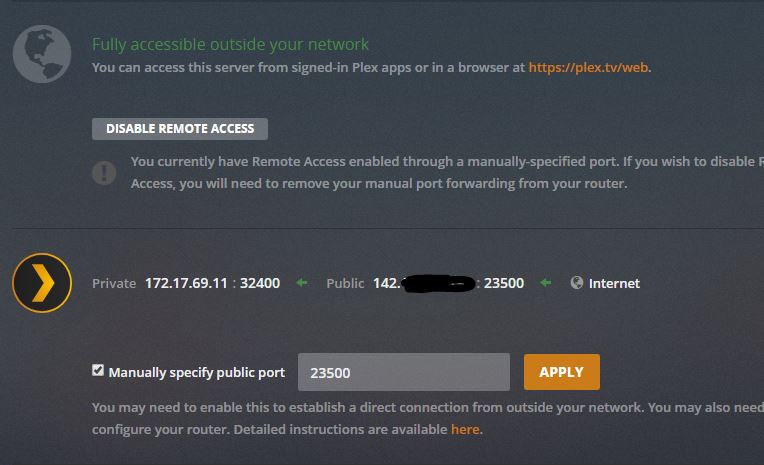
Ofcourse plex Remote Access shows as " Fully accessible outside your network" . note i am using a non standard port (im using 23500 -> 32400), and i have verified this is externally accessible/properly forwarded.

can anyone help / offer suggestions? this is killing my plex server/experience for friends I dont really mind running secure=disabled, except for the annoying messages that pop-up on various plex apps/clients about connection being insecure.

do i need to buy and apply a custom SSL cert (and setup a real dns to resolve to my plex server / pub IP maybe?)

“Treat WAN IP As LAN Bandwidth” is checked off (but again, i think this applies only to local, LAN connections, which im not having any issues with, its only remote connections)

Server Version#: Version 1.17.0.1709 (same issue with 1.16.x)
windows 2012r2 server

thanks!
Sorry if I’m not understanding, but doesn’t Settings > Quality > Video Quality control the 2Mbps cap for each player that you change it on?

I admit it’s late, and I need a nap.

That won’t do anything against DNS rebinding protection. This is solely a feature of your router/DNS resolver/firewall.

Do I remember correctly that 1.1.1.1 is from Cloudflare? I have seen numerous reports that it doesn’t work as reliably with Plex than Google’s 8.8.8.8

But that is just an aside.


Do you have set a custom server URL or a custom encryption certificate?

Are your remote clients connecting from inside ‘corporate’ or 3rd-party ‘managed’ networks? Those sometimes block access to plex.tv

Or they use DNS resolvers which don’t get updated fast enough, so they deliver the wrong IP to a given FQDN in the plex.direct domain.
If they have access to their gateway configuration, they can try to use the Google DNS servers as well.
The more frequent your external IP is changing (determined by your ISP), the more important a reliable support for the .direct TLD at the client side is getting.

Silly question, but did you restart PMS after you changed the security setting?

Thanks very much for your detailed reply, i will address each point (in bold):

That won’t do anything against DNS rebinding protection. This is solely a feature of your router/DNS resolver/firewall.
I dont think DNS rebinding is even relevant in my case, as its my understanding that DNS rebinding protection only interferes with local LAN plex connections - im not having any issues at all with my local plex connections (ie local network plex apps on my apple tvs and fire sticks work perfectly- issue in this post is only for remote connections (ie my various friends who im sharing my server with are almost always showing up as indirect connections). FWIW, i have a mikrotik router.

Do I remember correctly that 1.1.1.1 is from Cloudflare? I have seen numerous reports that it doesn’t work as reliably with Plex than Google’s 8.8.8.8

But that is just an aside.
agreed, (and 1.1.1.1 is cloudflare)

Do you have set a custom server URL or a custom encryption certificate?
I do not, please see below for screen shot of the relevant plex settings page

Are your remote clients connecting from inside ‘corporate’ or 3rd-party ‘managed’ networks? Those sometimes block access to plex.tv
agreed, but all of my friends are coming from standard home connections, also many of these had none of these “indirect” issues on my old plex server (about 2 months ago i re-created my entire plex install on new hardware, here. Fresh plex server install, and re-added all libraries. ie i didnt try to move or transfer anything from the old plex server app)

Or they use DNS resolvers which don’t get updated fast enough, so they deliver the wrong IP to a given FQDN in the plex.direct domain.
If they have access to their gateway configuration, they can try to use the Google DNS servers as well.
interesting, i thought that plex.direct only applied to local lan connections, but as i do manage the routers for some of these/my friends, i can look into this / make changes on their routers

The more frequent your external IP is changing (determined by your ISP), the more important a reliable support for the .direct TLD at the client side is getting.
agreed, that this could directly cause what im seeing, however my public IP address here is static (i have a “business/enterprise” uniti fiber line at my home that i pay out the aXX for)

I can say this (and its a very limited test), but from my iphone, on LTE (not wifi), i was getting a indirect connection when i had Secure Connections = Preferred , I have since tried switching that to Secure Connections = Required, and im now seeing a proper, direct connection from my iphone on LTE. (this was also the case when i tested Secure Connections = Disabled).

thanks

Another possibility. Did you have the security disabled in your previous server? If so, then your users would have gotten a message on their end if they want to switch to using an insecure connection. When you turned security back on, those clients are still set to use the insecure mode, so they end up with an indirect connection.

They wouldn’t be able to use a Relay connection then, because encryption is enforced for these.

hey, i wanted to update this, it seems the ISSUE IS FIXED!! what fixed it was making switch from:
secure = Preferred
to
secure = Required

(even with secure=disabled , users were still often getting tunneled, incorrectly)

This to me sounds like a bug / problem (ie there is no reason that required/preferred/disabled should have any impact on FORCING all users to be tunneled - i can see the tunnel requiring ssl, but that was not the issue here, the issue was TOO often use of the tunnel) , but since i made the change, everyone has been connecting directly! A few did have to do the reset home screen (as it was showing up as offline), which was a bit annoying as i had to walk a few friends through that process for the 2nd time now. (1st was when installed new plex server and deleted my old one, ALL users/friends had to reset home screen, or most just ended up delete xyz plex app, and reinstall).

thanks for all the replies and detailed info! very much appreciated.

This topic was automatically closed after 90 days. New replies are no longer allowed.
