Is there any way that the Now Playing screen can, or could transpose whether the currently playing media is being direct played, streamed, transcoded, etc? The is something that I use the Web App for a lot but can’t see how to do it in the new app.
This will be added to documentation / FAQ soon, but here is how you know:
single arrow = local, double arrow = remote. green arrow = secure connection, red arrow = insecure connection
3 Likes
Thanks for the response and the arrows that I see now make sense. Will anything indicate whether the server is Direct Playing the content or having to transcode it though?
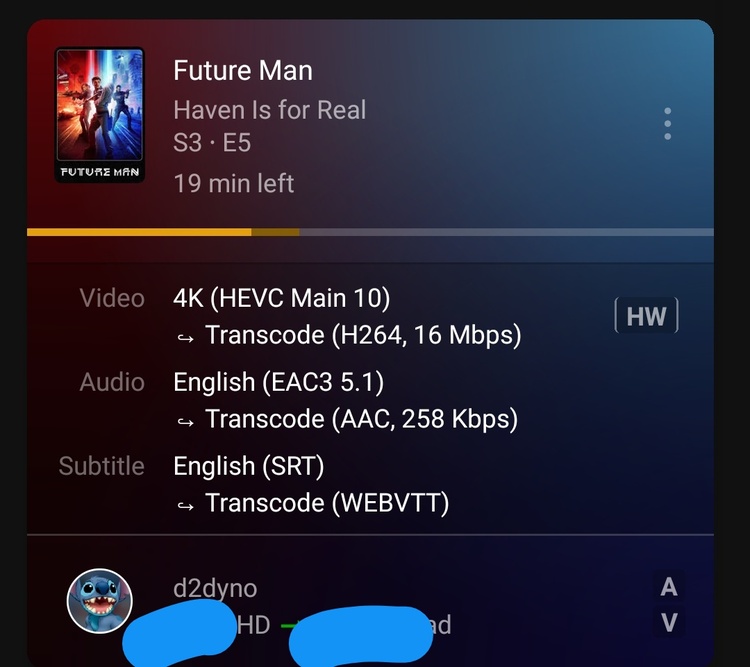
Yes, you will see 2 different icons V (video) and A (audio), meaning video and/or audio is being transcoded to the user. You can also see if HW transcoding is being enabled, and other specific details by clicking the options button on top right of now playing, and enable expanded view.
Here are screens for normal/expanded view with transcoding:

1 Like
Thanks for replying and providing the screenshots. I have now seen files transcoding within the App so I am happy that it was just me being thrown by it not positively confirming that a file is direct playing video and audio when this is the case. Slightly at odds with the web app but no problems now that I know. Cheers.
This topic was automatically closed 90 days after the last reply. New replies are no longer allowed.
