Server maintenance leads to excessive resource utilization

Server Version#: 1.19.5.3035
Player Version#: N/A not a playback issue
Plex is hosted on UnRAID using Docker.

As of about 3-5 days ago I’ve been noticing frequent and repeated excessive resource utilization during the server maintenance window that is causing docker to OOM reap Plex’s processes.

This is happening across both of my Plex servers on different hardware (AMD & INTEL), however to reduce confusion I will just be posting info from the one server as they are practically identical in both content, setup, & configuration.

I am using the LinuxServer.io Plex docker container. Docker RAM limits are in place but they should be more than high enough for plex to never hit them in normal operation:

NOTYOFLIX has a 6GB RAM limit for Plex and I am the only user/streamer from this server.
NODEFlix has an 8GB limit set for Plex.

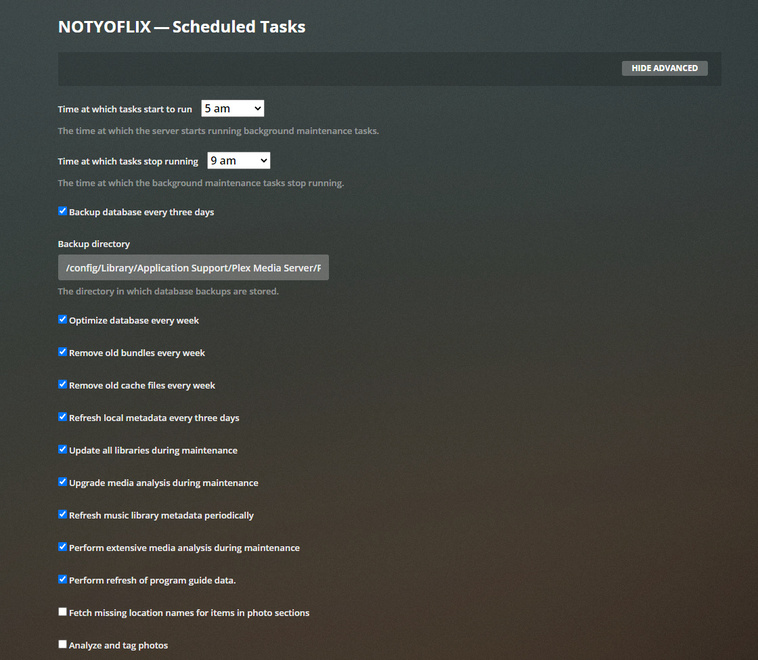
My server maintenance window is between 5AM and 9AM and like clockwork about 30 minutes into the maintenance window plex starts trying to take every bit of RAM it can get its hands on and is subsequently killed for being greedy

1. Jul  6 05:30:48 VOID kernel: CPU: 2 PID: 29776 Comm: Plex Script Hos Not tainted 4.19.107-Unraid #1

2. Jul  6 05:30:48 VOID kernel: Hardware name: Gigabyte Technology Co., Ltd. To be filled by O.E.M./970A-DS3P, BIOS FD 02/26/2016

3. Jul  6 05:30:48 VOID kernel: Call Trace:

4. Jul  6 05:30:48 VOID kernel: dump_stack+0x67/0x83

5. Jul  6 05:30:48 VOID kernel: dump_header+0x66/0x289

6. Jul  6 05:30:48 VOID kernel: oom_kill_process+0x9d/0x220

7. Jul  6 05:30:48 VOID kernel: out_of_memory+0x3b7/0x3ea

8. Jul  6 05:30:48 VOID kernel: mem_cgroup_out_of_memory+0x94/0xc8

9. Jul  6 05:30:48 VOID kernel: try_charge+0x52a/0x682

10. Jul  6 05:30:48 VOID kernel: ? __alloc_pages_nodemask+0x150/0xae1

11. Jul  6 05:30:48 VOID kernel: mem_cgroup_try_charge+0x115/0x158

12. Jul  6 05:30:48 VOID kernel: __add_to_page_cache_locked+0x73/0x184

13. Jul  6 05:30:48 VOID kernel: add_to_page_cache_lru+0x47/0xd5

14. Jul  6 05:30:48 VOID kernel: filemap_fault+0x238/0x47c

15. Jul  6 05:30:48 VOID kernel: __do_fault+0x4d/0x88

16. Jul  6 05:30:48 VOID kernel: __handle_mm_fault+0xdb5/0x11b7

17. Jul  6 05:30:48 VOID kernel: ? hrtimer_init+0x2/0x2

18. Jul  6 05:30:48 VOID kernel: handle_mm_fault+0x189/0x1e3

19. Jul  6 05:30:48 VOID kernel: __do_page_fault+0x267/0x3ff

20. Jul  6 05:30:48 VOID kernel: ? page_fault+0x8/0x30

21. Jul  6 05:30:48 VOID kernel: page_fault+0x1e/0x30

22. Jul  6 05:30:48 VOID kernel: RIP: 0033:0x149ce5010740

23. Jul  6 05:30:48 VOID kernel: Code: Bad RIP value.

24. Jul  6 05:30:48 VOID kernel: RSP: 002b:0000149cdd8ac2c8 EFLAGS: 00010207

25. Jul  6 05:30:48 VOID kernel: RAX: 0000000000000000 RBX: 0000000000000005 RCX: 0000149ce5001bb7

26. Jul  6 05:30:48 VOID kernel: RDX: 00000000000003ff RSI: 0000149cb4004d90 RDI: 0000000000000000

27. Jul  6 05:30:48 VOID kernel: RBP: 0000149cb4004d90 R08: 0000000000000000 R09: 0000000000000000

28. Jul  6 05:30:48 VOID kernel: R10: 00000000000000c8 R11: 0000000000000293 R12: 00000000000003ff

29. Jul  6 05:30:48 VOID kernel: R13: 00000000000000c8 R14: 0000149cb4004d90 R15: 0000149ce1490c30

30. Jul  6 05:30:48 VOID kernel: Task in /docker/9af320f12a9307277545efcf40eb6085d0bac2ded02eb6ce43fd8fb6f51eca33 killed as a result of limit of /docker/9af320f12a9307277545efcf40eb6085d0bac2ded02eb6ce43fd8fb6f51eca33

31. Jul  6 05:30:48 VOID kernel: memory: usage 6291456kB, limit 6291456kB, failcnt 63903251

32. Jul  6 05:30:48 VOID kernel: memory+swap: usage 6291456kB, limit 12582912kB, failcnt 0

33. Jul  6 05:30:48 VOID kernel: kmem: usage 49256kB, limit 9007199254740988kB, failcnt 0

34. Jul  6 05:30:48 VOID kernel: Memory cgroup stats for /docker/9af320f12a9307277545efcf40eb6085d0bac2ded02eb6ce43fd8fb6f51eca33: cache:6064KB rss:6236156KB rss_huge:409600KB shmem:0KB mapped_file:132KB dirty:264KB writeback:0KB swap:0KB inactive_anon:8KB active_anon:6236200KB inactive_file:3324KB active_file:748KB unevictable:0KB

35. Jul  6 05:30:48 VOID kernel: Tasks state (memory values in pages):

36. Jul  6 05:30:48 VOID kernel: [  pid  ]   uid  tgid total_vm      rss pgtables_bytes swapents oom_score_adj name

37. Jul  6 05:30:48 VOID kernel: [  28107]     0 28107       50        1    28672        0             0 s6-svscan

38. Jul  6 05:30:48 VOID kernel: [  28160]     0 28160       50        1    28672        0             0 s6-supervise

39. Jul  6 05:30:48 VOID kernel: [  28978]     0 28978       50        1    28672        0             0 s6-supervise

40. Jul  6 05:30:48 VOID kernel: [  28981]    99 28981  4021481  1367128 12034048        0             0 Plex Media Serv

41. Jul  6 05:30:48 VOID kernel: [  29020]    99 29020   427824    15510   561152        0             0 Plex Script Hos

42. Jul  6 05:30:48 VOID kernel: [  29173]    99 29173   108976      396   270336        0             0 Plex Tuner Serv

43. Jul  6 05:30:48 VOID kernel: [  29628]    99 29628   220654     6237   405504        0             0 Plex Script Hos

44. Jul  6 05:30:48 VOID kernel: [  29957]    99 29957   424266   115539  1437696        0             0 Plex Script Hos

45. Jul  6 05:30:48 VOID kernel: [  30042]    99 30042   223846     9600   430080        0             0 Plex Script Hos

46. Jul  6 05:30:48 VOID kernel: [    648]    99   648     4483      190    73728        0             0 EasyAudioEncode

47. Jul  6 05:30:48 VOID kernel: [  20102]    99 20102   309055    10451   491520        0             0 Plex Script Hos

48. Jul  6 05:30:48 VOID kernel: [  20457]    99 20457   255860     6914   442368        0             0 Plex Script Hos

49. Jul  6 05:30:48 VOID kernel: [  20629]    99 20629   357793     8912   495616        0             0 Plex Script Hos

50. Jul  6 05:30:48 VOID kernel: [  20838]    99 20838   223139     9579   434176        0             0 Plex Script Hos

51. Jul  6 05:30:48 VOID kernel: [   2050]    99  2050    47443     6783   393216        0             0 Plex Transcoder

52. Jul  6 05:30:48 VOID kernel: Memory cgroup out of memory: Kill process 28981 (Plex Media Serv) score 871 or sacrifice child

53. Jul  6 05:30:48 VOID kernel: Killed process 29957 (Plex Script Hos) total-vm:1697064kB, anon-rss:462156kB, file-rss:0kB, shmem-rss:0kB

54. Jul  6 05:30:48 VOID kernel: oom_reaper: reaped process 29957 (Plex Script Hos), now anon-rss:0kB, file-rss:0kB, shmem-rss:0kB

55. Jul  6 05:30:48 VOID kernel: Plex Media Serv invoked oom-killer: gfp_mask=0x6200ca(GFP_HIGHUSER_MOVABLE), nodemask=(null), order=0, oom_score_adj=0

56. Jul  6 05:30:48 VOID kernel: Plex Media Serv cpuset=9af320f12a9307277545efcf40eb6085d0bac2ded02eb6ce43fd8fb6f51eca33 mems_allowed=0
Here is an excerpt from this morning’s syslog showing the repeated OOM reaping: https://pastebin.com/PcmbqquR

UnRAID server Diagnostics zip file: void-diagnostics-20200706-0702.zip (199.3 KB)

Plex log directory with debug enabled during crashing.
Logs.zip (5.0 MB)

I never noticed these issues until a few weeks after the detect into feature was introduced though it doesn’t seem to be explicitly caused by intro detection…

I manually initiated a rescan of all Intro’s on NOTYOFLIX in an attempt to reproduce the issue but I couldn’t, it only seems to occur during the sever maintenance window.

I have turned off intro detection and am waiting for tomorrow’s maintenance window to see if disabling that setting prevents the OOM issues.

EDIT: My docker command if that helps:

root@localhost:# /usr/local/emhttp/plugins/dynamix.docker.manager/scripts/docker run -d --name=‘plex’ --net=‘host’ --cpuset-cpus=‘2,4,3,5’ -e TZ=“America/Chicago” -e HOST_OS=“Unraid” -e ‘VERSION’=‘latest’ -e ‘NVIDIA_VISIBLE_DEVICES’=‘’ -e ‘PUID’=‘99’ -e ‘PGID’=‘100’ -e ‘TCP_PORT_32400’=‘32400’ -e ‘TCP_PORT_3005’=‘3005’ -e ‘TCP_PORT_8324’=‘8324’ -e ‘TCP_PORT_32469’=‘32469’ -e ‘UDP_PORT_1900’=‘1900’ -e ‘UDP_PORT_32410’=‘32410’ -e ‘UDP_PORT_32412’=‘32412’ -e ‘UDP_PORT_32413’=‘32413’ -e ‘UDP_PORT_32414’=‘32414’ -v ‘/mnt/user’:‘/media’:‘rw’ -v ‘’:‘/transcode’:‘rw’ -v ‘/mnt/cache/appdata/plex’:‘/config’:‘rw’ --memory=6G ‘linuxserver/plex’

Of course, like the noise your car makes that suddenly stops when you take it to a mechanic, the OOM issue has not occurred today during the maintenance window on either server.

I will monitor and bump this topic again if it re-appears.

Today it’s back across both servers, started about 30 minutes into the maintenance window again, have not changed anything since yesterday except maybe added a few new pieces of media.

Can anyone from the Plex team take a look at my logs?

Jul 05, 2020 06:07:36.708 [0x15000205e700] INFO - Plex Media Scanner v1.19.5.3035-864bbcbb7 - Docker Docker Container (LinuxServer.io) x86_64 - build: linux-x86_64 - GMT -05:00
Jul 05, 2020 06:07:36.708 [0x15000205e700] INFO - Linux version: 4.19.107-Unraid, language: en-US
Jul 05, 2020 06:07:36.708 [0x15000205e700] INFO - Processor AMD FX™-6300 Six-Core Processor
Jul 05, 2020 06:07:36.708 [0x15000205e700] INFO - /usr/lib/plexmediaserver/Plex Media Scanner --analyze-deeply --item 22876 --log-file-suffix Deep Analysis
Jul 05, 2020 06:07:37.006 [0x15000a253300] WARN - [FFMPEG] - Format matroska,webm detected only with low score of 1, misdetection possible!
Jul 05, 2020 06:07:37.006 [0x15000a253300] ERROR - [FFMPEG] - EBML header parsing failed
Jul 05, 2020 06:07:37.007 [0x15000a253300] ERROR - Exception analyzing media file ‘/media/TV/The X-Files/Season 2/The X-Files - S02E18 WEBDL-720p.mkv’ (Could not parse /media/TV/The X-Files/Season 2/The X-Files - S02E18 WEBDL-720p.mkv (error=-1094995529): Invalid data found when processing input)

this ive seen before and its something to do with problems with the media.

I had seen mention of the intro scanner causing these issues when it comes to processing files with “bad” data in them but I didn’t think to check the Deep analysis log for the files. I stupidly assumed they would be in the main scanner or server logs. :doh:

I will check those files but I am not convinced that is my only problem here otherwise I would be crashing every day on those same files, right?

Why did I not have any OOM errors yesterday? None of these files are new by any means, they have been on my server for years.

But at least this gives me a place to start, I was desperately trying to avoid letting FFMPEG crawl 15-20TB of TV shows hunting for bad files.

EDIT: Alright so it looks like half that season of X-Files is just rife with audio stream issues according to FFMPEG. I’m going to replace those files and the one Cromarti HS episode that got flagged and we will see if I have any further OOM issues.

i think because the new “scanner” hasnt gotten around to scanning your X files yet, doing by schedule everynight takes some time

This issue is not strictly the intro detection.

I replaced all files that were causing analysis errors on both servers yesterday outside of the maintenance window. Since I added “new” media Plex detected intros and did not crash or exceed its memory limit.

This morning (7/9) one of the Plex instances exceeded it’s memory limit during maintenance and the other did not. Both had the same files replaced. NODEFLIX (the crashing server today) did not flag any new files for analysis issues in the deep analysis logs today so I’m still not sure why the servers seem to take turns crashing and exceeding my set memory limits.

I don’t believe this is strictly file related and I’m hoping someone with more experience crawling through all these logs can point me in the right direction.

Here is my logs from NODEFlix today with debug on (it was the only crasher today): Logs-NODE-7-8.zip (4.9 MB)

I mean it is just insane how frequent this issue is. Plex is being killed about every 10 minutes for the entirety of the four hour maintenance window. It renders the Plex completely unusable while this is occuring.

I can confirm that behaviour for my Unraid Plex Server running in a LinuxServer.io docker as well. My maintenance window starts at 02:00 and ends at 04:00. At 04:00 til 06:00 my own backup jobs run.

5 minutes after start of Plexs maintenance at 02:05 my cache pool (2x NVMe M.2 devices) report heavy load with temperatures beyond 50 degree celsius. This lasts for nearly an hour and ends at that point with the NVMe devices cooling down.

My own backup jobs read from these devices at high speed and don’t bring these devices to higher temperatures. So my guess is, Plex is writing to these devices constantly. As these devices host those trillions of Plex folders/files and it’s SQLite DB I think the truth might be in Plex own directories.

MKV-only here - not one single MP4 File AFAIK.

EDIT: Forgot to mention, that I did not set any limits for my docker containers. Only my two Unraid VMs have it’s own CPUs and RAM. All dockers share the remaining CPUs (24 threads) and RAM (96 GB). Never experienced one single crash of Unraid in several years. Just confess that it’s server grade hardware here.

Well I’m glad I’m not the only one!

I haven’t noticed excessive disk load or temp issues but I use SATA SSDs as opposed to NVMe.

Do you have memory limits set on your docker? Do you notice Plex consuming large amounts of RAM or is it strictly a disk issue for you?

I haven’t gotten any other confirmations from other users on the UnRAID forum whether this is a widespread or isolated issue.

EDIT: I was finally able to see the behavior in action. Check out the video below, start at the 40 second mark.

While all of this is occuring you can see the Plex spinning wheel like it is working in the background but it gives no indication of what exactly it is trying to do:

image

EDIT: Captured a video of the insane RAM growth in action in top. It starts at about the 40 second mark in the video and within 2 minutes it has been reaped for RAM usage.

No memory limits for dockers here. All dockers share the same remaining CPU/memory. I don’t know how much memory you have but can’t you simply remove the limit? Perhaps your machines/dockers don’t crash then.

I can’t say anything about Plexs memory usage because I don’t use any tools to observe it. In the morning I do see the yellow warnings within Unraids GUI because of the cache devices becoming to hot.

In the end I gave up to check why Plex uses trillions of files or why it uses this or that heavily. Once I had to restore a backup of Plexs appdata. It took nearly 8 hours to copy/untar the files back - on NVMe M.2 devices at around 3GB/s. Once a month I take a full backup of Plexs appdata. It ends 24 hours later - when the next backup starts :wink: So many files, so many occupied resources.

One server has 16GB of RAM and one has 32GB for the whole system. Under normal usage I have never observed Plex hit the RAM limits I’ve set and they have been in place for years (6GB and 8GB respectively).

I don’t want to remove the RAM limits as they are in place to prevent this exact sort of problem. Where an application has some sort of issue and tries to consume every but of available RAM in the system, taking the entire server down, not just Plex.

Looked at your video. It seems the Plex server is eating RAM - not the Scanner. I don’t know what task is responsible for what but IMHO the media files are not the reason.

EDIT: Some minutes ago I did run a “du -h .” in “/mnt/cache/system/appdata/plex”. Guess what - the command stalled. Ha Ha. Does the amount of Plex files exceed a Linux du limit? That’s really funny.

Plex seems to walk towards a Content Delivery Network. I don’t like that step but at least the count of files will decrease.

Yes I just wasn’t sure if whatever the scanner is doing is a contributor to this issue as it only occurs during my maintenance window when there is bound to be heavy scanner/analysis activity.

It does use a lot of small files spread out over many directories though I think this is mostly for posters, fanart, thumbnails, etc. When my issue is occuring UnRAID and IOTOP show most of my disk activity is the scanner reading various media files from my array.

Unrelated to my issue but check out Squid’s Backup Appdata plugin, it seems to be well optimized for backing up Plex and its many tiny files. My Plex folder alone is about 60GB and it rips through it with compression in about 4 hours and makes a backup.

I’m really hoping I can get a moderator or a plex staff member in here to help me make sense of the litany of logs Plex produces.

Somebody, anybody from plex? @ChuckPa @anon18523487 I could really use some help in diagnosing this.

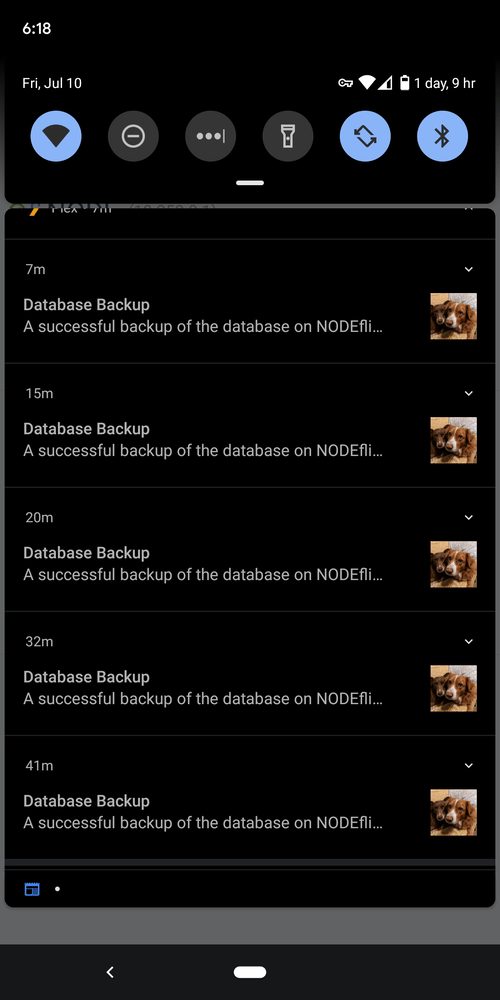
Today my server is just backing up the database over and over again. Its backed up 5 times in the last hour on top of the constant excessive RAM usage. This is a new symptom and not something that I remember seeing on the 7th which would have been my previous 3 day backup day.

I’m to the point where I’m considering just disabling server maintenance (or bailing on Plex all together) until this gets resolved. This is unnecessary wear on my disks rerunning various maintenance tasks and scanning repeatedly because of the constant crashing due to physical RAM usage growth.

It seems to be exclusively affecting NODEFlix now with no clear indication as to why. I have not changed anything on either server besides enable debug logging and adjust the maintenance window to lessen the impact of the constant crashing.

Logs.zip (5.2 MB)

I continue to check the logs and cannot find anything that seems to give me a clue as to WTF is going on. There are a few media file FFMPEG analysis errors to be addressed, but I don’t believe they are causing this bizarre behavior.

Beyond that all I find in the logs is issues connecting to some servers friends have shared with me that are currently offline, some “curl_easy_perform(handle)” errors, and what appear to be some webhook scrobbler errors…I’m not finidng anything in these logs to explain what is happening.

EDIT: Since it’s now NODEFlix that is continuosly crashing, here is an UnRAID Diagnostics file that should show my hardware, disks, etc.node-diagnostics-20200710-0645.zip (142.7 KB)

How much media do you have indexed?

A fairly large amount, but I wouldn’t say it is the largest I have ever seen mentioned by other users in Plex’s various communities.

This is from Tautuli’s main page:

Both servers have roughly the same library size, it is mirrored as a backup server. Why does this not affect NOTOFLIX currently when it is has a smaller RAM limit and the same size library?

Looking at your logs, it looks like there are Maintenance settings you can turn OFF (no need to repeat work).

Are the following turned OFF ?

  1. Refresh local metadata every 3 days
  2. Upgrade media analysis during maintenance
  3. Refresh music library metadata periodically
  4. Perform extensive media analysis during maintenance

I suggest turning these off because:

  1. Metadata doesn’t change . You either have it or you don’t.
  2. When you upgrade any particular file, if you manually Analyse it, you don’t need to have PMS look for things to update
  3. Music library – same thing. Music matches and stays – leave metadata static.
  4. Media analysis is performed when first added. Unless you’re looking to use adaptive bitrate streaming, this feature isn’t necessary.
  1. Metadata doesn’t change . You either have it or you don’t.
  2. When you upgrade any particular file, if you manually Analyse it, you don’t need to have PMS look for things to update
  3. Music library – same thing. Music matches and stays – leave metadata static.
  4. Media analysis is performed when first added. Unless you’re looking to use adaptive bitrate streaming, this feature isn’t necessary.

I can attempt to try turning these off on both servers and see if it resolves the issues.

This is more of a band-aid over the leak in the dam than a real solution though. Why the sudden monstrous ballooning of the physical RAM requirements for basic maintenance? I may try to roll back to a version before detect intro was introduced and see if things return to what I consider normal (if your suggestions don’t have any real affect).

Did you watch the video I posted above? The PMS service RAM requirements fly out of control in under 2 minutes when there is no one using the server. How can the maintenance tasks consume so much RAM but I can stream to 10+ people at once during regular use and I maybe use 4GB at the most while adding, removing, analyzing media constantly throughout the day?

I’m going to move my maintenance window on the affected server and see if I can get it to test these settings now so i don’t need to wait until tomorrow (I will be going out of town).

EDIT: and btw thank you for coming in and taking time to look at my issue, its been really frustrating trying to troubleshoot it on my own.

Ok so I turned off the settings you recommended but left Detect Intros on for both servers.

Within minutes both plex dockers were using an insane amount of RAM and were shortly after killed by the OOM reaper:
image

(this grew to about 7GB, i screen grabbed it a little early out of fear of missing it)
image

Here are my logs for both after the most recent changes and tests: Logs-NOTYOFLIX-7-10.zip (6.0 MB) Logs-NODEFLIX-7-10.zip (4.8 MB)

I’m turning intro detection off on both now and re-testing again.

You can just turn off Intro Detection too.

I don’t use intro skip.
