Server Version#: Version1.19.4.2902 server with windows 7 ultimate service pack 1
Player Version#:Many players: 3 smart TV apps with Plex for Samsung 4.25.2, Tizen 2.4.0
The past June 7th I had a change of modem by my internet vendor and after that I realize I can’t use the streaming service anymore in my TV’s, cellphone neither in other PC. I really did as many things as you suggest in your support pages:
Sign out and sign in in the server,
Reviewed the remote access settings but it can’t be set as enabled for long time, I really don’t know why I try to set it on but after some seconds it returns to off (before my modem change it was also disable this option but it was possible to use my local tvs)
I already review my new modem settings and the “UPnP” “NAT-PMP” both are enabled,
I also uninstall the server plex and install it again, I did the same with the app in the TV but the tv shows the server is not available.
Which means your new modem is doing nat, and perhaps your existing router is doing nat.
If this is true, you need to contact your ISP and find out how to put the modem into ‘bridge’ mode, so that your public ip address is handed to your router.
This has nothing to do with plex itself, but your internet connection.
And you should have asked for help long before doing anything as drastic as uninstalling/reinstalling or doing any amount of changes to PMS itself, when it is obviously because of the modem change.
Hello @TeknoJunkyand and thank you for your answer,
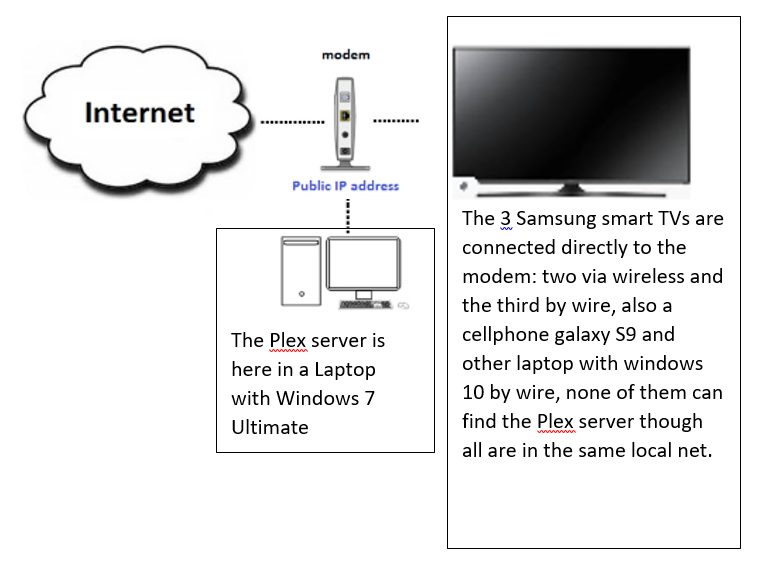
By streaming service I mean my local stuff, my movies and series. The TVs (and other devices) only show the internet stuff of Plex as news for example, but are no able to find my local plex server, and all of them are in the same local network, below is the schematic of how I have connected my server
As you can see I don’t have another router after my modem, just the TVs directly connected by wire or wireless to the modem. Do this is still considered as a “double natted” as you suggest?
I did “drastic moves” as you say because I don’t like to use portals like this because the response is kind of slow and all of you asume that one knows all about computer communications terminology as if we were IT engineers, that is not my case, I don’t know what you mean with “PMS” for example, I google it and many definitions appears but none related to computers or modems or plex, however I in that part I think I catched your idea. I bought Plex in android playstore as an usual client, and believe me that to enter here is because I’m despair.
I have to update some info here, the cellphone and the other laptop player are detecting now my plex server (my laptop with windows 7 ultimate) however the TV’s are not. But by the time I posted 4 days ago neither the cell nor the laptop player were detecting the server.
if you can access the settings of your modem/router, you might look and see if it has any ‘security’ features, maybe something called ‘client isolation’ which helps to block virus etc from spreading, but also blocks server programs from working.
there could be other names for it, and there could be other similar type functions which ‘lock down’ the network.
in any case, if everything worked before, and not after the new modem, the all the basic troubleshooting starts there.
if it is possible to put the ‘old’ modem back, at least temporarily, you could make sure everything works as it used to, then start comparing the settings between the old and new modem.
I think I found the IPs, one TV has 192.168.0.11, other TV has 192.168.0.12 and the laptop with Plex server is 192.168.0.4 according to the IPconfig command.
I would test and disable it temporarily, also check the wireless sections for any ‘isolation’ settings (this will block wireless connections from seeing other things on the lan).
Do yo mean to disable all in that page or just the first one related to firewall?
I don’t think is an issue of the wireless because the TV with IP 192.168.0.11 is connected by wire and also is not detecting the server.
However I entered to both wireless settings and both have the isolation disabled:
I just meant uncheck the first firewall enable/disable setting, it may reboot the modem. changing other settings may cause to reboot too. just a warning in case you were in the middle of something.
if disabling the firewall doesn’t help, I would put it back on until you can otherwise figure out what is causing the problems.
As far as the client isolation being off, thats good, I just wanted to make sure, but yes that would only block the wireless anyway.
I disable the firewall but is still not detecting the server, however the modem didn’t restart. just a few seconds I lost my signal and then continue working.