Server Version#: 1.42.0.9975
Player Version#: 2025.21.0
Does Plex Media Server do some sort of predictive bandwidth when streaming to a client? Like if my phone mostly streams from my LAN at Maximum and then I try to stream via a Cellular connection a few days later, will it try to push the same level of bandwidth?
I know there are setting in the mobile apps for local vs cellular streaming, but lately I have been observing massive remote bandwidth spikes in Plex Dash when trying to stream files, which causes a weird delay for the video loading on the mobile device when it used to be instant.
Example: I can set bandwidth and quality limits of 2 Mbps in the mobile app and then try to stream a 600 MB, 1 Mbps 480p file and Plex dash reports the remote bandwidth spikes to 20 Mbps before settling down. Setting the file to transcode to something other than “original quality” loads the video instantly.
Would love to see if someone has thoughts on why this might be occurring.
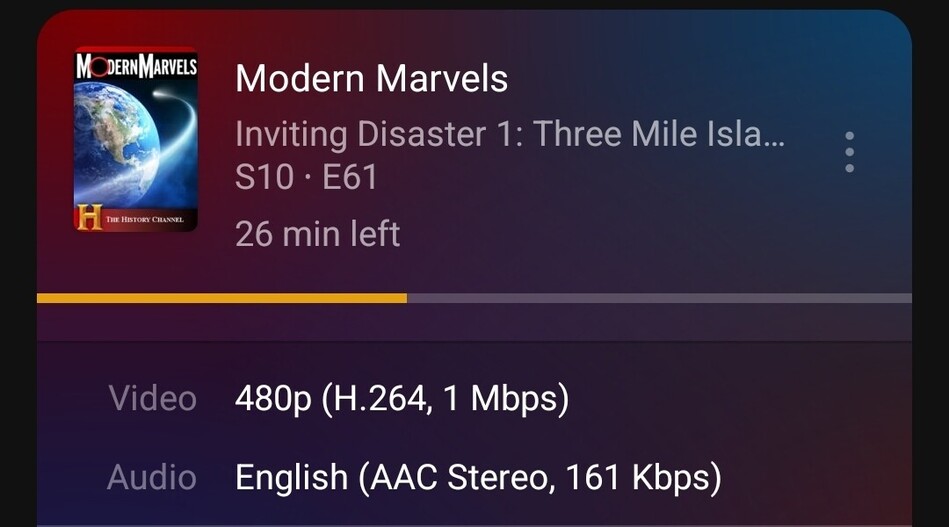
The file as you can see has a 1 Mbps bitrate and tries to direct play. For some reason the server tries to push 48 Mbps out to the player. At first I get a black screen, then the video stutters and spins.
If I set the quality to 480p 2Mbps then it forces a HW transcode and plays right away.
Neither of these seem like the right behavior and is not something I experienced previously.
Any help or thoughts on the matter would be appreciated
Mobile connection is Verizon 5G UW
Server had 2 Gbps symmetrical fiber.
This is totally normal.
At the beginning of playback, the file will be started to get transferred into the network buffer of the client as fast as possible – until that buffer is well filled. Further transfer is then throttled and only resumes as playback is progressing along the timeline.
Another possibility is missing or poor interleaving of the source file. If your source file is using the mp4/m4v container format, this is something you should investigate. Interleaving is pretty much essential to the ability to stream a video file.
See Capcut videos playback issues with plex - #2 by OttoKerner for more detail.
Thank you for your reply Otto. I can tell you these are MP4’s I encoded myself and have had them for close to a decade. The previous app/server combo did not behave this way.
The app will literally remain with a black screen until that surge of data is resolved when playing original quality (480p). Transcoding to 720p (which should not be possible) it plays instantly and does not have that same surge.
Let’s assume for now that the culprit is my second topic: missing interleaving.
If you force transcoding on the server, then the server’s transcoder is solving the issue for you. The server has direct access to the file, so it can jump around in it to reach the parts where video and audio are stored relatively easy.
If however the transcoder does nothing, and the file is sent to the client as-is (i.e. Direct Play), then it is up to the client to jump around within the file and combine the video and audio data which belong to the same playback position. This will cause a dramatic raise in used network bandwidth. With larger files it may even prevent playback altogether.
I propose you try the method in the linked post: remux the file to mkv as a test, then see if something changes.
Hi Otto. My apologies for the delayed reply. I was traveling and did not get a chance to test things until today. For this test, I used a 367 MB M4V that I have had since April of 2019. I compressed it myself in Handbrake from a DVD rip and selected Web Optimized so that the Moov file was moved to the beginning of the file to allow for optimized streaming.
This is a file I have played several times in the past and have experienced very little delay.
Testing this file on a 5G UW connection with the quality preset to maximum, the M4V takes 15 second to start.
As requested, I remuxed the file into a 365 MB MKV using MKVTools. Playing this file under the same conditions, it takes 3 seconds to start.
While this was good to see, most of my library is M4V and have work flawlessly up until the most recent app update. A long term fix might be to remux everything to MKVs, I am still confused at why things are suddenly different. Is it possible either the new app or something in the server is ignoring the MOOV file in MP4 containers?
 Treat WAN IP As LAN Bandwidth