Evening,
Having an issue with a server where every time I launch the plex server and open it, I have to login and it redirects to “client-setup” to select features/libraries. Then any settings I change it says “Settings have been saved” but as soon as I relaunch the server web interface all the settings are back to what they were. Any idea?
Client setup is the web player, not the server itself. If you have your browser set to delete cookies/site data when the closing windows or browser then it will ask you again each time you open it.
In the Chrome browser this is in “Settings>Privacy and Security> Cookies & other Site data” which has various settings to control this globally or per site with white/black lists of which can save and which cannot after windows are closed.
You can turn on Settings Sync which should help as well.
Damn I even looked at “Cookies and other site data” and overlooked the option to clear cookies each reset on the browser which was turned on. Turned it off and now the settings are holding and it’s staying logged in. Thank you.
Another issue I have is no matter what I load remotely from the server it always just shows it 2mbps 720p even though I’ve changed my settings and the remote settings?
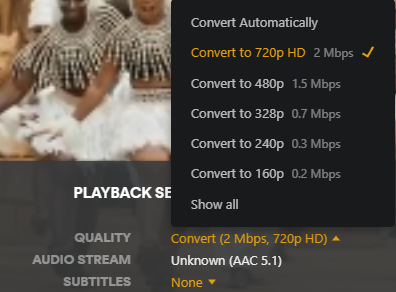
If you are sure your remote quality settings of the client are are set to something higher,
then the other likely causes are …
that remote access is not set up optimally on server and is using relay. https://support.plex.tv/articles/216766168-accessing-a-server-through-relay/
or there is a bandwidth limit on remote streams set on that server
Thank you for all the info. I think it’s a relay issue since the user has plex pass and its limited to 2mbps remote stream as well as having a double nat router issue that I’m waiting to get into the routers to resolve.


