Server setup wizard not authorized

Server Version#: latest

Ive installed PMS on ubuntu server (24.04 ltsc)

Trying to first setup wizard from another pc in local network (by local IP)

Login in account

And always encounter “not authorized“

So I cant setup media folders

What should I do?

Give us more information.

How did you install?
Docker
Download and dpkg -i
Snap

Assuming you downloaded the .deb file and dpkg -i to install grab the “Plex Media Server.log” file from /var/lib/plexmediaserver/Library/Application Support/Plex Media Server/Logs.

Well, I figured out solution

I should use ssh tunnel for first setup

Cos it (surprise) should be done from localhost only

But Im on ubuntu server without GUI (and any browser)

Now all works great

PS

Can you somehow free my email and username?

I delete old and create new account for troubleshooting

(Google recomended that)

And now I cant use them on this account

(Username: ZAIAC001 email: pasha1346798213@gmail.com )

Now new problem

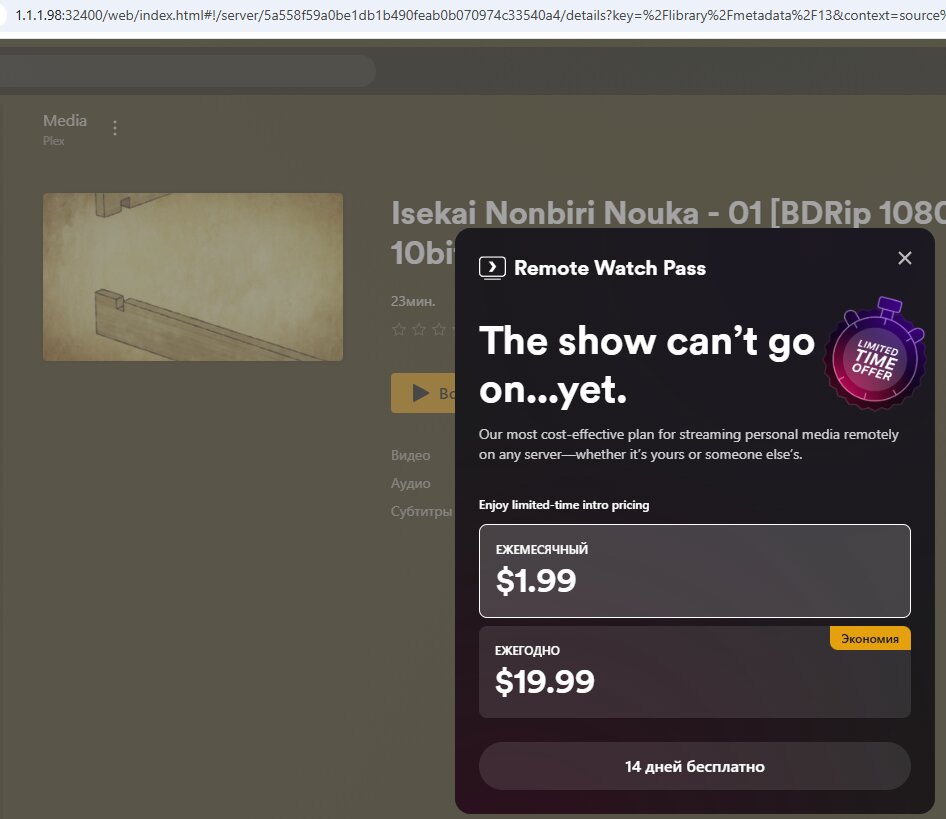
Why plex think that Im using remote (and ask for pro subscription)?

If Im on lan

What is the LAN IP of the server and what is the LAN IP of the player ?

They must be on the same subnet else it is considered Remote.

As on screenshot

Server on 1.1.1.98

Player on 1.1.1.2

Can it be cos of cifs mount?

Storage with media mounted to server via cifs

Then scanned and shared via plex

But all of them on same subnet 1.1.1.*

CIFS does not matter when claiming.

I have multiple hosts on the LAN.

I SSH into each of them.

To (re)claim a server, I do this while in that ssh session.

There are instructions & examples in the README file

Thats not a private network, you need to use an RFC-1918 subnet.

Well, ty for help

Seems plex not compatible with my network

Ill try emby instead, cos there are no such limits

Your current network configuration does not comply with standard networking practices and will likely lead to problems in the future. According to RFC 1918, specific ranges of IP addresses are reserved for private use within homes and organizations. These are:

  • 10.0.0.0/8

  • 172.16.0.0/12

  • 192.168.0.0/16

Instead of using one of these reserved ranges, your network is configured with 1.1.1.0/24, which is not a private range. In fact, this block belongs to Cloudflare and is part of the global public address space. Cloudflare actively uses this range, including 1.1.1.1, which serves as a widely used public DNS resolver.

By assigning addresses from this public range internally, your devices may experience conflicts, routing issues, or connectivity problems when communicating with the internet. To ensure stability, compliance, and proper functionality, the network should be reconfigured to use one of the RFC 1918 private ranges.

This topic was automatically closed 90 days after the last reply. New replies are no longer allowed.