Hi!
I have a Plex Livetime-Pass and want to add specific labels to a movie (4K) to exclude them for sharing external (because 4K Transcoding doesn’t work well). I read the help, but I do not have the sharing Option in the movie details section. Where can I add labels to exclude movies for sharing? I want to avoid making a second library just for 4K movies.
Best!
Please clarify something, I am unable to determine your intent:
Do you want to prevent streaming/transcoding of 4K to your own account as well if you were to watch outside the house? I’m… not sure how to do that, other than discipline yourself to avoid these videos…
Or do you want to prevent an invited friend from being able to stream/transcode 4K video? If this one, where are you hung up on? If you are unsure of where to apply labels to your content, you click the Pencil icon on an item, seen here:
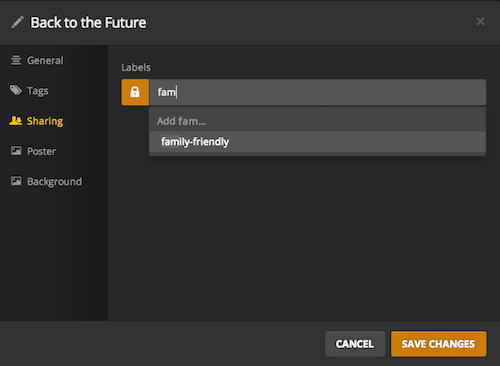
Make up a label, called 4K, and apply it to every 4K video you have. You can do this in bulk by selecting all 4K video at once (use filters to display only those of 4K resolution) and clicking the pencil icon that appears at the top. Apply the label to all at once.
Then you go to Settings > Users & Sharing, select the user, and go to the Restrictions tab along the top. Here you pick which labels you want to prevent their account from being able to see.
Hi,
Although when I am a Plex Pass user, I don’t have the “Sharing” option mentioned in the screenshot. That is exactly the problem.
https://www.dropbox.com/s/wqzugfgns6gt7ah/Bildschirmfoto%202022-01-04%20um%2021.18.01.png?dl=0
Oh man! You nailed it. Thx

