It is actually the third step. 
Apple TV and Roku showed these details already.
I think it will come to Android eventually.
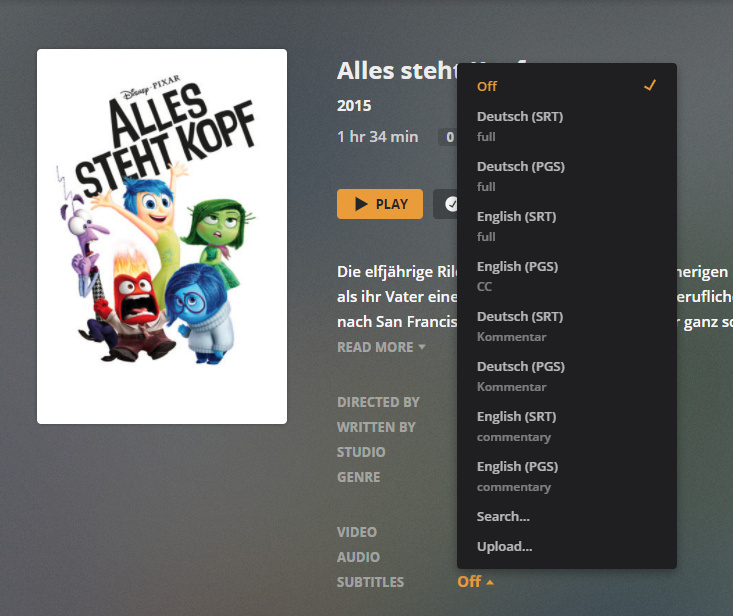
This is currently only being implemented for internal tracks (which really only applies to subtitles).
It would be great if this could be implemented for external subs as well in a way that would be able to be modified by the admin. Part of how I see this being implemented is to use the naming convention for external subtitles as such.
For forced subs, the extended display title could be “Language Forced” for forced subs which are already recognized by
Movies/Movie_Name (Release Date).[Language_Code].forced.ext
And then for “regular” subs (non SDH/HI subs), they can be done as
Movies/Movie_Name (Release Date).[Language_Code].ext
and the extended display title can be just “Language” (could also possibly make this user defineable so that if somebody preferred “Language Regular” or “Regular Language” instead of just “Language” that shouldn’t be too difficult).
Finally for SDH/HI it a few possibilities could be
Movies/Movie_Name (Release Date).[Language_Code].sdh.ext
Movies/Movie_Name (Release Date).[Language_Code].hi.ext
Movies/Movie_Name (Release Date).sdh.[Language_Code].ext
Movies/Movie_Name (Release Date).hi.[Language_Code].ext
(not sure if have hi at the end would work as HI is a 2 digit language code) but I know external subtitles with hi.[Language_Code].ext show up as I use that now to have 2 subtitles for the same language. Using something like that then the extended display could be “Language SDH” (and again, like mentioned above, making it user configurable would allow that to be decided by the admin).
This would also come in handy for users that allow subtitles to be downloaded because then it would allow regular and SDH subs to be distinguished for those.
Just my 2 cents for this feature which is slowly be implemented.
-Shark2k
Oddly enough, my client (web version 4.34.4, server version 1.20.1.3252) does not display the extend tracks in my browsers (Chrome or Edge… ugh).
You’re not using https://app.plex.tv
1 Like
Well, that kind of sucks, guess in 2025 it will finally come to the Kodi plugin.
While this idea certainly has merit I can assure you the PLEXtocracy will never go for it. We’ve had similar discussions before & Plex has made it clear that if the naming of files from torrent sites would be a problem it’s a hard “No”. Those names often use . instead of spaces with I think it’s the uploader’s code, or something that helps people find them again if they like their stuff, at the end. So a file may be Willow.1988.HD.720p.Eng.Lucasfilm.IH8SW.mp4 & since the subtitle file has to have the exact same name it’d be Willow.1988.HD.720p.Eng.Lucasfilm.IH8SW.eng.srt & it’d end up being labeled IH8SW English
That’s why those language codes have to be specific
Any eta on when these changes will come to the Samsung app and PMP?
What changes are you referring to?
The web app, roku, and apple TV now show track names. Though PMP and Samsung app don’t.
Android/FireTV also do not yet.
Let me get this clear…the Plex app on Roku supposedly shows the track names? It always did that by language. But I have the latest app and it still just shows the track names by language only. Additional information–like description does not show up. Yes, I have the latest Plex app on roku, so not sure what has changed (or am I missing something–wouldn’t be the first time).
Here’s a picture from my Kitchen roku with Yojimbo audio track names properly showing on latest version.

Where is that description from?
The Title field on the track in the MKV header info.
Cool, at least it’s something, I work with MKVs, but always Recode to Plex’s preferred MP4, but something is better than nothing
Thanks. Perhaps my problem is actually with my own films where I have added multiple soundtracks or where I add different language interpretations. On those, even though VLC shows my alternate descriptions in the audio track listing, neither plex web nor roku plex app shows them.
1 Like
Plex Web does show them

That is not a preference of Plex.
It used to be advantageous to use mp4 when you primarily had Apple devices.
But these devices have long since learned to direct Play MKV containers as well.
The XBox One doesn’t direct play MKVs, & the Roku didn’t a year ago, haven’t checked recently
My Tuppence Worth…
Roku’s do play MKV’s and have done for a few years. I currently own 2 Roku Premiere’s and before that a LT.
Also Roku’s can play multiple audio streams (not HD audio mind) but it does play DD and DD+, DTS and DTS 96/24 (although for DTS 96/24 on Roku you need to allow DTS HD passthrough) and multiple subtitles too. I encode in HEVC with either DD/DD+/DTS/DTS 96/24 audio (I have 5.1 surround albums).
I prefer MKV’s because they are more flexible than mp4’s, I name all the headers using either MKVToolnix or if I am changing a load at once I a program called jmkvpropedit. It allows batch header name changing. Saves loads of time if doing a TV series with multiple seasons.
Also as the Roku doesn’t work with HD audio if I have a Dolby True HD soundtrack I encode it in DD+. with a bitrate of 1536kbps. Can’t tell the difference from the HD soundtrack… With DTS HD i just use the core DTS. And Plex doesn’t need to transcode anything.
CCF
I dunno, it may have been as much as 2 years since the last time I checked, but until Corona hit I only used a NAS, & not a very powerful one, for my server. My Roku 2, & whatever one I had before that, would hang because it was trying to transcode when I’d play an MKV. Pass it through XMedia Recode to change the container & it’d play fine.
