It is but only when you are watching a movie. It’s not displaying track titles on movie pre-play screens like before.

1 Like
Good catch, I can reproduce this in the new-experience apps.
-
Details page → language (2x) + format
-
Playback on-screen display → language, format + description


2 Likes
Which app?
Edited my response… this was about the new experience apps on iOS / Android mobile and the current previews.
1 Like
this still doesn’t work
when you select a subtitle track or audio track with the PLEX APP on either a TV, video projector
You only get the language code, not the name of the track, so if you have multiple track in a language, for example English, and you have named them to be
-
english DTS
-
english commentary
-
english AC3
-
english dolby
you only get
-
english
-
english
-
english
-
english
so after almost 10 year of complain, this is still not done
what bother me is that when i use the plex app on my phone, i have the name of the track, so plex can DO the job,
but for unknown reason you have not implemented that function everywhere
3 Likes
How is it still not supported? Please please fix this for everyone!
1 Like
so far the only thing i have seen been done quick is the moderator that get rid of post when they already exist, and the fact that anything AI is frown upon, and that any complain get deleted,
i am not happy about this form of communication, especially when you have paid for a service, 10 year for this post and its still not done, why ?
I agree this should be supported everywhere, and specifically adding in MP4 support as part of it. There is still no support in any client I’ve tried for displaying audio track names or subtitle track names from MP4 files: Show names for audio tracks and subtitles in MP4 files
1 Like
I’ll add to this, been wanting this feature for years. Specifically for movies, I’d like to be able to see or edit the audio display title to whatever I see fit. I have a lot of Dolby Atmos and DTS:X movies, but you have to view the file into in order to see the actual Dolby Atmos title.
If you use the MKV container, Plex will read the titles for the audio and subtitle tracks within that container. This has been the case for years. What this specific request is for is to have that info displayed in all apps as it unfortunately only shows in certain apps. The below screenshot is from the web app for a movie in my library and you can see the names I gave the audio tracks. The Android TV app also shows this info (for now) but I can confirm the Android Mobile app does not.
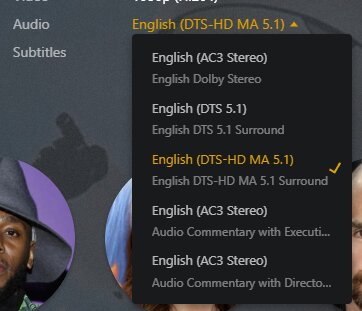
The titles do not scroll if they are wider than the box however (at least on the web app).
You can use MKVToolNix, which is available on multiple OSes, which includes the mkvprops program which will allow you to update the track titles.
-Shark2k
1 Like
MKVToolNix works well changing Audio Track Naming and Subtitles. Very useful when there are numerous same language subtitles. You can even add a subtitle to a mkv
Forced Subtitles, SDH for examples.
You can even prune Audio, Video , subtitles that will not be required.
https://support.plex.tv/articles/200471133-adding-local-subtitles-to-your-media/
MkvToolNix is a must have IMHO
1 Like
Using Plex on Apple TV again after some years away. How is displaying subtitle track names still not implemented in some clients? Isn’t this a core functionality?
