thanks. (it’s been a long day)
I will check with some friends who also have this device.
thanks. (it’s been a long day)
I will check with some friends who also have this device.
Thanks! No problem. Perfectly understand. Long day here too.
Got some feedback.
Have him unplug one of his NW cables from the synology and see if issue goes away. LIkely cause would be incorrect Link Aggregation setup. Also if he is plugging both ports into the 8 port switch on the UDMP itself, it ONLY has 1 GB of shared bw for all ports. See products:unifi:unifi_dream_machine_pro [Ubiquiti Community Wiki]
Tried unplugging one of the cables. No change
Deleted bond and redid bond as Active/Standby - No change
Also, the only thing I am running on this is the 4K TV, 1 work laptop, our two personal laptops, and NAS. We use the rest of the space for personal file/photo backup. Needless to say, we have a TON of movies as we are both movie-holics. When we are watching a movie from the TV, there is no other traffic, Bandwidth aggregation is not an issue, nor is backplane saturation trying to push 40 Mbps. If I was running an SMB with 30 users, I could get down with a bandwidth issue, but this has been proven out.
The only other time I have seen something like this is with Webex Video Mesh nodes, where the CPU runs about 20-30% max, but is working at 100% as it is maxing the CPU threads of the VM. That’s why I was wondering about why there were so many instances of Server and Transcoding in the process monitor.
What UDMP Firmware/Unifi Controller version are you running?
In your previous posts, it shows you sw transcoding the audio track (like to stereo 2-channel for TV). Do you have any soundbar/etc. hooked up to the tv, or just internal speakers.
Have you tried pre-transcoding the video to say 4k h.264 / 2 channel audio with something like Handbrake/etc. and then added that version to Plex and then try to play it?
May I have a 1-2 minute sample, (however much is required to reproduce), so i may try it on our lab systems?
Figured out something… Its gotta be a bug in your software. Just logged into Plex admin side just a bit ago and saw there was a server update notification. Updated to latest 1.23.1.4571-6119e8eed / 1.23.1.4571.-6000.
I have no more issues streaming to my WiFi devices. My TV still buffers, but only about 1/4th of what it was buffering before.
Then just to 100% verify… I just did a full factory reset on my Dream Machine. Completely blown out. All I have done to it is basic setup, so it’s just functioning as a switch and I’m the only one on it.
All of this was working the last time we watched a movie off of Plex six months ago with no issues. Now this update partially fixed what ever was jacked. Don’t know what else to try on my side.
If it’s our software, May I please have a sample of a file which recreates this so I can get it fixed?
(second request)
Sure. But it will have to be tomorrow. I still have a couple of hours left on this project I have a deadline tomorrow. I was playing around with this for a “brain break.”
A dd slice of the file, about 3-4 GB (?) should do it ?
You know better how long it takes for the bitrate involved.
I only need as much as it takes to replicate.
OK I played around with it for a bit this morning before jumping on for work. I’m going to claim to being a dolt. I’m not sure how to split it with what I have. The two programs I have are Sony Vegas, Xilisoft video cutter, and Super video cutter. The issue with all of them is that they want to transcode from x.265 and Dolby/AC3 to x.264 and AAC. I don’t want to give you a false file. Do you have a repository that I can upload it directly to like Box, where you can download it so the full file will not be posted “in the wild?”
mkvtoolnix (even for windows)
will let you remove that subtitle stream from the file without forcing a re-encode like handbrake does.
I would suggest first removing the subtitle stream and testing it.
We do not have a “box” for uploads. typically someone shares a link to a file; we grab; then it’s removed if a significant size. (I have a 100 GB google drive for this type thing)
Working on it now.
I included the file we just just burned and two we have watched previously that worked. I will also note that we don’t have any subtitles burned in when we rip them with CloneBD from the 4Ks we have purchased.
For instance, now in WW1984, it is starting to buffer in the DC logo, and again during the initial running scene. Roughly about every 10 ~ 12 seconds.
Ah Ha moment.
Ok… so here’s another clue.
I thought the update partially fixed it yesterday, but I didn’t realize something was happening until tonight. So I was playing around with it tonight and it started buffering on my laptop again, like it had done before the update. So, I was a bit frustrated. HA. Sure you are too.
So I spun up a movie on my laptop to test again and it started buffering. Then I tried it again, and still buffering. So I spun it up again, but this time I immediately paused it and went out for a smoke.
When I came back in after about 5~6 minutes, clicked play, and it was no longer buffering. Ah ha moment.
Restarted it and buffering, restarted it and waited 5 minutes, no buffering. Restart, wait, no buffering, but skip to another part of the movie, and buffering again.
So the result is this:
So what was happening tonight vs. last night. I noticed last night, I have " Include Cinema Trailers from new and upcoming movies in theaters" to movies turned on, and I have a THX and Dolby video file intro(s) that plays before the movie. Last night, after I updated it, when I tested it, it played movie previews, and no buffering. Tonight, when I was testing, it didn’t play any previews for some reason. IDK why??? Just went from my THX intro straight to the movie with no preview.
So it’s something to do with the transcode and/or buffer speed/capacity? If plex is playing a lower quality preview and my lower quality THX/Dolby preview, it allowed it to fill up the buffer enough to keep up with no buffering. If I played the movie direct, it didn’t have time to fill up the buffer enough to keep up. Is my guess.
Right now I have Transcoder default throttle buffer set to 30
I changed it to 1 second and it buffered about twice as often.
I set it to 300 but it’s back to buffering just as much as it being set to 30 seconds
Hope this helps.
The reason that:
works is because the transcoder has time to build up the output buffer. (SOFTWARE is involved).
When all the conditions are right,
Completely understand. That’s how it should work. However, two things:
We see the CPU is not peaking over 30-40% utilization under full NAS load while playing. As evidenced in the screen shots above, so the CPU is not being fully utilized even though “Make my CPU Hurt” is checked. So it still has 60-70% of overhead remaining… 30-40% to be realistic so as not to hoze the NAS. [Maybe change it to throttle down, when CPU utilization hits 70% utilization instead of throttling up?]
Even though “Transcoder default throttle buffer” is set to 30 seconds or even in my test 300 seconds (5 minutes ~ my smoke time), Plex is not filling that buffer up enough before beginning play, to allow it to keep up with the demand. [Make sure the throttle buffer is working effectively to fill up the seconds setting?]
OR
In my test of tonight vs. last night, Movie previews did not playing tonight (for some odd reason) to allow the buffer extra time to fill before playing, which seemed to work fine when they did play last evening. [Make sure that Plex is pulling down previews to play at low quality to ensure that the buffer has time to fill?]
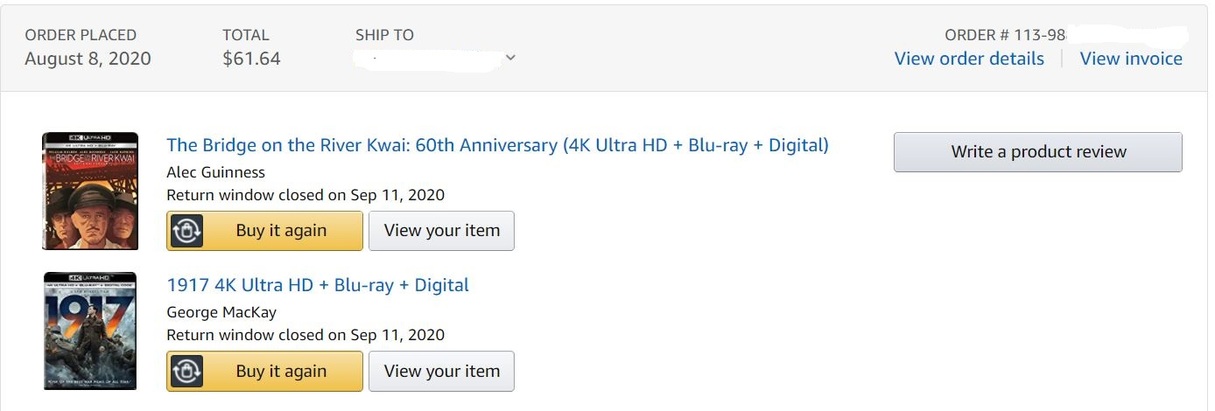
So something must have changed, because two of the snips that I sent you above did work previously. 1917, as soon as it hit Amazon, I purchased it, and the wife and I burned it and watched it that same night with no issues. From my Amazon receipt, that was August 2020
You can’t tell me I bought that almost 9 months ago, and now, suddenly, complaining about having issues. 
Thor, we got at Best Buy, and can’t remember when we got that, but probably a Black Friday thing last November.
The thing about how I rip the movies that I purchase is that I rip them at full, original quality. Just me being a purist.
The three suggestions above in [ ] would appear, on-the-surface, to fix the issue. A combinatorial of the three would definitely seem to fix it. IMHO.
I will work on this tomorrow. (near midnight here).
There are several tasks which are single threaded which will prevent a CPU from being “100%”.
Subtitles is the single most common codec which is.
H.264 / H.265 are multi-threaded by design.
Subtitles are single threaded; one task painting each frame; one at a time.
When I get to look at the files, I’ll be able to see exactly what’s happening and why.
If you want to take down the files, you can. I have them downloaded.
I am trying to work this out with you so would appreciate a non-confrontational exchange.
HA. I’ve done combat tours in Iraq and Afghanistan. That’s not me being confrontational. Just stating facts as I know them.
My wife thinks I was born a 75 year old curmudgeon. LOL
I do appreciate you working on this. 
I just finished doing all my testing.
Here are my findings.
webm captures.(apologies for the dual-4k desktop but you can see that there’s no buffering by PMS)
Conclusions:
First to check – HDR Tone Mapping setting.
a. NAS box native applications do not yet have the needed libraries.
b. The docker container does (leveraging the virtualization of PMS in the container)
Do not know the local network there nor do I know the players.
a. Recommend reviewing / experimenting with Playback Quality settings .
b. Some Network + TV’s / device combinations cannot handle “Full Speed” (