SOLUTION: Conversion failed. The transcoder exited due to an error

The throttling appears to be for bandwidth control - 6 second throttles sounds excessive and I will be raising this with the development team to look into and review

There were three remote playback sessions

  1. A roku 2 playback session for user breezy84
  2. A firefox plex web session for user joeswire
  3. Your Sage’s iPhone playback session

Can you tell me what settings you have for these within server settings - to see what has been changed from the default

Server Network Settings

  • Remote Streams allowed per user

Server Remote Access Settings

  • Internet Upload Speed
  • Limit remote stream bitrate

Server Transcoder Settings

  • Transcoder quality
  • Transcoder default throttle buffer
  • Background transcoding x264 preset
  • Maximum simultaneous video transcode

As this appears to be relating to bandwidth control, I would expect the problem to go away if you remove the Remote Access advanced setting for upload speed and limit remote stream bitate

could you try that and if there are still similar issues get new logs please

Sorry i assumed the new transcoder processes were to do with seeks. It appears to have been part of the bandwidth management !

Some further information concerning bandwidth usage and controls

This support article covers the subject https://support.plex.tv/articles/227715247-server-settings-bandwidth-and-transcoding-limits/
There is mention of operating at 80%

Tip! : The Plex Media Server is smart enough to prevent saturating the bandwidth value specified here. It will only use 80% of this for streams both to ensure that normal network requests can be completed and because streams have variable bitrates and will naturally go up and down somewhat.

This shows bandwidth usage through the period covered by the logs

Dec 05, 2018 18:31:11.213 [3836] DEBUG - Streaming Resource: Usage: 4743kbps of WAN bandwidth, 1 streaming transcode slots, and 0 static transcode slots across 2 sessions
Dec 05, 2018 18:37:37.497 [9148] DEBUG - Streaming Resource: Usage: 4743kbps of WAN bandwidth, 1 streaming transcode slots, and 0 static transcode slots across 2 sessions
Dec 05, 2018 18:42:16.102 [3416] DEBUG - Streaming Resource: Usage: 4743kbps of WAN bandwidth, 1 streaming transcode slots, and 0 static transcode slots across 2 sessions
Dec 05, 2018 18:46:33.200 [3952] DEBUG - Streaming Resource: Usage: 5751kbps of WAN bandwidth, 2 streaming transcode slots, and 0 static transcode slots across 3 sessions
Dec 05, 2018 18:52:07.909 [7668] DEBUG - Streaming Resource: Usage: 5345kbps of WAN bandwidth, 2 streaming transcode slots, and 0 static transcode slots across 3 sessions
Dec 05, 2018 18:59:53.905 [13416] DEBUG - Streaming Resource: Usage: 5633kbps of WAN bandwidth, 2 streaming transcode slots, and 0 static transcode slots across 3 sessions

and this shows the adjustments to streaming to share out the available bandwidth between the active sessions

Dec 05, 2018 18:46:02.927 [11328] DEBUG - Streaming Resource: Calculated bandwidth of 6150kbps exceeds bandwidth limit. Changing decision parameters provided by client to fit bandwidth limit of 2000kbps
Dec 05, 2018 18:46:13.207 [14280] DEBUG - Streaming Resource: Calculated bandwidth of 6150kbps exceeds bandwidth limit. Changing decision parameters provided by client to fit bandwidth limit of 2000kbps
Dec 05, 2018 18:46:31.430 [6592] DEBUG - Streaming Resource: Calculated bandwidth of 6150kbps exceeds bandwidth limit. Changing decision parameters provided by client to fit bandwidth limit of 2000kbps
Dec 05, 2018 18:47:30.034 [9056] DEBUG - Streaming Resource: Calculated bandwidth of 6150kbps exceeds bandwidth limit. Changing decision parameters provided by client to fit bandwidth limit of 2000kbps
Dec 05, 2018 18:48:26.273 [9056] DEBUG - Streaming Resource: Calculated bandwidth of 6150kbps exceeds bandwidth limit. Changing decision parameters provided by client to fit bandwidth limit of 2000kbps
Dec 05, 2018 18:49:30.399 [9056] DEBUG - Streaming Resource: Calculated bandwidth of 6150kbps exceeds bandwidth limit. Changing decision parameters provided by client to fit bandwidth limit of 1500kbps
Dec 05, 2018 18:50:48.236 [12016] DEBUG - Streaming Resource: Calculated bandwidth of 6150kbps exceeds bandwidth limit. Changing decision parameters provided by client to fit bandwidth limit of 2000kbps
Dec 05, 2018 18:51:29.167 [13416] DEBUG - Streaming Resource: Calculated bandwidth of 6150kbps exceeds bandwidth limit. Changing decision parameters provided by client to fit bandwidth limit of 2000kbps
Dec 05, 2018 18:51:57.577 [8728] DEBUG - Streaming Resource: Calculated bandwidth of 6150kbps exceeds bandwidth limit. Changing decision parameters provided by client to fit bandwidth limit of 720kbps
Dec 05, 2018 18:52:02.183 [3952] DEBUG - Streaming Resource: Calculated bandwidth of 6150kbps exceeds bandwidth limit. Changing decision parameters provided by client to fit bandwidth limit of 720kbps
Dec 05, 2018 18:52:20.529 [7668] DEBUG - Streaming Resource: Calculated bandwidth of 6150kbps exceeds bandwidth limit. Changing decision parameters provided by client to fit bandwidth limit of 1500kbps
Dec 05, 2018 18:53:18.253 [14280] DEBUG - Streaming Resource: Calculated bandwidth of 6150kbps exceeds bandwidth limit. Changing decision parameters provided by client to fit bandwidth limit of 2000kbps
Dec 05, 2018 18:54:14.496 [8728] DEBUG - Streaming Resource: Calculated bandwidth of 6150kbps exceeds bandwidth limit. Changing decision parameters provided by client to fit bandwidth limit of 2000kbps
Dec 05, 2018 18:55:11.597 [8728] DEBUG - Streaming Resource: Calculated bandwidth of 6150kbps exceeds bandwidth limit. Changing decision parameters provided by client to fit bandwidth limit of 2000kbps
Dec 05, 2018 18:57:58.457 [6772] DEBUG - Streaming Resource: Calculated bandwidth of 6150kbps exceeds bandwidth limit. Changing decision parameters provided by client to fit bandwidth limit of 2000kbps
Dec 05, 2018 18:58:43.201 [7744] DEBUG - Streaming Resource: Calculated bandwidth of 6150kbps exceeds bandwidth limit. Changing decision parameters provided by client to fit bandwidth limit of 2000kbps

Hi

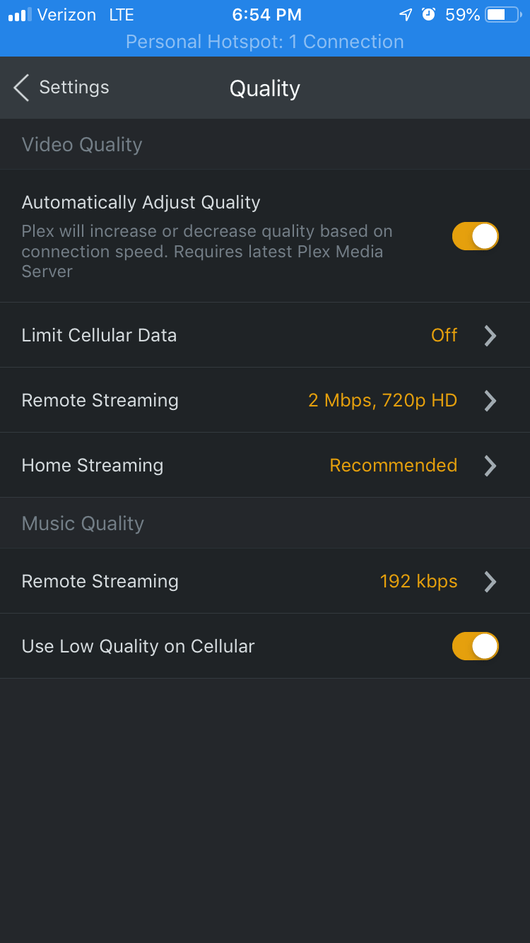
In addition to the server settings info i requested, could i also have the Plex for iOS settings for Quality / Automatically Adjust QUality (screenshot of the Quality settings screen) and also Advanced setting screen to see which video player is used

As the throttling is to do with a calculation on what has been requested and what has been played, there is some additional logging relating to this that is only available in verbose logging - so could i have a repeat of this last test = the 9 minute playback and then the restart of the app and resume later but this time with server logging having verbose enabled -see settings / server / general/ show advanced

Sure, no problem.

Settings:
Remote Stream: 4
Upload Speed: 20Mbps (though my actual upload is only 8, but the bandwidth control doesn’t agree with this. I’ve always had to do this for my server since this feature came out. 20 seems to be the happy medium in my case.) I can also tell you that my actual bandwidth has plenty of free room. I don’t normally have more than 4-5 people streaming at one time.
Bitrate: 8Mbps 1080p
Transcoder Quality: Make my CPU hurt
Throttle: 60 secs
x264: Very slow
Maximum simultaneous: Unlimited

I will have to test disabling bandwidth control a bit later, but I will test this and report back to you.

iOS Settings:
Quality:


Advanced:

Something of note as well. I just recently had issues with the audio going out of sync on longer piece of media. It doesn’t happen all the time, and if I reset the playback, it will go back to normal.

@soulvoid86 - if you have not yet got the verbose logging for the issue, could you also get the Plex for iOS log as this may turn out to be a client app issue. After you get the server logs, please email the logs zip from the Plex for iOS app to yourslef and attach here with the server logs zip. The iOS app logs can be emailed to yourself through settings / help & support / debugging / share debugging data / and select the Mail option

thanks

I have been looking at the logs and can see a number of playbacks of

Stranger Things - S01e07 T02.mkv
Stranger Things - S01e08 T03.mkv
Elf (2003).mkv

I note that the log says thee is no hardware transcoding and also that the client app is not allowing Direct Play and we end up software transcoding because of TrueHD

Dec 07, 2018 20:09:25.954 [22696] DEBUG - MDE: Cannot direct stream audio stream due to codec truehd when profile only allows aac

Dec 07, 2018 20:09:25.957 [22696] DEBUG - Streaming Resource: Reached Decision id=12469 codes=(General=1001,Direct play not available; Conversion OK. Direct Play=3000,App cannot direct play this item. Direct play is disabled. Transcode=1001,Direct play not available; Conversion OK.) media=(id=15201 part=(id=15201 decision=transcode container=mpegts protocol=hls streams=(Video=(id=32275 decision=copy width=1920 height=960) Audio=(id=32276 decision=transcode bitrate=774 encoder=aac channels=6 rate=48000))))

and

Dec 07, 2018 20:09:26.649 [22675] DEBUG - TPU: hardware transcoding: enabled, but no hardware decode accelerator found
Dec 07, 2018 20:09:26.650 [22675] DEBUG - TPU: hardware transcoding: final decoder: , final encoder:

What settings do you have in the Plex for Android app in Advanced settings for Passthrough and for Exoplayer ? You can try switching the Exoplayer to see if it makes a difference

The server logs show that transcode segments requested by the Plex for Android app are being made soon after being requested - longest delay was about 3 seconds but they were 10 second segments and there should be sufficient buffering. There were delays on start as we seek to the position requested but after that segments were served promptly

It has been a while since you posted - is the problem still there? To investigate issues like this would need sample files eg a 300 Mb clip from the mkv file (you can use tools such as mkvtoolnix to extract the first 300Mb) and to confirm that the problem arises with this clip and to provide logs from both the server and the client app and to say when exactly the issue was noticed.

Best of course is to aim to avoid having to software transcode.

If there is a difference between using Exoplayer v2 and disabling it, please provide logs of both tests

For Plex for Android logs, see https://support.plex.tv/articles/201573117-android-android-tv-fire-tv-logs/

could you provide server logs with debug logging enabled and Plex for SmartTV logging enabled and media info xml for initial investigation of the error

See
https://support.plex.tv/articles/201643703-reporting-issues-with-plex-media-server/
https://support.plex.tv/articles/200250417-plex-media-server-log-files/

https://support.plex.tv/articles/216955788-logging-for-smart-tvs-tivo/

https://support.plex.tv/articles/201998867-investigate-media-information-and-formats/

Thanks for the logs. There appears to be an issue with the subtitles served by 3rd party plugin SuperSubtitles.bundle - please check the logs for that plugin and raise with the developer. If there is a plex issue then the developer would need to say what it is

The same type of error repeated itself in the logs

Dec 25, 2018 10:38:08.514 [0x7000002a0000] ERROR - [Transcoder] /Users/bauhome/Library/Caches/PlexMediaServer/Transcode/Sessions/plex-transcode-D487396C-1254-495C-900F-864AE44F6590-da723254-3b01-4218-88a6-4c1b00478ff9/temp-0.supersubtitle_22dfdb061e201d08e2c6436e85a998a9f96bbc85: Invalid data found when processing input

Dec 25, 2018 10:38:08.521 [0x700000a4d000] DEBUG - Jobs: '/Applications/Plex Media Server.app/Contents/MacOS/Plex Transcoder' exit code for process 20170 is 1 (failure)

Dec 25, 2018 10:38:08.521 [0x7000007be000] DEBUG - Streaming Resource: Terminated session 0x7fa404ad5150:D6F85CA1-E5DE-4ED9-A6ED-E6DE3DC02298 with reason Conversion failed. The transcoder exited due to an error.

The error is generic and as can be seen from this thread could be due to many different causes.

Please could you provide server logs with debug logging enabled and media info xml for initial investigation of the error

See
https://support.plex.tv/articles/201643703-reporting-issues-with-plex-media-server/
https://support.plex.tv/articles/200250417-plex-media-server-log-files/

https://support.plex.tv/articles/201998867-investigate-media-information-and-formats/

could you get logs and evidence of all transcodes failing after initial fail and then not failing after restart ? - two sets of logs with debug logging please

See
https://support.plex.tv/articles/201643703-reporting-issues-with-plex-media-server/
https://support.plex.tv/articles/200250417-plex-media-server-log-files/

The only transcoder related error i can see in the logs was before you enabled debug logging - so i am not sure if this was the issue you wanted looking into

Logs covered period Dec 14, 2018 18:00:23 to Dec 27, 2018 22:41:06
Debug Logging was disabled throughout until Dec 27, 2018 22:15:04.

The transcoder related error i see was to do with OpenSubtitles which you would need to have investigated initially at that end

Dec 27, 2018 22:08:38.504 [5104] ERROR - Couldn't find the file to stream: C:\Users\Administrator\AppData\Local\Plex Media Server\Media\localhost\1\af325cc6b46f618ab945ebbc017b5397d08d35b.bundle\Contents\Subtitles\en\com.plexapp.agents.opensubtitles_83fbe0d0392ced51972769ecb71ef2b083c19a52.srt

Dec 27, 2018 22:08:38.729 [1112] ERROR - [Transcoder] C:\Users\Administrator\AppData\Local\Plex Media Server\Cache\Transcode\Sessions\plex-transcode-10yjkdpj71y037r4d0vcj8cv-2512703d-ad24-4935-afad-0d5f770128f9\temp-0.srt: Invalid data found when processing input

Hello!

Thanks. I checked it, and yes this is the problem. If I turn off the subtitle downloaded by the plugin the playback works fine.

Best regards

Papp Szilveszter

tel: +36 (30) 25 25 677
skype: szilveszter.papp

I went ahead and tried playing some of the content that either gave me the error message or it would be on the loading screen forever.

Look at the last couple of actions on the logs. Let me know what I can do to fix or help find out more information about itPlex Media Server Logs_2018-12-30_15-02-19.zip (4.0 MB)

Thanks for the response sa2000!

I have not been using Plex much lately with the holidays and having a toddler, plus for stranger things, we just decided to watch straight from Netflix.

Passthrough is set for Auto
Could not find any settings for the exoplayer on the Shield client or server.

A few clarification questions:

  1. If I use TrueHD, it will need to software transcode no matter what? Or is this a limitation of what my soundbar can accept? (my shield is plugged into the soundbar first, then from soundbar to TV)
  2. It is forced to software transcode both audio and video if the audio is the only issue?
  3. How can I determine what audio options will not require software transcoding? (I suppose this is somewhat answered by my first question)

I will be on the lookout for the issue again, and if I see this again, I will post back here to see if we can find the problem.

Thanks!

There is a problem with creating hard links for the OpenSubtitles srt files

This error leads to the transcoder failing

Dec 30, 2018 14:44:57.477 [8140] ERROR - Couldn't find the file to stream: C:\Users\Administrator\AppData\Local\Plex Media Server\Media\localhost\c\f9b871228cb823204f2f8000bd5f91d0f49dc37.bundle\Contents\Subtitles\en\com.plexapp.agents.opensubtitles_4bf3c599d0be4437979df02795a368d8838f0b17.srt

and this would have been caused by an error of this type

2018-12-30 07:01:03,217 (1650) :  DEBUG (storage:252) - Error creating hard link from [C:\Users\Administrator\AppData\Local\Plex Media Server\Media\localhost\a\e37871e48400cb1e452bbaf4abcbe184e16a20a.bundle\Contents\Subtitle Contributions\com.plexapp.agents.opensubtitles\en\62d19c6fecdafadd02fa4efce2aa307e1f9e81b9.srt] to [C:\Users\Administrator\AppData\Local\Plex Media Server\Media\localhost\a\e37871e48400cb1e452bbaf4abcbe184e16a20a.bundle\Contents\Subtitles\en\com.plexapp.agents.opensubtitles_62d19c6fecdafadd02fa4efce2aa307e1f9e81b9.srt]

Hard Links should work for NTFS filesystems

Can you tell me if it is different on your system? eg ReFS or Drive Pooling?

It does appear to be forcing transcode to aac. I have referred this to the development team to look into

Everything should be NTFS… Is there anything I can do to fix this issue? Should I copy the whole drive to another drive and unlink the original drive? This way it would recreate hard links?

Is there a way to completely disable OpenSubtitles srt files? I know its not a permanent solution but it would give me some time to figure out a solution…

Any help out be appricated

I am also still facing this issue, It used to be just a few movies, but now it turns to be the majority of newly added movies. All movies work with Emby, MrMC and VLC. So, this seems to be a Plex-TVOS issue.

Log attached. Error message is “conversion failed. the transcoder exited due to an error”.

Thanks for looking into this.Plex Media Server Logs_2019-01-03_11-52-34.zip (5.4 MB)

As it is easily reproducible could you repeat setting a new movie that gets an open subtitles srt file - only this timesavers sysinternals process monitor running to capture all events and and try to stream and when you get the error, stop procmon capture and get the logs as before

Save the procmon capture as PML file and zip and upload to Dropbox etc and send me link by private message and also get the server logs
And let me know the time of the first event in the PML as timeline differences would result in me not seeing the real times of events when i open the PML file - note that procmon produces large files so stop the capture as soon as the error occurs and start the capture before opensubtitles gets the SRT.

Procmon link Process Monitor - Sysinternals | Microsoft Learn

In theory disabling the agent and removing it from the advanced settings for the library would do this - but may need to go through the Plex Dance sequence as well - effectively recreating the items in the library

Additional info, the same movies play well not only on Emby, MrMC, VLC and others, but also on the Plex IOS app and web player. Just the Plex for TVOS player fails to play them. It used to be just a handful, but now seems to be an issue for half of the movies.

Anything you need beyond the provided logs?
