See
Windows 10
Intel 8700K
16gig DDR4
Nvidia GTX 1080
My recent two library entries have been affected by this error consistently when the episodes reach within the last 5 minutes of runtime. Tried updating to latest version, both OS and Plex Media Server. Checked firewall settings, tried taking the files out and putting them back in. Media works fine outside of Plex.
Logs (File removed)
Sorry logs were removed due to recent issue mentioned in the banner here
Please provide fresh logs - preferably using the current version of Plex Media Server 1.21.1.3876
Please start with a fresh reboot and server debug logging enabled beforehand - capture logs zip when issue arises
Please also check the Windows System Event Log using event viewer and note down when the first event id 4227 is logged and when the reboot was
May be permissions issue ? disc issue?
Getting errors on accessing the media files
Jan 19, 2021 16:58:26.579 [0x7f62437fe700] ERROR - [Transcoder] /mnt/unionfs/tv/Planet Earth II/Season 1/Planet Earth II - S01E06 - Cities Bluray-1080p.mkv: Input/output error
Jan 19, 2021 17:15:08.587 [0x7f62c2ffd700] ERROR - [Transcoder] /mnt/unionfs/xmovies/Everything Butt/EverythingButt.18.03.09.Francesca.Le.And.Alana.Cruise.XXX.720p.MP4-KTR-Pornfuscated/EverythingButt.18.03.09.Francesca.Le.And.Alana.Cruise.mp4: Input/output error
Jan 19, 2021 17:16:11.100 [0x7f61817fa700] ERROR - [Transcoder] /mnt/unionfs/xmovies/WhippedAss.16.06.24.Abella.Danger.Mona.Wales.Mistress.Kara.And.Phoenix.Marie.XXX.720p.MP4-KTR/wpa.16.06.24.abella.danger.mona.wales.mistress.kara.and.phoenix.marie.mp4: Input/output error
Jan 19, 2021 17:16:29.182 [0x7f62c2ffd700] ERROR - [Transcoder] /mnt/unionfs/xmovies/WhippedAss.16.06.24.Abella.Danger.Mona.Wales.Mistress.Kara.And.Phoenix.Marie.XXX.720p.MP4-KTR/wpa.16.06.24.abella.danger.mona.wales.mistress.kara.and.phoenix.marie.mp4: Input/output error
Jan 19, 2021 17:18:31.086 [0x7f62c2ffd700] ERROR - [Transcoder] /mnt/unionfs/tv/Planet Earth II/Season 1/Planet Earth II - S01E06 - Cities Bluray-1080p.mkv: Input/output error
Jan 19, 2021 17:23:11.617 [0x7f62417fa700] ERROR - [Transcoder] /mnt/unionfs/tv/Planet Earth II/Season 1/Planet Earth II - S01E06 - Cities Bluray-1080p.mkv: Input/output error
Jan 19, 2021 17:23:46.150 [0x7f62c0ff9700] ERROR - [Transcoder] /mnt/unionfs/tv/Planet Earth II/Season 1/Planet Earth II - S01E06 - Cities Bluray-1080p.mkv: Input/output error
Jan 19, 2021 17:23:52.376 [0x7f6183fff700] ERROR - [Transcoder] /mnt/unionfs/tv/Planet Earth II/Season 1/Planet Earth II - S01E06 - Cities Bluray-1080p.mkv: Input/output error
Jan 19, 2021 17:24:51.829 [0x7f6183fff700] ERROR - [Transcoder] /mnt/unionfs/tv/5th Ward/Season 1/5th Ward - S01E03 - Elbows & Vogues WEBDL-720p.mkv: Input/output error
Current server is 1.21.1.3876.
Restart was done and didn’t see a 4227 log that coincided the time of restart.
Debug is enabled.
Sidenote-
One oddity I’ve noticed since last week is that while these same video files experience the same error at around the last 5 minutes of runtime. All while watching on an Android phone app, Windows pc on Explorer, Roku app, and Xbox app. When I tried out a shot in the dark with watching on Kodi’s Plex add-on the video not only ran normally on all devices, and they almost always direct played the content.
just had the problem yet again. downloaded the logs immediately after the issue. here they are: Plex Media Server Logs_2021-01-26_17-08-32.zip (7.4 MB)
Thanks for the logs
The Transcoder is failing with a memory allocation failure
I can see transcoder job starting at 16:00:46 on Jan 20, 2021
for file
M:\Anime Series\Hakumei and Mikochi\Hakumei And Mikochi - S01e02-2.mkv
and a seek to position at approx 21 minutes was followed by the failure
Jan 20, 2021 16:01:39.443 [20980] ERROR - [Transcoder] Error while filtering: Cannot allocate memory
Jan 20, 2021 16:01:39.444 [20980] ERROR - [Transcoder] Failed to inject frame into filter network: Cannot allocate memory
Jan 20, 2021 16:01:39.444 [20980] ERROR - [Transcoder] Error while processing the decoded data for stream #0:0
Jan 20, 2021 16:01:39.851 [21588] DEBUG - Jobs: 'C:\Program Files (x86)\Plex\Plex Media Server\Plex Transcoder.exe' exit code for process 8256 is 1 (failure)
Could you get me the first 30 minutes of the mkv file - you can use mkvtoolnix to crop the file and extract first 30 minutes
Please upload zip of the cropped mkv file to dropbox / google drive / etc and send me link by private message
Of course please confirm that the error arises when streaming the cropped mkv file in Plex - add it to a test library and see if it fails to transcode
I will try to reproduce with the cropped file and if the issue arises, I will refer it to our development team
How much free memory in windows at the time of these failures ? Has windows been running for long time?
Thanks
The failure was due to the tcp dynamic port exhaustion which may happen after scanning a large library
Jan 26, 2021 17:04:53.489 [9352] ERROR - [Transcoder] [tcp @ 0263a940] Connection to tcp://127.0.0.1:32400 failed: Error number -138 occurred
The was a scan of the TV Shows library just before that - starting at 17:03:31
A similar issue arose when scanning the Music library - which started at 16:53:31
And also after scanning the Movies library which started at 16:48:31
I notice that you are using the same folder paths for the 3 libraries. The recommendation is that you have different media folders paths for music, movies, tv - otherwise you are processing more folders than you need to
See
Naming and organizing your Movie files | Plex Support
Category : TV Show Files (Naming and Organizing) | Plex Support
Category : Music Files (Naming and Organizing) | Plex Support
Also - the scanners for Music and Movies were upgraded so that they are in-line and not a separate process - please upgrade these libraries to the new scanners to minimize the chances of this arising
Work is in progress to bring the TV Shows scanner to be in-line and there is a preview test release out at the moment. Upgrading to the new scanner when it is released will help with this
And we will also be releasing a fix to curl in a future version of Plex Media Server - this will reduce port usage by 66%
You could also reduce the frequency of periodic library scans to reduce the impact of this issue
So is this the tread you put all of these conversion issues in for help with them? I posted one in a different area I guess and haven’t gotten an answer ever from an admin telling me to come here. The post being from 2018 kind of throws you off.
Here is where I put my other request - Conversion failed, the transcoder exited due to an error
Also it is from a few days ago and I haven’t had the issue on my network since. I can get logs from my aunt’s computer next time I am there to see issues on that side I guess. Mostly I would like to figure out why people get it trying to get into my server from outside my network.
ok. i have separated all the folder paths. thank you for that. can you tell me how i can upgrade the scanners or what you mean here by upgrade the libraries? i just upgraded to the newest version available to me ( Version 1.21.3.4014), would that do the trick?
A movies library with the old scanner will have “Upgrade Matching” option - see this screenshot
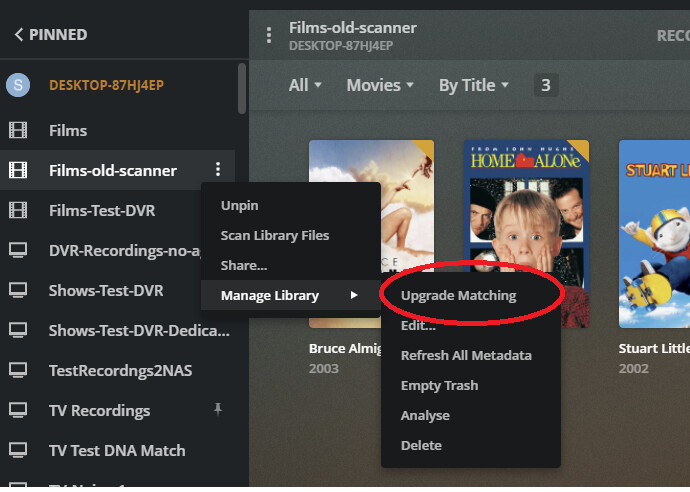
Selecting the Upgrade Matching option, should then take you to this dialogue box

After the upgrade, when you edit the library in Plex Web and select Advanced - you should see the scanner as being Plex Movie and the agent as Plex Movie as well
The Music library would have similar option and after the upgrade the scanner and agent in Advanced settings for the library would show as Plex Music for both
We actually have support articles for this !
See
Upgrading a Movie library to the use the new Plex Movie Agent | Plex Support
Upgrading Music Libraries to the New Metadata System | Plex Support
I have responded to your post here Conversion failed, the transcoder exited due to an error - #2 by sa2000
It is a similar set of errors but no indication of high volume of Plex scanner requests - so could be vpn / proxy or some other program using up ports. We can continue the dialogue in the other forum thread
Thanks for the 24 minute sample. I reproduced the error at position 21:58 and have referred the issue to the development team. Please keep the sample file available on the link you gave me
Remote viewers were having this issue CONSTANTLY. I found a way to stop it from happening. I’m not offering this as a solution (as it is NOT)… but my work-around might offer an additional piece of information to help identify and correct the problem properly.
Over a period of time, I figured out that the Transcoding error was generated for my remote viewers when Plex was scanning library files… as I had it set to automatically scan the libraries every 15 minutes. I unchecked the “Scan Libraries Automatically” box and the problem completely dissappeared. It’s been 6 months since I made this change and I have not had a single incident with Transode errors. I hope this gives you another clue that could help you resolve the problem.

Ah, didn’t see this thread. As someone pointed out, May 2018 throws you off a bit.
Anyways:
Server Version#: 1.21.3.4021
Player Version#: 2.65.1.70 (Xbox App)
Basically, I watch my shows on PMS (all have subs in the file, not separate SRTs). PMS plays pretty much everything fine, except for 1 show. It plays about 18 minutes in, then the Playback Error, Transcoder exited shows up. I then continue to play it again, but the PMS just only plays like a minute or 2, then dies. I’ve tried refreshing metadata, database, setting scan to daily, and some of the “easier” methods. Attached are the logs. Thanks in advance.
If the issue is with just 1 file, then likely the issue is the file. It will be very hard to identify what is wrong. You can try running the file through a video encoder and remux the file first. If that doesn’t work, you may need to re-encode it.
Hmmm, the videos that have problems are all mkvs, whereas my other ones that work fine are mp4. And I found a MalwareBytes related thing, which might be the cause (although it not causing a problem with the mp4s with integrated subs seems sus whereas integrated subs mkv has issue and having more mkvs I haven’t played yet)
I’ll take a look around.
EDIT: MB didn’t solve. Got a new log with the short timeframe. Looks like it tries to find subs (in the mkv) but blows itself up? I’m not sure.
It appears that the transcoder is getting an error when allocating memory and then exiting
Would need a cut version of one or two of these mkv files that are causing problems = you can use mkvtoolnix to produce a 5 minute file and then add it as test mkv file to a test video library and see if still crashes the transcoder -if it does, zip and upload somewhere and provide link and logs for the failure and I will refer it to the development team
Example of one of these failures
File: "E:\Anime\[Polarwindz] Monster Musume no Iru Nichijou [BD 1080p x265 10bit Opus 2.0]\[Polarwindz] Monster Musume no Iru Nichijou - 12 [BD 1080p x265 10bit Opus 2.0].mkv"
Feb 12, 2021 10:57:35.457 [8728] DEBUG - [Transcode] Jobs: Starting child process with pid 21776

Feb 12, 2021 11:18:56.760 [13672] ERROR - [Transcoder] Error while filtering: Cannot allocate memory
Feb 12, 2021 11:18:56.760 [13672] ERROR - [Transcoder] Failed to inject frame into filter network: Cannot allocate memory
Feb 12, 2021 11:18:56.760 [13672] ERROR - [Transcoder] Error while processing the decoded data for stream #0:0
Feb 12, 2021 11:18:57.150 [15148] DEBUG - Jobs: 'C:\Program Files (x86)\Plex\Plex Media Server\Plex Transcoder.exe' exit code for process 21776 is 1 (failure)
The failures appear to have sometime after transcoding starts.
This was after 21 minutes - so may need more than 5 minute chunk of the file to reproduce the error
Update: Actually it also failed within 4 minutes of start
E:\Anime\[Polarwindz] Monster Musume no Iru Nichijou [BD 1080p x265 10bit Opus 2.0]\[Polarwindz] Monster Musume no Iru Nichijou - 12 [BD 1080p x265 10bit Opus 2.0].mkv"
Feb 12, 2021 11:19:11.102 [19992] DEBUG - [Transcode/xt3tzxn1qu3i6ozznd1kpzz0] Jobs: Starting child process with pid 4948


Feb 12, 2021 11:21:01.375 [19992] ERROR - [Transcoder] Error while filtering: Cannot allocate memory
Feb 12, 2021 11:21:01.376 [19992] ERROR - [Transcoder] Failed to inject frame into filter network: Cannot allocate memory
Feb 12, 2021 11:21:01.377 [19992] ERROR - [Transcoder] Error while processing the decoded data for stream #0:0
Feb 12, 2021 11:21:01.717 [15148] DEBUG - Jobs: 'C:\Program Files (x86)\Plex\Plex Media Server\Plex Transcoder.exe' exit code for process 4948 is 1 (failure)
Wow wtf, now that I think back I’m quite sure all these issues started years ago after I ticked that box!
Crazy! I will try to report back if this worked for me.
Nevermind lol, I tried this when it first started happening.
This unfortunately didn’t fix anything. Never used to have issues ~3 years ago my plex + TV combo could handle literally anything with ease. Now I throw the most basic h264 mkv at it and it crashes 20 times while watching. Super frustrating that things used to work great, but now they suck.
