Server Version#: 1.19.3.2764
Player Version#:Web Player
I’ve moved my plex server to a small NUC from the QNAP server. I’ve followed the very nice guide on the site to set it up in PVE, so I have hardware transcoding.
Most of it works, but I also have a HD Homerun Expand that I use for recording TV to the PLEX.
However, I can only mount the NFS share as RO, not as RW, so it can’t store the tv recordings on the qnap.
I’ve set up the fstab like this: 10.11.12.27:/Film /nfs/film nfs rw,nosuid,soft 0 0
but if I try to activate it I get: mount.nfs: access denied by server while mounting 10.11.12.27:/Film
I also tried just using ‘default’ as options, gave the same message.
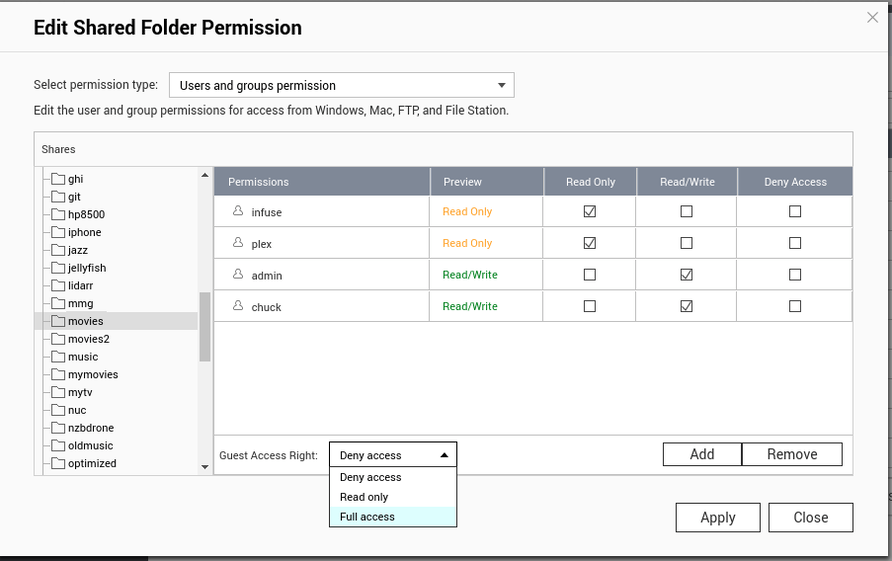
In QNAP I’ve set this up:
Well Film is the CIFS share, and the NFS ‘share’, but it’s mounted on the plex as nfs/film.
As it can access it as RO I doubt that would cause a problem?
I wasn’t aware that the guest access rights could affect the NFS mount.
I’ve tried setting the guest access to full access.
Then remove the NFS rights, and reapply them.
That didn’t help
I don’t get it, still the same, access denied. I wonder if I need to get QNAP to help me out here, or maybe swap over to use cifs, allthough it seems a bit silly to run CIFS between two linux’es
I agree with “Resist CIFS until your dying breath!”
You can even show them what I use.
After they laugh ("Oh, him again? haha) it’ll be fine. Yes, the US tech support guys know me very well. We work together on a lot of projects.
Resist resist, and I got it solved.
After doing quite a bit of experimenting, I could see that it was only the LXC container that didn’t want to work, so in the options for the lxc container there was an ‘NFS’, which I had assumed was for sharing the containers nfs out, I tried enabling that, and voila, it works. So I guess it was also a internal firewall setting for it?? anyways, it works now, thankyou for the help @chuckpa. Now on to the next challenge with local network (another thread ).



 Resist resist, and I got it solved.
