[Temporary Solution: reverted server version to 1.41.5.9522]
[Better Solution, thanks to TheLivingBubba’s posts below: Replaced the UID identifier in my script with PLEX_UID and PLEX_GID identifiers. See my script below. I had to ssh into my NAS and use the command
cat /etc/group
to determine the Group ID (GID) of the Group of which my User is a member. ]
Server Version#: 1.42.1.10060
on QNAP NAS TS-453D
Current firmware version: QTS 5.2.6.3195
Date: 2025/07/15
This Plex Media Server (PMS) docker has performed successfully for at least a year in its current configuration, both in remote and local modes. Last successful use was 9 Aug 2025, in remote mode. I have moved since then, and thought my issue had to do with my new Public IP designation. I can still access my PMS from client apps and it will show the media I have, it’ll just say that it is unavailable. (“Please check that the file exists and the necessary drive is mounted.“)
So far, I have eliminated User Assignment, User Permissions, Folder Contents and File Path (see below for verification) as causes of this issue. As this configuration was working fine up until recently, I believe it’s an issue on the Plex side.
All three folders from subject line are on same NAS; /data is on a separate volume because I don’t want to waste storage space on taking snapshots of my media. Again, this was working fine up until recently.
My server can still see the metadata of my media and show me what I have, but it cannot find the actual media files. When I go to Manage>Libraries>[library]>Edit Library>Add folders>Browse for Media Folder, I can expand both the /config and /transcode folders to show their contents. However, the /data folder appears empty.
[empty /data folder below]
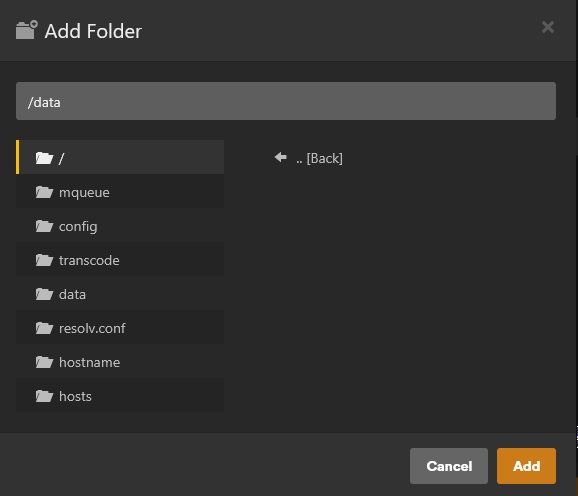
[/config folder shows contents below]

[/transcode folder shows contents below]

I know that the /data folder has contents and that the docker-script-specified user (Plex_Docker with UID 1009) has Read&Write access to it. When I log into my NAS as Plex_Docker, I can access the Media_NAS folder (specified as my /data folder) and create folders in it.


The filepath is correct as well. I can SSH into my NAS to confirm the filepath and contents of the Media_NAS folder. CACHEDEV1 volume contains /config and /transcode folders; CACHEDEV3 volume contains Media_NAS (specified as my /data folder), which contains my media folders and files.

The bottom line in the above PuTTY screenshot is what I use to specify my /data folder in my PMS docker script.
This docker script is the now working version
version: ‘2’
services:
plex:
container_name: plex-bridge
image: plexinc/pms-docker:latest
restart: unless-stopped
network_mode: bridge
ports:
-
32400:32400/tcp
-
8324:8324/tcp
-
32469:32469/tcp
-
1900:1900/udp
-
32410:32410/udp
-
32412:32412/udp
-
32413:32413/udp
-
32414:32414/udp
environment: -
#UID=1009 this is the line of code I was previously using, but was not the correct command to use
-
the two below commands are the proper ones to use
-
PLEX_UID=1009
-
PLEX_GID=1000
-
TZ=[REDACTED]
-
PLEX_CLAIM=claim-[REDACTED]
-
ADVERTISE_IP=http://[REDACTED]:32400/
hostname: [REDACTED]
volumes: -
/share/CACHEDEV1_DATA/Container/Plex/config:/config
-
/share/CACHEDEV1_DATA/Container/Plex/transcode:/transcode
-
/share/CACHEDEV3_DATA/Media_NAS:/data
So, any suggestions on things I’ve missed? This doesn’t even work when UID 1009 is an Admin, nor does it work if I use more direct filepaths (such as /share/CACHEDEV3_DATA/Media_NAS/GrantNAS_Music:/Music). At this point I’d revert to the previous version of PMS if I could figure out how.
