SOLVED - TV Show not appearing - Plex Media Scanner Log showing SQL Errors

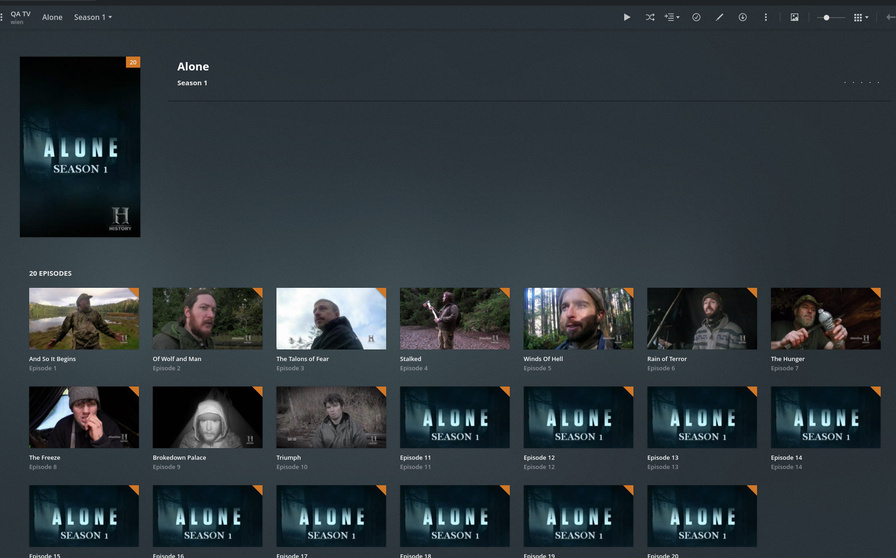
I’ve added a TV show to my Plex media folder (/tvshows in this case) via Sonarr. However, even though the folder and episodes are structured correctly it is not showing up in Plex. I’ve done the Plex dance of removing the files and cleaning up the bundles and emptying the trash with no change. When I check the Plex Media Scanner Log I an seeing the following entries for the show:

Aug 24, 2020 11:38:09.238 [0x153f5d2a9740] DEBUG - Checking descendants of Alone
Aug 24, 2020 11:38:09.239 [0x153f5d2a9740] DEBUG -  -> Searching down into Alone/Season 7
Aug 24, 2020 11:38:09.239 [0x153f5d2a9740] DEBUG - Checking descendants of Alone/Season 7
Aug 24, 2020 11:38:09.240 [0x153f5d2a9740] DEBUG -  -> Searching down into Alone/Season 6
Aug 24, 2020 11:38:09.240 [0x153f5d2a9740] DEBUG - Checking descendants of Alone/Season 6
Aug 24, 2020 11:38:09.240 [0x153f5d2a9740] DEBUG -  -> Searching down into Alone/Season 5
Aug 24, 2020 11:38:09.240 [0x153f5d2a9740] DEBUG - Checking descendants of Alone/Season 5
Aug 24, 2020 11:38:09.241 [0x153f5d2a9740] DEBUG -  -> Searching down into Alone/Season 2
Aug 24, 2020 11:38:09.241 [0x153f5d2a9740] DEBUG - Checking descendants of Alone/Season 2
Aug 24, 2020 11:38:09.241 [0x153f5d2a9740] DEBUG -  -> Searching down into Alone/Season 4
Aug 24, 2020 11:38:09.241 [0x153f5d2a9740] DEBUG - Checking descendants of Alone/Season 4
Aug 24, 2020 11:38:09.242 [0x153f5d2a9740] DEBUG - Creating show 'Alone'
Aug 24, 2020 11:38:09.242 [0x153f5d2a9740] DEBUG - Downloading document http://127.0.0.1:32400/library/changestamp
Aug 24, 2020 11:38:09.243 [0x153f5d2a9740] DEBUG - HTTP requesting GET http://127.0.0.1:32400/library/changestamp
Aug 24, 2020 11:38:09.244 [0x153f5d2a9740] DEBUG - HTTP 200 response from GET http://127.0.0.1:32400/library/changestamp
Aug 24, 2020 11:38:09.246 [0x153f5d2a9740] ERROR - SQLITE3:(nil), 1, statement aborts at 174: [update metadata_items set guid=?,hash=? where id=?] SQL logic error
Aug 24, 2020 11:38:09.246 [0x153f5d2a9740] ERROR - Exception inside transaction (inside=1) (../Library/MetadataItem.cpp:1072): sqlite3_statement_backend::loadOne: SQL logic error
Aug 24, 2020 11:38:09.247 [0x153f5d2a9740] ERROR - Exception inside transaction (inside=1) (../Library/Episode.cpp:193): sqlite3_statement_backend::loadOne: SQL logic error
Aug 24, 2020 11:38:09.247 [0x153f5d2a9740] ERROR - Exception inside transaction (inside=1) (../Library/MetadataItem.cpp:3595): sqlite3_statement_backend::loadOne: SQL logic error
Aug 24, 2020 11:38:09.247 [0x153f5d2a9740] ERROR - Exception assimilating media item in Alone/Season 2: sqlite3_statement_backend::loadOne: SQL logic error
Aug 24, 2020 11:38:09.247 [0x153f5d2a9740] DEBUG - HTTP requesting PUT http://127.0.0.1:32400/activities/?percentComplete=%2B0&subtitle=Season%202
Aug 24, 2020 11:38:09.248 [0x153f5d2a9740] DEBUG - HTTP 200 response from PUT http://127.0.0.1:32400/activities/?percentComplete=%2B0&subtitle=Season%202
Aug 24, 2020 11:38:09.249 [0x153f5d2a9740] DEBUG - HTTP requesting PUT http://127.0.0.1:32400/activities/?percentComplete=99.000000
Aug 24, 2020 11:38:09.250 [0x153f5d2a9740] DEBUG - HTTP 200 response from PUT http://127.0.0.1:32400/activities/?percentComplete=99.000000
Aug 24, 2020 11:38:09.250 [0x153f5d2a9740] DEBUG - Removing 0 media items that were left.
Aug 24, 2020 11:38:09.250 [0x153f5d2a9740] DEBUG - Removing 0 directories that were left.
Aug 24, 2020 11:38:09.250 [0x153f5d2a9740] DEBUG - Updating directory 'Alone' (ID 1869) to time 2020-08-24 11:37:51.
Aug 24, 2020 11:38:09.252 [0x153f5d2a9740] DEBUG - Updating directory 'Alone/Season 4' (ID 1875) to time 2020-08-24 09:55:04.
Aug 24, 2020 11:38:09.427 [0x153f5d2a9740] DEBUG - HTTP requesting PUT http://127.0.0.1:32400/activities/?percentComplete=100
Aug 24, 2020 11:38:09.429 [0x153f5d2a9740] DEBUG - HTTP 200 response from PUT http://127.0.0.1:32400/activities/?percentComplete=100

Is this a sign that my database is becoming corrupt or is there something else going on?
Would you share with me the exact filename(s) and diretories so I may recreate and determine whether it’s PMS or if we need start being proactive with your database?

In that particular example it is

mnt/user/tvshows/Alone/Season 2/Alone - S02E04 - Hunger’s Grip.mkv.

mnt/user/tvshows/ is a media share on my UnRAID server that is then passed to the PMS docker as \tvshows. However that Alone parent directory currently has a Season 2, Season 4, Season 5, Season 6, and Season 7 folder inside of it with several files in each sub directory as well, none of which show up. I can grab a full directory list if you’d like.

Also as a note, there are several other TV shows within that mnt/user/tvshows/ folder, with some episodes being added as late as early this morning. Everything shows up fine in Plex, except this Alone series.

Thanks. I will go investigate now.

While I’m doing the checks, would you please give PMS a restart at your earliest convenience, allow it to sit completely idle for 2 minutes , then download the logs ZIP and attach here?

I’ld like to make certain nothing in the startup sequence is causing problems.

EDIT:

Making "Alone/Season 01"
Making "Alone/Season 02"
Making "Alone/Season 03"
Making "Alone/Season 04"
Done
[chuck@lizum ~.178]$ 

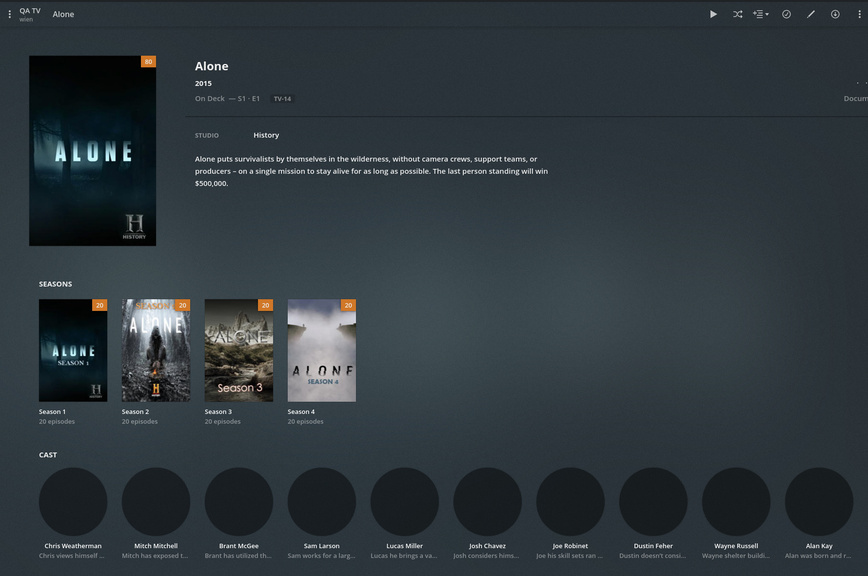
The series page presents;

Season 1 presents me with, which implies there are only 10 episodes.

Plex Media Server Logs_2020-08-24_19-12-00.zip (4.1 MB)

Here are the logs after rebooting as requested.

Thank you for the logs.

From what I see, which are those transaction errors, coupled with the 408 (timeout) errors, it looks like the host itself is overloaded.

Aug 24, 2020 16:35:50.322 [0x152ce4fe7700] DEBUG - Activity: updated activity 50e61f6f-a75b-4761-94f4-a9fd1e44b26b - completed 96.4% - Scanning Movies
Aug 24, 2020 16:35:50.322 [0x152d47671700] DEBUG - Completed: [127.0.0.1:41492] 200 PUT /activities/50e61f6f-a75b-4761-94f4-a9fd1e44b26b?percentComplete=%2B0%2E0892696157&subtitle=Plex%20Versions (15 live) GZIP 0ms 166 bytes
Aug 24, 2020 16:35:50.337 [0x152d46035700] DEBUG - Request: [127.0.0.1:41496 (Loopback)] GET /:/metadata/updateProgressMessage?message=Scanning%20The%20Boy%20%282016%29 (15 live) GZIP Signed-in Token (Twiggy159)
Aug 24, 2020 16:35:50.337 [0x152d47470700] DEBUG - Completed: [127.0.0.1:41496] 200 GET /:/metadata/updateProgressMessage?message=Scanning%20The%20Boy%20%282016%29 (15 live) GZIP 0ms 166 bytes
Aug 24, 2020 16:35:50.359 [0x152ce4fe7700] DEBUG - Request: [127.0.0.1:41502 (Loopback)] PUT /activities/50e61f6f-a75b-4761-94f4-a9fd1e44b26b?percentComplete=%2B0%2E0892696157&subtitle=Plex%20Versions (16 live) GZIP Signed-in Token (Twiggy159)
Aug 24, 2020 16:35:50.359 [0x152ce4fe7700] DEBUG - Activity: updated activity 50e61f6f-a75b-4761-94f4-a9fd1e44b26b - completed 96.5% - Scanning Movies
Aug 24, 2020 16:35:50.360 [0x152d46035700] DEBUG - Request: [127.0.0.1:41504 (Loopback)] GET /:/metadata/updateProgressMessage?message=Scanning%20The%20Boy%20%282016%29%2FPlex%20Versions (16 live) GZIP Signed-in Token (Twiggy159)
Aug 24, 2020 16:35:50.360 [0x152ce65f2700] ERROR - SQLITE3:(nil), 1, statement aborts at 1: [COMMIT] cannot commit - no transaction is active
Aug 24, 2020 16:35:50.360 [0x152ce65f2700] ERROR - Failed to commit transaction (../Library/MetadataItem.cpp:1020) (tries=10): Cannot commit transaction. cannot commit - no transaction is active
Aug 24, 2020 16:35:50.360 [0x152ce65f2700] ERROR - Exception inside transaction (inside=1) (../Library/MetadataItem.cpp:1020): Cannot commit transaction. cannot commit - no transaction is active
Aug 24, 2020 16:35:50.360 [0x152ce65f2700] ERROR - SQLITE3:(nil), 1, statement aborts at 1: [ROLLBACK] cannot rollback - no transaction is active
Aug 24, 2020 16:35:50.360 [0x152d47671700] DEBUG - Completed: [127.0.0.1:41502] 200 PUT /activities/50e61f6f-a75b-4761-94f4-a9fd1e44b26b?percentComplete=%2B0%2E0892696157&subtitle=Plex%20Versions (16 live) GZIP 0ms 166 bytes
Aug 24, 2020 16:35:50.360 [0x152ce65f2700] ERROR - Failed to roll back transaction (../Library/MetadataItem.cpp:1018): Cannot rollback transaction. cannot rollback - no transaction is active
Aug 24, 2020 16:35:50.360 [0x152d47470700] DEBUG - Completed: [127.0.0.1:41504] 200 GET /:/metadata/updateProgressMessage?message=Scanning%20The%20Boy%20%282016%29%2FPlex%20Versions (16 live) GZIP 0ms 166 bytes
Aug 24, 2020 16:35:50.360 [0x152ce65f2700] ERROR -  * Error loading episode.
Aug 24, 2020 16:35:50.360 [0x152d46839700] WARN - Took too long (7.240000 seconds) to start a transaction on ../Library/MetadataItem.cpp:8491
Aug 24, 2020 16:35:50.360 [0x152d46839700] WARN - Transaction that was running was started on thread 0x152ce65f2700 at ../Library/MetadataItem.cpp:1018
Aug 24, 2020 16:35:50.361 [0x152d46638700] WARN - Took too long (3.000000 seconds) to start a transaction on ../Library/MetadataItem.cpp:8491
Aug 24, 2020 16:35:50.361 [0x152d46638700] WARN - Transaction that was running was started on thread 0x152d46839700 at ../Library/MetadataRelation.cpp:109
Aug 24, 2020 16:35:50.362 [0x152d46839700] DEBUG - Item 17384 (The Debate) Scanning metadata graphic elements in XML file "seasons/4/episodes"/20.xml
Aug 24, 2020 16:35:50.363 [0x152d46638700] DEBUG - Item 3188 (Perverse Instantiation (2)) Scanning metadata graphic elements in XML file "seasons/3/episodes"/16.xml
Aug 24, 2020 16:35:50.366 [0x152d46839700] DEBUG - Item 17384 (The Debate) Scanning metadata graphic elements in XML file "seasons/4/episodes"/20.xml
Aug 24, 2020 16:35:50.367 [0x152d46638700] DEBUG - Item 3188 (Perverse Instantiation (2)) Scanning metadata graphic elements in XML file "seasons/3/episodes"/16.xml
Aug 24, 2020 16:35:50.370 [0x152ce65f2700] DEBUG -  * Season 1 (-1) Episode 4 (2018) (2018-07-18)
Aug 24, 2020 16:35:50.370 [0x152ce65f2700] DEBUG - Looking up season and index for an episode, indexKey=S01E04 dateKey=2018-07-18.
Aug 24, 2020 16:35:50.370 [0x152ce65f2700] DEBUG -    * Found episode with key S01E04
Aug 24, 2020 16:35:50.370 [0x152ce65f2700] DEBUG -  * Found episode s01e04
Aug 24, 2020 16:35:50.372 [0x152ce4de6700] DEBUG - HTTP requesting GET http://127.0.0.1:39645/system/agents/media/get?guid=com%2Eplexapp%2Eagents%2Ehama%3A%2F%2Ftvdb-84912%2F4%2F20%3Flang%3Den&mediaType=4&url=metadata%3A%2F%2Fseasons%2F4%2Fepisodes%2F20%2Fthumbs%2Fcom%2Eplexapp%2Eagents%2Ehama_f393ae8dde8a8e07ac7b8c494692847ba71b22f3
Aug 24, 2020 16:35:50.374 [0x152d45c33700] DEBUG - HTTP requesting GET http://127.0.0.1:39645/system/agents/media/get

Here you can see where PMS tried to scan and then update the metadata for one of your movies.

While the report timing seems odd, it attempted to make the update but failed to start the transaction.

It reported that it can’t rollback that which wasn’t started. The different pieces running here cause that timing to be “effect → cause” but is really “cause → effect”

What else is running on this CPU? I see you’re running in a Docker container.
Are there other containers active and consuming CPU?

Also, please be aware, in spite of 6 cores (12 threads) the CPU itself isn’t all that fast delivering about 1000 Passmarks per core. Workhorse – yes. Speed daemon getting in and out of the database or scanning media – no.

What can you tell me?

Interesting. I have several other dockers running, none that are particularly CPU heavy. At the time of the screenshot below nothing was using over 1% CPU apart from Plex, which was using around 5%, so nothing is waiting on CPU availability.

firefox_DIKZCNXpDn

This server actually has two of those 6 core CPUs in it, and the dockers are all set to use cores and threads that don’t interfere with the system or the two lightweight VMs. I just find it odd that the server hasn’t had issues adding episodes for existing shows yet this series it is having this issue.

I rebooted the entire server, tried downloading a movie that was not added before, and I am seeing the SQL errors again. So it looks like net-new media isn’t being added correctly.

I’ve also rebooted, only allowed Plex to be the only running docker, no other dockers or VMs are started. Running the library scan I still get flooded with SQL errors.

How many threads are you allowing the PMS docker to have. It’s going to need at least 4 to be effective on that CPU.

All of the dockers share 10 cores. So it has plenty of workspace.

So I went with the semi-nuclear option and restored my database from backup and rescanned. All of the Alone series has been found along with some of the movies I added earlier to test. So it does look like there must’ve been some sort of corruption occurring.

There is a bottleneck somewhere. We need to find it.

Where is the Plex metadata diretory? Is it on a NAS or ZFS partition?

It all lives on the UnRAID server that hosts Plex and its media shares. It lives at
/mnt/user/appdata/PlexMediaServer

The media shares themselves are SMB/ZFS partitions.

How did you format the drives / how did it? (I’m not familiar with unraid at that level)

UnRAID will run a preclear process where it will 0 out a drive and run a series of checks to make sure SMART alerts are good before formatting to an XFS filesystem.

Good. I’m glad you didn’t say ZFS because that’s fatal. None of the ZFS systems I’ve seen know when to stop trying to compress the database before everything gets corrupted.

If you look in the Plex Media Server/Plug-in Support/Databases directory,
do you have database backups?

I do, I made sure to have Plex auto-backup the database, so that’s how I recovered from a backup that was run on 8/6 (It runs weekly but I was curious to see if all of these backups had the issue). So far it has been running fine with no mentions of SQL errors in the console.

I believe i missed a step. :slight_smile: (the hour is late for me)

You are currently using one of the backups and are error free?

No worries! Yeah a couple replies ago I mentioned I recovered from a backup to test and it was able to find the new series as well as a couple movies I added to test to see if they’d get picked up by Plex.

:man_facepalming:

Thanks.

I would delete the bad database copy before it gets confused back into the mix.
I would also now refresh all the metadata so PMS is fully up to date (each library section). We don’t know what else might have been dropped along the way