[Edit: this was solved by reinstalling the Plex app]
Server Version#: 1.24.2.4973
Player Version#: iOS app 7.23
So when I try to watch a video that requires transcoding on my iPhone, the server CPU goes to 100% and the loading screen for the video just sits there and never starts the video. I never see the (hw) to indicate the GPU is doing the transcoding.
If I try to watch the same video on my Roku, the video starts nearly instantly and I see the (hw) show up on the Dashboard with roughly 25% CPU. Same with my computer. My computer is hardwired but the Roku and iPhone are connected via WiFi network so I don’t think it’s network related.
If a video is able to be played directly, it will work fine on my iPhone.
Below are the comparisons from the Dashboard
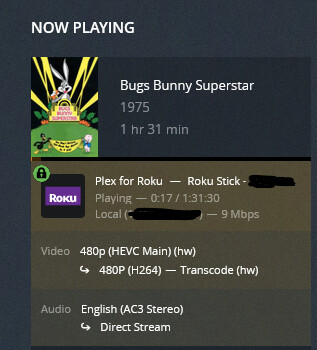

Plex is running on:
OS: Windows 10 Pro
Version: 21H1
OS Build: 19043.1202
Processor: Intel Core™2 Quad CPU Q9400 @ 2.66GHz
RAM: 8 GB
GPU: NVIDIA Quadro P600, NVIDIA driver 27.21.14.6231
In the Plex Media Server Log, I found the following selected lines:
Sep 10, 2021 12:51:55.583 [8380] DEBUG - [Transcode] Codecs: hardware transcoding: testing API nvenc
Sep 10, 2021 12:51:57.068 [2932] DEBUG - [Transcode/8334A41F-A531-4395-A0CB-0A41D9A03EE0] TPU: hardware transcoding: using hardware decode accelerator nvdec
Sep 10, 2021 12:51:57.068 [2932] DEBUG - [Transcode/8334A41F-A531-4395-A0CB-0A41D9A03EE0] TPU: hardware transcoding: zero-copy support not present
Sep 10, 2021 12:51:57.068 [2932] DEBUG - [Transcode/8334A41F-A531-4395-A0CB-0A41D9A03EE0] TPU: hardware transcoding: final decoder: nvdec, final encoder: mf
Sep 10, 2021 12:51:57.544 [5436] DEBUG - TPU: hardware transcoding: enabled, but no hardware decode accelerator found
Anyone have an idea what’s going on?
